Close Menu
GeekBlog

    Subscribe to Updates

    Get the latest creative news from FooBar about art, design and business.

    What's Hot

    Anthropic Tells Pete Hegseth to Take a Hike

    February 27, 2026

    Samsung Galaxy Book 6 Ultra review: A MacBook Pro alternative that truly lasts all day

    February 27, 2026

    This AI Agent Is Designed to Not Go Rogue

    February 26, 2026
    Facebook X (Twitter) Instagram Threads
    GeekBlog
    • Home
    • Mobile
    • Tech News
    • Blog
    • How-To Guides
    • AI & Software
    Facebook
    GeekBlog
    Home»Tech News»Asus ROG Falcata Review: A Split Gaming Keyboard
    Tech News

    Asus ROG Falcata Review: A Split Gaming Keyboard

    Michael ComaousBy Michael ComaousJanuary 15, 20263 Mins Read
    Share Facebook Twitter Pinterest LinkedIn Tumblr Email Copy Link
    Asus ROG Falcata Review: A Split Gaming Keyboard
    Share
    Facebook Twitter LinkedIn Pinterest Email Copy Link

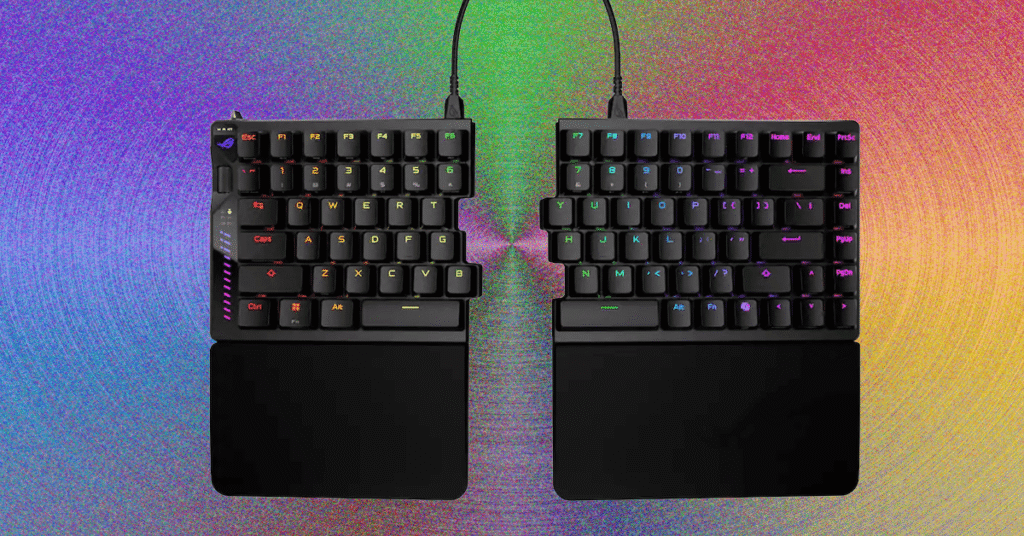
    The wheel on the left side has options to adjust actuation distance, rapid-trigger sensitivity, and RGB brightness. You can also adjust volume and media playback, and turn it into a scroll wheel. The LED matrix below it is designed to display adjustments to actuation distance but feels a bit awkward: Each 0.1 mm of adjustment fills its own bar, and it only uses the bottom nine bars, so the screen will roll over four times when adjusting (the top three bars, with dots next to them, illuminate to show how many times the screen has rolled over during the adjustment). The saving grace of this is that, when adjusting the actuation distance, you can press down any switch to see a visualization of how far you’re pressing it, then tweak the actuation distance to match.

    Alongside all of this, the Falcata (and, by extension, the Falchion) now has an aftermarket switch option: TTC Gold magnetic switches. While this is still only two switches, it’s an improvement over the singular switch option of most Hall effect keyboards.

    Split Apart

    Photograph: Henri Robbins

    The internal assembly of this keyboard is straightforward yet interesting. Instead of a standard tray mount, where the PCB and plate bolt directly into the bottom half of the shell, the Falcata is more comparable to a bottom-mount. The PCB screws into the plate from underneath, and the plate is screwed onto the bottom half of the case along the edges. While the difference between the two mounting methods is minimal, it does improve typing experience by eliminating the “dead zones” caused by a post in the middle of the keyboard, along with slightly isolating typing from the case (which creates fewer vibrations when typing).

    The top and bottom halves can easily be split apart by removing the screws on the plate (no breakable plastic clips here!), but on the left half, four cables connect the top and bottom halves of the keyboard, all of which need to be disconnected before fully separating the two sections. Once this is done, the internal silicone sound-dampening can easily be removed. The foam dampening, however, was adhered strongly enough that removing it left chunks of foam stuck to the PCB, making it impossible to readhere without using new adhesive. This wasn’t a huge issue, since the foam could simply be placed into the keyboard, but it is still frustrating to see when most manufacturers have figured this out.

    Source: www.wired.com

    Asus Falcata Gaming Keyboard review ROG split
    Share. Facebook Twitter Pinterest LinkedIn Tumblr Telegram Email Copy Link
    Previous ArticleExclusive: Volvo tells us why having Gemini in your next car is a good thing
    Next Article Why I use this $200 Android tablet more than my iPad, and don’t regret it
    Michael Comaous
    • Website

    Michael Comaous is a dedicated professional with a passion for technology, innovation, and creative problem-solving. Over the years, he has built experience across multiple industries, combining strategic thinking with hands-on expertise to deliver meaningful results. Michael is known for his curiosity, attention to detail, and ability to explain complex topics in a clear and approachable way. Whether he’s working on new projects, writing, or collaborating with others, he brings energy and a forward-thinking mindset to everything he does.

    Related Posts

    4 Mins Read

    Anthropic Tells Pete Hegseth to Take a Hike

    6 Mins Read

    Samsung Galaxy Book 6 Ultra review: A MacBook Pro alternative that truly lasts all day

    4 Mins Read

    This AI Agent Is Designed to Not Go Rogue

    3 Mins Read

    Pops, whines, and roars: xAI accused of torturing neighbors of noisy power plant

    2 Mins Read

    Google paid startup Form Energy $1B for its massive 100-hour battery

    1 Min Read

    DHS reportedly detained a Columbia University student and content creator

    Top Posts

    Discord will require a face scan or ID for full access next month

    February 9, 2026760 Views

    The Mesh Router Placement Strategy That Finally Gave Me Full Home Coverage

    August 4, 2025527 Views

    Past Wordle answers – all solutions so far, alphabetical and by date

    August 1, 2025228 Views
    Stay In Touch
    • Facebook

    Subscribe to Updates

    Get the latest tech news from FooBar about tech, design and biz.

    Most Popular

    Discord will require a face scan or ID for full access next month

    February 9, 2026760 Views

    The Mesh Router Placement Strategy That Finally Gave Me Full Home Coverage

    August 4, 2025527 Views

    Past Wordle answers – all solutions so far, alphabetical and by date

    August 1, 2025228 Views
    Our Picks

    Anthropic Tells Pete Hegseth to Take a Hike

    February 27, 2026

    Samsung Galaxy Book 6 Ultra review: A MacBook Pro alternative that truly lasts all day

    February 27, 2026

    This AI Agent Is Designed to Not Go Rogue

    February 26, 2026

    Subscribe to Updates

    Get the latest creative news from FooBar about art, design and business.

    Facebook
    • About Us
    • Contact us
    • Privacy Policy
    • Disclaimer
    • Terms and Conditions
    © 2026 GeekBlog

    Type above and press Enter to search. Press Esc to cancel.

    Ad Blocker Enabled!
    Ad Blocker Enabled!
    Our website is made possible by displaying online advertisements to our visitors. Please support us by disabling your Ad Blocker.