Close Menu
GeekBlog

    Subscribe to Updates

    Get the latest creative news from FooBar about art, design and business.

    What's Hot

    I used Gemini Nano Banana 2 to create sketchnotes – here’s what it got right (and hilariously wrong)

    March 4, 2026

    The Colorful MacBook Neo Is Apple’s Cheapest Laptop Ever

    March 4, 2026

    FCC chair calls Paramount/WBD merger “a lot cleaner” than defunct Netflix deal

    March 4, 2026
    Facebook X (Twitter) Instagram Threads
    GeekBlog
    • Home
    • Mobile
    • Tech News
    • Blog
    • How-To Guides
    • AI & Software
    Facebook
    GeekBlog
    Home»Tech News»Do I really need a webcam? Yes, yes I do – here are 3 reasons why
    Tech News

    Do I really need a webcam? Yes, yes I do – here are 3 reasons why

    Michael ComaousBy Michael ComaousAugust 12, 20254 Mins Read
    Share Facebook Twitter Pinterest LinkedIn Tumblr Email Copy Link
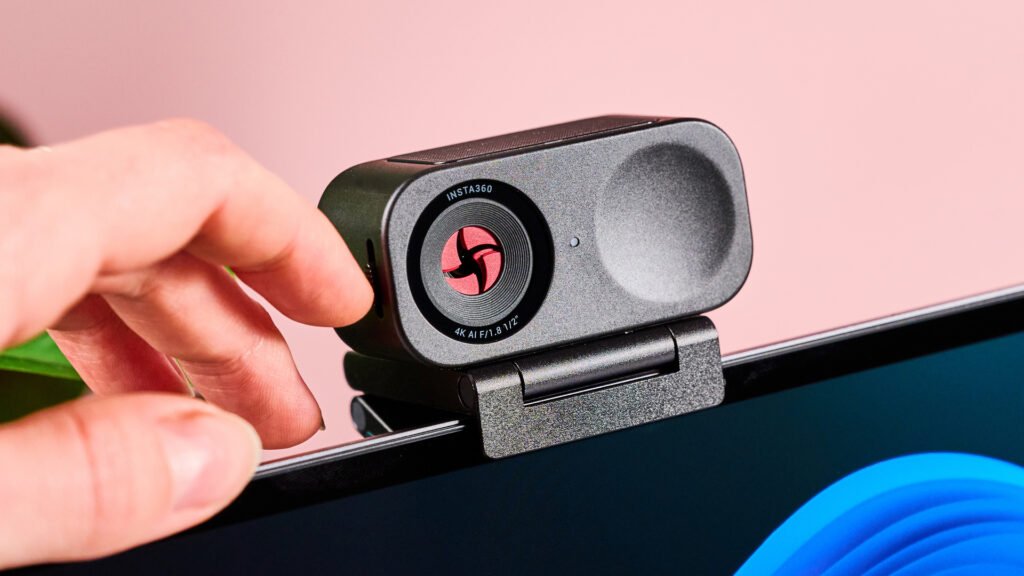
    Insta360 Link 2C with shutter partially closed
    Share
    Facebook Twitter LinkedIn Pinterest Email Copy Link

    In all my years of life, the thought of adding a webcam to my computer hadn’t once occurred to me. I’ve always just stuck with my built-in laptop camera and hoped for the best, and in fairness, that’s usually done an OK job for video calls.

    But recently I reviewed the Insta360 Link 2C, and after integrating it into my setup, I could never ever go back to my standalone laptop cam. If you’re somebody who takes a lot of video calls, streams video, creates content, or teaches online, I’d argue a webcam is an absolute must-have.

    So, what exactly makes an external webcam so special? Here are 3 improvements the Insta 360 Link 2C has made to my work life; the key benefits to acquiring one of the best webcams.


    You may like

    Today’s best Insta360 Link 2C deals

    1. Massively improved picture quality

    (Image credit: Future)

    A lot of laptop webcams lack the higher resolution picture quality that you can get with a top quality external option. My 1080p Windows Surface camera, for example, has nothing on the 4K quality of the Insta360 Link 2C.

    Sure, you won’t see premium 4K video with every video calling platforms, but if you’re a content creator or you simply want a top-tier look, 4K support is going to be a game-changer. If you take a video on the Link 2C, for example, you can get up to 4K 30fps quality – though models like the Elgato Facecam Pro can even offer 4K 60fps recording.

    When switching between my Insta360 webcam and my built-in laptop camera, the former was so much better at highlighting finer details – aspects like individual hair strands, facial hairs, and markings on my face, for instance. So, if you want to show yourself in the best possible light, grabbing a 4K webcam could make a huge difference.

    2. Better tracking and framing

    Insta360 Link 2C with green LED active

    (Image credit: Future)

    I also really appreciate my Insta360 Link 2C’s ability to track my movements and keep my face centered during any video call. The Link 2C makes use of auto-framing and AI tracking technology, which is ideal if, like me, you’re a fidgety person or moving around a large space.

    Sign up for breaking news, reviews, opinion, top tech deals, and more.

    What’s more, the Link 2C makes use of gesture controls, which enhance the quality of tracking. For instance, you can make an L shape with your hand and move it up or down to zoom in or out respectively. On top of that, you can hold your palm up to the webcam, which then frames the shot to your face – pretty useful!

    But wait…I’m not done yet, because the Link 2C makes use of enhanced Phase Detection Auto Focus, which seamlessly captures details of objects you hold up.

    Finally, there’s a whiteboard mode, which keeps anything on which you’re writing squared and in focus. If you need to be animated and use props on camera, say for online tutoring, that kind of functionality is transformative.

    3. Detailed filters and customizability

    Insta360 Link 2C with shutter closed

    (Image credit: Future)

    Finally, I want to shine a light on the high levels of customizability you can unlock with a great webcam like the Insta360 Link 2C.

    If you tap into the Insta360 Link Controller software, you can play around with a variety of picture settings including contrast, exposure, and white balance (all that good stuff). In addition, you can activate a number of filters, including blur, bokeh, and even makeup.

    All of these options are most welcome if you want to optimize your picture for low-lit rooms, say, or if you want more granular control over your appearance on-screen. Luckily, a lot of other webcams offer this degree of personalization – even cheaper alternatives like the Obsbot Meet SE.

    Today’s best Insta360 Link 2C and Obsbot Meet SE deals


    So, do you own a webcam? I’d love to hear how it’s made a difference to your setup, and which models you’ve enjoyed using, so make sure to get chatting in the comments.

    You may also like

    Reasons webcam
    Share. Facebook Twitter Pinterest LinkedIn Tumblr Telegram Email Copy Link
    Previous ArticleThe Trump Administration Is Using Memes to Turn Mass Deportation Into One Big Joke
    Next Article Save $50 on the OnePlus Pad 3 plus get a free gift – here’s the deal
    Michael Comaous
    • Website

    Michael Comaous is a dedicated professional with a passion for technology, innovation, and creative problem-solving. Over the years, he has built experience across multiple industries, combining strategic thinking with hands-on expertise to deliver meaningful results. Michael is known for his curiosity, attention to detail, and ability to explain complex topics in a clear and approachable way. Whether he’s working on new projects, writing, or collaborating with others, he brings energy and a forward-thinking mindset to everything he does.

    Related Posts

    10 Mins Read

    I used Gemini Nano Banana 2 to create sketchnotes – here’s what it got right (and hilariously wrong)

    2 Mins Read

    The Colorful MacBook Neo Is Apple’s Cheapest Laptop Ever

    2 Mins Read

    FCC chair calls Paramount/WBD merger “a lot cleaner” than defunct Netflix deal

    2 Mins Read

    Who needs data centers in space when they can float offshore?

    3 Mins Read

    I’m not ashamed to admit the Kobo Remote is the best gadget I’ve bought this year

    6 Mins Read

    Skyrover S1: The lightweight cinematic drone leading the next wave of accessible aerial creativity

    Top Posts

    Discord will require a face scan or ID for full access next month

    February 9, 2026761 Views

    The Mesh Router Placement Strategy That Finally Gave Me Full Home Coverage

    August 4, 2025561 Views

    Past Wordle answers – all solutions so far, alphabetical and by date

    August 1, 2025230 Views
    Stay In Touch
    • Facebook

    Subscribe to Updates

    Get the latest tech news from FooBar about tech, design and biz.

    Most Popular

    Discord will require a face scan or ID for full access next month

    February 9, 2026761 Views

    The Mesh Router Placement Strategy That Finally Gave Me Full Home Coverage

    August 4, 2025561 Views

    Past Wordle answers – all solutions so far, alphabetical and by date

    August 1, 2025230 Views
    Our Picks

    I used Gemini Nano Banana 2 to create sketchnotes – here’s what it got right (and hilariously wrong)

    March 4, 2026

    The Colorful MacBook Neo Is Apple’s Cheapest Laptop Ever

    March 4, 2026

    FCC chair calls Paramount/WBD merger “a lot cleaner” than defunct Netflix deal

    March 4, 2026

    Subscribe to Updates

    Get the latest creative news from FooBar about art, design and business.

    Facebook
    • About Us
    • Contact us
    • Privacy Policy
    • Disclaimer
    • Terms and Conditions
    © 2026 GeekBlog

    Type above and press Enter to search. Press Esc to cancel.

    Ad Blocker Enabled!
    Ad Blocker Enabled!
    Our website is made possible by displaying online advertisements to our visitors. Please support us by disabling your Ad Blocker.