Close Menu
GeekBlog

    Subscribe to Updates

    Get the latest creative news from FooBar about art, design and business.

    What's Hot

    Stop falling for scams when Norton’s antivirus software is 70% off right now

    March 28, 2026

    Acer Promo Codes and Deals: Save 40% on Bundles

    March 28, 2026

    Playing Wolfenstein 3D with one hand in 2026

    March 28, 2026
    Facebook X (Twitter) Instagram Threads
    GeekBlog
    • Home
    • Mobile
    • Tech News
    • Blog
    • How-To Guides
    • AI & Software
    Facebook
    GeekBlog
    Home»Tech News»How to AirDrop on an Android phone (and the few models that can actually do it)
    Tech News

    How to AirDrop on an Android phone (and the few models that can actually do it)

    Michael ComaousBy Michael ComaousMarch 22, 20263 Mins Read
    Share Facebook Twitter Pinterest LinkedIn Tumblr Email Copy Link
    How to AirDrop on an Android phone (and the few models that can actually do it)
    Share
    Facebook Twitter LinkedIn Pinterest Email Copy Link

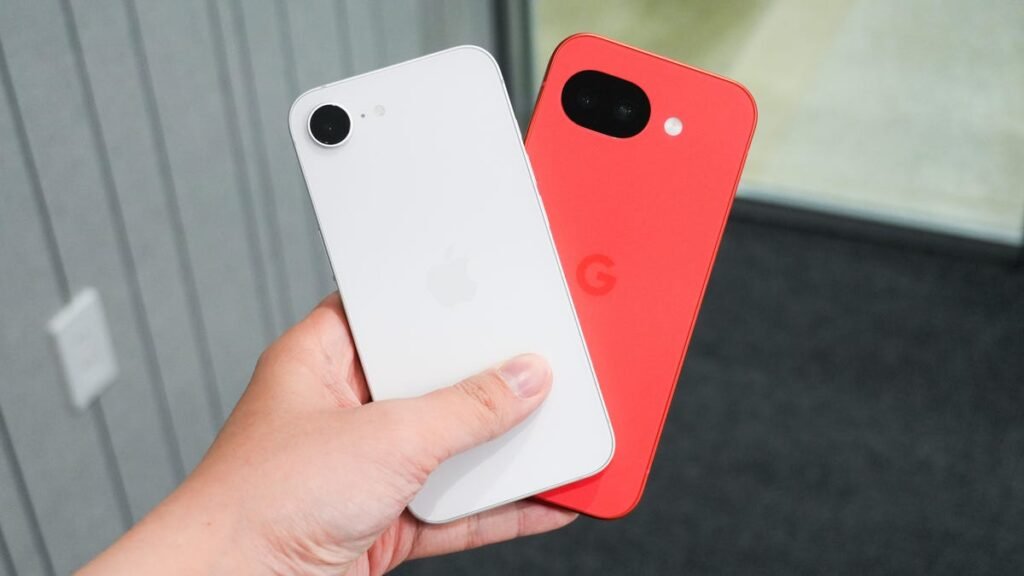
    Kerry Wan/ZDNET

    Follow ZDNET: Add us as a preferred source on Google.


    ZDNET’s key takeaways

    • Android and iPhone users can now share files quickly and easily.
    • Currently, only Pixel 10 phones support the feature.
    • Google says it will expand the tech to other Android devices.

    I use an iPhone as my primary mobile device. From my phone, I can easily share files with another iPhone, an iPad, or a Mac. However, I’d also like an easy way to share files with Android devices, whether one of my own or those owned by an Android-loving friend or relative. Now Google is taking the first step toward making that capability a reality.

    In a blog post late last year, Google announced that iPhones and Android devices will finally be able to share files. Great, you say. However, before you get too excited, there is a catch. At this initial stage, only Google’s latest Pixel 10 series supports the feature. Android users with a different Pixel or Android phone are out of luck, at least for now.

    Also: If the Fire Phone returns, I’m praying Amazon fixes its app store problem first

    Until this feature release, iPhone users could only share files with other Apple devices thanks to Apple’s AirDrop. Android users could only share files with other Android devices thanks to Quick Share. But never the twain would meet. Now, Google has apparently found a way for Quick Share to play nicely with AirDrop, paving the way for the new sharing method.

    How to AirDrop from Android to iPhone

    So, how does this capability work? Based on the video in Google’s blog post and hands-on testing, you first fire up Quick Share on the Android device and then select the file or files you want to share. 

    Quick Share then scouts around for nearby devices, including iPhones and Macs. When the right iPhone appears, select it on the Android phone. AirDrop then appears on the iPhone, prompting you to accept the transfer. Accept the transfer, and the file completes the trip.

    iPhone and Android phone sharing files

    Google

    How about security? Here, Google said it has implemented strong safeguards to protect your files during the transfer. Outside security experts tested these safeguards.

    This feature marks the latest development in an ongoing effort to bring iPhone and Android users together. In May 2024, Apple and Google both rolled out a feature designed to alert iOS and Android users of any Bluetooth-enabled tracking devices tracking them without their knowledge or consent. 

    With the release of iOS 18 later in 2024, Apple finally brought RCS, or Rich Communications Service, to the iPhone, allowing iOS and Android users to exchange rich text messages with each other.

    Also: How to turn your Pixel phone into a PC – with the new Android Desktop Mode

    These are big steps toward compatibility, as Apple and Google have long been fierce competitors in the mobile landscape. They’ve battled not just in the marketplace but in the courtroom. But even rivals sometimes realize they need to stop fighting long enough to do what’s in their users’ collective best interests.

    What does the future hold for this technology? Google said it’s looking forward to improving the experience and expanding it to other Android devices. For now, Pixel 10 owners who want to use this feature should check out the video displayed in the blog post to see how it works. You can then try it yourself with a friendly, neighborhood iPhone owner.


    Source: www.zdnet.com

    AirDrop Android Models Phone
    Share. Facebook Twitter Pinterest LinkedIn Tumblr Telegram Email Copy Link
    Previous ArticleAiper Scuba V3 Pool Robot Review: Eye on the Prize
    Next Article Oh, the New ‘Absolute Batman’ Villains Are…Kinda Normal?
    Michael Comaous
    • Website

    Michael Comaous is a dedicated professional with a passion for technology, innovation, and creative problem-solving. Over the years, he has built experience across multiple industries, combining strategic thinking with hands-on expertise to deliver meaningful results. Michael is known for his curiosity, attention to detail, and ability to explain complex topics in a clear and approachable way. Whether he’s working on new projects, writing, or collaborating with others, he brings energy and a forward-thinking mindset to everything he does.

    Related Posts

    3 Mins Read

    Stop falling for scams when Norton’s antivirus software is 70% off right now

    4 Mins Read

    Acer Promo Codes and Deals: Save 40% on Bundles

    2 Mins Read

    Playing Wolfenstein 3D with one hand in 2026

    7 Mins Read

    Whoop has LeBron – now it wants your mom

    1 Min Read

    Sony temporarily suspends memory card sales due to shortages

    2 Mins Read

    Apple TV is now home to CrunchyRoll anime

    Top Posts

    Discord will require a face scan or ID for full access next month

    February 9, 2026765 Views

    The Mesh Router Placement Strategy That Finally Gave Me Full Home Coverage

    August 4, 2025729 Views

    Trade in your old phone and get up to $1,100 off a new iPhone 17 at AT&T – here’s how

    September 10, 2025322 Views
    Stay In Touch
    • Facebook

    Subscribe to Updates

    Get the latest tech news from FooBar about tech, design and biz.

    Most Popular

    Discord will require a face scan or ID for full access next month

    February 9, 2026765 Views

    The Mesh Router Placement Strategy That Finally Gave Me Full Home Coverage

    August 4, 2025729 Views

    Trade in your old phone and get up to $1,100 off a new iPhone 17 at AT&T – here’s how

    September 10, 2025322 Views
    Our Picks

    Stop falling for scams when Norton’s antivirus software is 70% off right now

    March 28, 2026

    Acer Promo Codes and Deals: Save 40% on Bundles

    March 28, 2026

    Playing Wolfenstein 3D with one hand in 2026

    March 28, 2026

    Subscribe to Updates

    Get the latest creative news from FooBar about art, design and business.

    Facebook
    • About Us
    • Contact us
    • Privacy Policy
    • Disclaimer
    • Terms and Conditions
    © 2026 GeekBlog

    Type above and press Enter to search. Press Esc to cancel.

    Ad Blocker Enabled!
    Ad Blocker Enabled!
    Our website is made possible by displaying online advertisements to our visitors. Please support us by disabling your Ad Blocker.