Close Menu
GeekBlog

    Subscribe to Updates

    Get the latest creative news from FooBar about art, design and business.

    What's Hot

    Super Bowl LX ads: all AI everything

    February 8, 2026

    YouTube now lets you watch content auto-dubbed in your own language

    February 8, 2026

    Charli XCX Is a Demonic Brat in Takashi Miike’s ‘Untitled Tokyo’

    February 8, 2026
    Facebook X (Twitter) Instagram Threads
    GeekBlog
    • Home
    • Mobile
    • Tech News
    • Blog
    • How-To Guides
    • AI & Software
    Facebook
    GeekBlog
    Home»Tech News»RIP to the Macintosh HD hard drive icon, 2000–2025
    Tech News

    RIP to the Macintosh HD hard drive icon, 2000–2025

    Michael ComaousBy Michael ComaousAugust 6, 20252 Mins Read
    Share Facebook Twitter Pinterest LinkedIn Tumblr Email Copy Link
    RIP to the Macintosh HD hard drive icon, 2000–2025
    Share
    Facebook Twitter LinkedIn Pinterest Email Copy Link

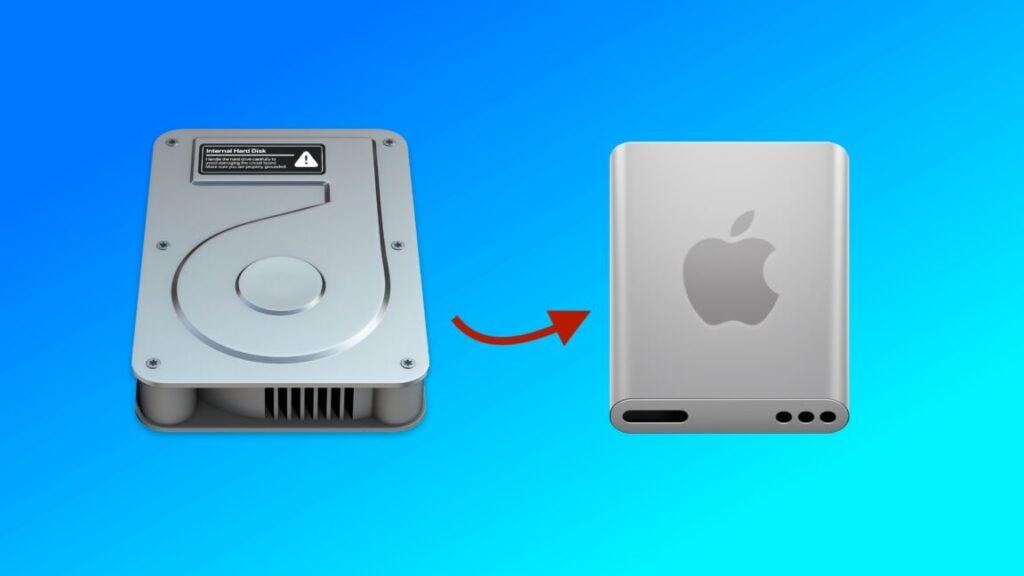
    That version of the icon persisted through the Apple Silicon-era Big Sur redesign and was still with us in the first public beta build for macOS 26 Tahoe that Apple released last week. The new beta also updates the icons for external drives (orange, with a USB-C connector on top), network shares (blue, with a globe on top), and removable disk images (white, with an arrow on top).

    All of the system’s disk icons get an update in the latest macOS 26 Tahoe developer beta.


    Credit:

    Apple/Andrew Cunningham

    Other icons that reused or riffed on the old hard drive icon have also been changed. Disk Utility now looks like a wrench tightening an Apple-branded white bolt, for some reason, and drive icons within Disk Utility also have the new SSD-esque icon. Installer apps use the new icon instead of the old one. Navigate to the /System/Library/CoreServices folder where many of the built-in operating system icons live, and you can see a bunch of others that exchange the old HDD icon for the new SSD.

    Apple first offered a Mac with an SSD in 2008, when the original MacBook Air came out. By the time “Retina” Macs began arriving in the early 2010s, SSDs had become the primary boot disk for most of them; laptops tended to be all-SSD, while desktops could be configured with an SSD or a hybrid Fusion Drive that used an SSD as boot media and an HDD for mass storage. Apple stopped shipping spinning hard drives entirely when the last of the Intel iMacs went away.

    This doesn’t actually matter much. The old icon didn’t look much like the SSD in your Mac, and the new one doesn’t really look like the SSD in your Mac either. But we didn’t want to let the old icon’s passing go unremarked. So, thanks for the memories, Macintosh HD hard drive icon! Keep on spinning, wherever you are.

    drive Hard icon Macintosh RIP
    Share. Facebook Twitter Pinterest LinkedIn Tumblr Telegram Email Copy Link
    Previous ArticleThe iOS 26 Beta Just Unveiled New Details About the Apple Watch Ultra 3
    Next Article Forget LG – Hisense’s new super-sized fridge freezer plans your meals for you
    Michael Comaous
    • Website

    Michael Comaous is a dedicated professional with a passion for technology, innovation, and creative problem-solving. Over the years, he has built experience across multiple industries, combining strategic thinking with hands-on expertise to deliver meaningful results. Michael is known for his curiosity, attention to detail, and ability to explain complex topics in a clear and approachable way. Whether he’s working on new projects, writing, or collaborating with others, he brings energy and a forward-thinking mindset to everything he does.

    Related Posts

    1 Min Read

    Super Bowl LX ads: all AI everything

    2 Mins Read

    YouTube now lets you watch content auto-dubbed in your own language

    2 Mins Read

    Charli XCX Is a Demonic Brat in Takashi Miike’s ‘Untitled Tokyo’

    6 Mins Read

    Watching football? Change these 5 settings on your TV for better performance instantly

    2 Mins Read

    Sony’s Biggest QLED Screens See Big Discounts This Weekend

    2 Mins Read

    Malicious packages for dYdX cryptocurrency exchange empties user wallets

    Top Posts

    The Mesh Router Placement Strategy That Finally Gave Me Full Home Coverage

    August 4, 2025412 Views

    Past Wordle answers – all solutions so far, alphabetical and by date

    August 1, 2025203 Views

    Buying a projector is useless until you know throw

    August 4, 2025145 Views
    Stay In Touch
    • Facebook

    Subscribe to Updates

    Get the latest tech news from FooBar about tech, design and biz.

    Most Popular

    The Mesh Router Placement Strategy That Finally Gave Me Full Home Coverage

    August 4, 2025412 Views

    Past Wordle answers – all solutions so far, alphabetical and by date

    August 1, 2025203 Views

    Buying a projector is useless until you know throw

    August 4, 2025145 Views
    Our Picks

    Super Bowl LX ads: all AI everything

    February 8, 2026

    YouTube now lets you watch content auto-dubbed in your own language

    February 8, 2026

    Charli XCX Is a Demonic Brat in Takashi Miike’s ‘Untitled Tokyo’

    February 8, 2026

    Subscribe to Updates

    Get the latest creative news from FooBar about art, design and business.

    Facebook
    • About Us
    • Contact us
    • Privacy Policy
    • Disclaimer
    • Terms and Conditions
    © 2026 GeekBlog

    Type above and press Enter to search. Press Esc to cancel.

    Ad Blocker Enabled!
    Ad Blocker Enabled!
    Our website is made possible by displaying online advertisements to our visitors. Please support us by disabling your Ad Blocker.