Close Menu
GeekBlog

    Subscribe to Updates

    Get the latest creative news from FooBar about art, design and business.

    What's Hot

    Stop falling for scams when Norton’s antivirus software is 70% off right now

    March 28, 2026

    Acer Promo Codes and Deals: Save 40% on Bundles

    March 28, 2026

    Playing Wolfenstein 3D with one hand in 2026

    March 28, 2026
    Facebook X (Twitter) Instagram Threads
    GeekBlog
    • Home
    • Mobile
    • Tech News
    • Blog
    • How-To Guides
    • AI & Software
    Facebook
    GeekBlog
    Home»Tech News»The tiny iOS 26 update that made a big difference for me
    Tech News

    The tiny iOS 26 update that made a big difference for me

    Michael ComaousBy Michael ComaousSeptember 5, 20253 Mins Read
    Share Facebook Twitter Pinterest LinkedIn Tumblr Email Copy Link
    The tiny iOS 26 update that made a big difference for me
    Share
    Facebook Twitter LinkedIn Pinterest Email Copy Link

    Nina Raemont/ZDNET

    Follow ZDNET: Add us as a preferred source on Google.


    ZDNET’s key takeaways

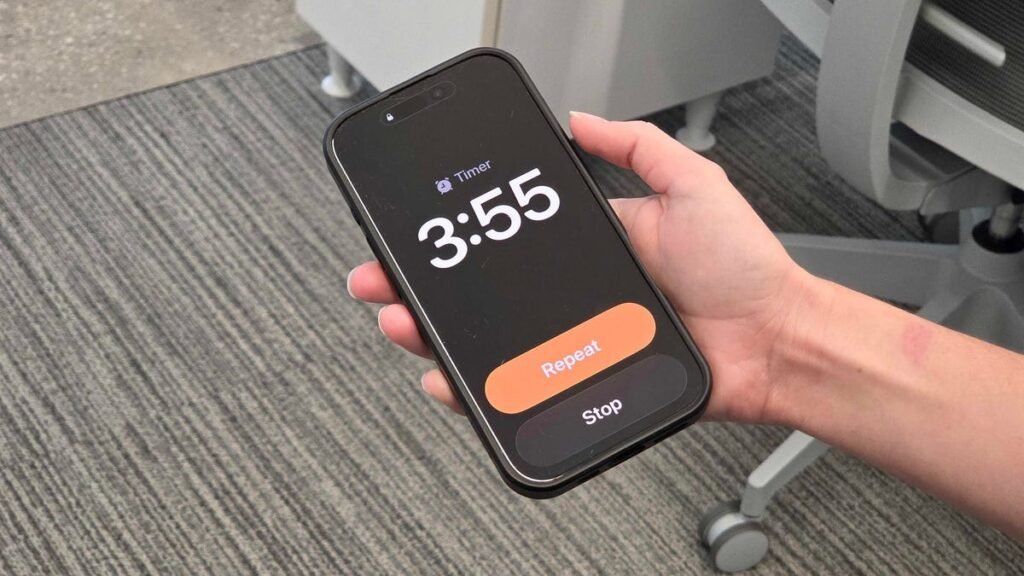
    • Apple increased the size of its timer and alarm buttons on iOS 26.
    • The update makes it easier to dismiss them. 
    • Not every software update needs to be flashy to be helpful. 

    I’m waking up at the crack of dawn, after a shoddy night of sleep. My iPhone alarm and its ever-strong siren song blare as it shakes me from my slumber. At this point, I’ll do anything to turn that wretched sound off as quickly as possible. 

    The one thing that gets in my way? The iPhone’s dismiss button for its alarm is too small. In my half-asleep state, I don’t always hit and dismiss it the first time. 

    iPhone alarm not going off? 6 potential fixes to this annoying issue

    For context, this is what the previous Alarm screen looked like on iPhone. 

    Elyse Betters Picaro / ZDNET

    The smallest and, perhaps, subtlest feature update of iOS 26 solves a problem for me. The dismissal buttons on Apple’s latest software update are, thankfully, bigger, removing a pain point I’ve had with its timers and alarms on Apple’s Clock app, one of my most-used native apps. 

    Also: 5 features that made updating to iOS 26 worth it

    The Clock app and its Alarm feature encounter users at their most groggy, disrupting their sacred sleep. Most people aren’t happy to be woken up. When an Apple alarm goes off — and, with it, that signature, bone-chilling ringtone — I immediately activate fight or flight. Turning those tunes off quickly feels imperative, and anything that gets in the way is a great disturbance at best and a day-ruiner at worst. 

    There’s not super reliable data on this metric, but surveys show that most Americans use their smartphone as their alarm clock, with usage growing significantly among younger Americans. Unless you are one of the few lucky sleepers who wakes up every day without an alarm at the right time, chances are you’re using your smartphone most days of the week to get out of bed. 

    I’m delighted that Apple finally updated this functionality in an app used daily by many iPhone owners, including me. 

    Also: Your Apple Watch is getting a big upgrade for free

    When considering meaningful software changes, it’s easy to focus on more advanced updates, such as AI-powered assistants or voice-translation features, which can be catchy and flashy. However, the updates that are most appreciated by the largest group of people are simple design changes, like maximizing the dismissal button on a timer or alarm. 

    I’ve noticed larger buttons in other apps as well, such as on the Apple Watch Workout app, where, instead of a workout-like elliptical taking up a portion of the screen, the workout activation takes up the entire screen. 

    Before updating to WatchOS 26, I’d sometimes fail to click on the Start button because of its smaller size. The button size issue was only exacerbated when I was on the move, such as running or beginning an elliptical workout. 

    Also: If these iPhone 17 Air rumors are real, my old phone is about to be retired

    Apple’s September iPhone event takes place in Cupertino next week, and the tech giant will unveil its latest lineup of shiny new tech. It could reveal thinner iPhones or Apple Watches with blood pressure-measuring functionalities.

    Surely AI will infuse its way into all these products, and, while I’ll be eager to learn about all the latest eye-catching and earth-shattering hardware and software features, I also hope Apple continues to improve the simple features, too, little by little. 

    big difference iOS tiny Update
    Share. Facebook Twitter Pinterest LinkedIn Tumblr Telegram Email Copy Link
    Previous ArticleDespite bringing Steam to its knees, Silksong attracted more day one players than the Battlefield 6 open beta
    Next Article Latest iPhone 17 Release Date News: When Does the New iPhone Come Out?
    Michael Comaous
    • Website

    Michael Comaous is a dedicated professional with a passion for technology, innovation, and creative problem-solving. Over the years, he has built experience across multiple industries, combining strategic thinking with hands-on expertise to deliver meaningful results. Michael is known for his curiosity, attention to detail, and ability to explain complex topics in a clear and approachable way. Whether he’s working on new projects, writing, or collaborating with others, he brings energy and a forward-thinking mindset to everything he does.

    Related Posts

    3 Mins Read

    Stop falling for scams when Norton’s antivirus software is 70% off right now

    4 Mins Read

    Acer Promo Codes and Deals: Save 40% on Bundles

    2 Mins Read

    Playing Wolfenstein 3D with one hand in 2026

    7 Mins Read

    Whoop has LeBron – now it wants your mom

    1 Min Read

    Sony temporarily suspends memory card sales due to shortages

    2 Mins Read

    Apple TV is now home to CrunchyRoll anime

    Top Posts

    The Mesh Router Placement Strategy That Finally Gave Me Full Home Coverage

    August 4, 2025871 Views

    Discord will require a face scan or ID for full access next month

    February 9, 2026767 Views

    Trade in your old phone and get up to $1,100 off a new iPhone 17 at AT&T – here’s how

    September 10, 2025334 Views
    Stay In Touch
    • Facebook

    Subscribe to Updates

    Get the latest tech news from FooBar about tech, design and biz.

    Most Popular

    The Mesh Router Placement Strategy That Finally Gave Me Full Home Coverage

    August 4, 2025871 Views

    Discord will require a face scan or ID for full access next month

    February 9, 2026767 Views

    Trade in your old phone and get up to $1,100 off a new iPhone 17 at AT&T – here’s how

    September 10, 2025334 Views
    Our Picks

    Stop falling for scams when Norton’s antivirus software is 70% off right now

    March 28, 2026

    Acer Promo Codes and Deals: Save 40% on Bundles

    March 28, 2026

    Playing Wolfenstein 3D with one hand in 2026

    March 28, 2026

    Subscribe to Updates

    Get the latest creative news from FooBar about art, design and business.

    Facebook
    • About Us
    • Contact us
    • Privacy Policy
    • Disclaimer
    • Terms and Conditions
    © 2026 GeekBlog

    Type above and press Enter to search. Press Esc to cancel.

    Ad Blocker Enabled!
    Ad Blocker Enabled!
    Our website is made possible by displaying online advertisements to our visitors. Please support us by disabling your Ad Blocker.