

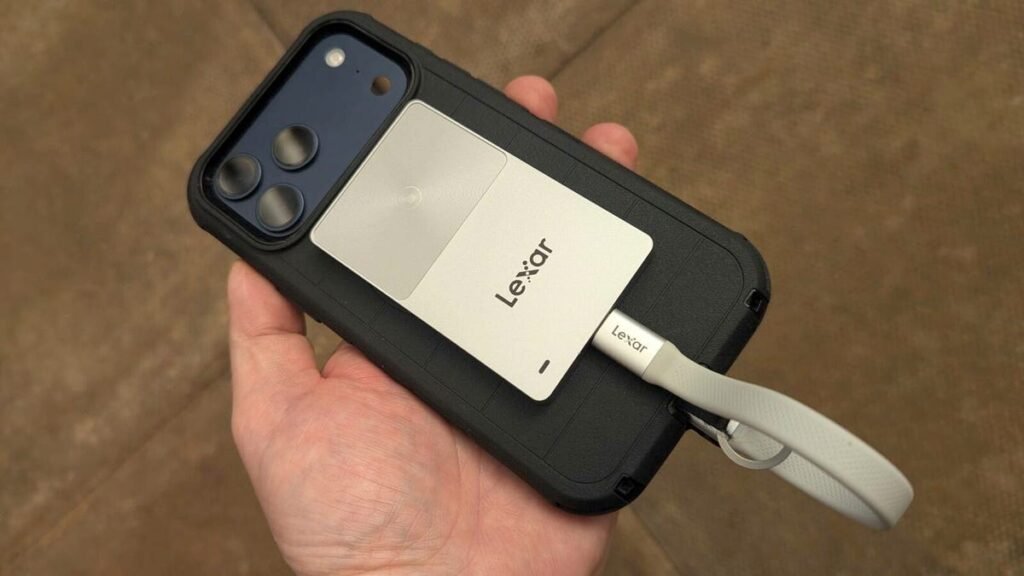
Lexar TouchLock Portable SSD
ZDNET’s key takeaways
- A super-thin and super-light portable SSD
- Innovative NFC unlocking eliminates passcodes and biometrics
- Not the fastest SSD, but fast enough to handle 4K ProRes 60 fps video
Follow ZDNET: Add us as a preferred source on Google.
I think the days of carrying data around in an unencrypted state have pretty much come to an end. It’s just too risky, especially if that data is in any way important or subject to regulatory oversight.
But encrypting and decrypting drives can also be a pain, and must be as quick and simple as possible. I don’t think that process can get any easier than tapping an SSD with your smartphone — and this is exactly how the Lexar TouchLock Portable SSD works.
Also: I tested a solid-state portable battery for a week – now lithium-ion feels outdated
Out of the box, the TouchLock Portable SSD feels small and light. Made of lightweight aluminum, measuring a petite 3.37 x 2.09 x 0.28 inches, and weighing in at only 1.4 ounces, this drive feels space-age. There’s an NFC touchpad on the back, a MagSafe magnet ring on the front for attaching to a smartphone, and a single USB-C port on the bottom.
That MagSafe ring gives you a big clue as to the typical use case for this storage drive — a drive that attaches to your iPhone.
The outer shell has been designed to survive a 6.5-foot drop, which is great for the rough-and-tumble of day-to-day life.
Also: This flexible phone accessory effectively makes rugged cases unnecessary for me
On the inside is a 128-bit AES hardware-encrypted SSD that protects everything written to it, so your data is never left in an unencrypted state. The drive has been built with reliability in mind rather than speed, and to achieve this, Lexar developed a custom low-power controller that generated less heat but improved reliability.
Unlocking the drive using NFC is quick and easy.
Adrian Kingsley-Hughes/ZDNET
Despite not being built for speed, this drive can still reach write speeds of up to 450Mbps and read speeds of 420Mbps. This speed is fast enough for the device to handle 4K ProRes 60 frames-per-second video recorded directly by an iPhone (if you want a faster drive for the iPhone, but without the encryption, you’re looking at something like the Lexar ES3, but that doesn’t have built-in encryption).
Also: 10 quirky cables and connectors everyone should be using (and they’re mostly cheap)
This is the first drive in a long time that I had to read the manual to figure out how to use it. I first plugged the drive into my iPhone. Nothing happened. Then my Mac — and, once again, nothing happened. Then I read the manual and found out that I needed to download the appropriate Lexar app (iOS and Android), and use the NFC feature on my smartphone to unlock and set up the smartphone as the handset that unlocks the drive.
The drive is super thin and light, and is dwarfed by the iPhone.
Adrian Kingsley-Hughes/ZDNET
Once that was done, the drive was easy to use. You connect it to a device — smartphone, tablet, laptop, or computer — tap the smartphone onto the NFC pad, and it’s unlocked in a few seconds. From that point onwards, the drive acts like any other.
Also: The best power banks of 2026: Expert tested and reviewed
Along with the drive, you get a short USB-C-to-USB-C cable, a USB-C-to-USB-A adapter, and a self-adhesive magnetic ring to attach the drive to things other than iPhones.
ZDNET’s buying advice
The Lexar TouchLock Portable SSD comes in a 500GB and 1TB model, for $94 and $143, respectively. I like the unlock mechanism because it’s quick and easy, but there is an initial passcode that you have to remember just in case you lose your phone or wipe the app or something like that. I also like how small and light the drive is — it’s barely noticeable when attached to an iPhone.
Performance was also more than acceptable, and Lexar has done a wonderful job of keeping heat to a minimum. I’ve tested a lot of SSDs that attach to your iPhone and get super hot, adding to the already ample amount of heat generated by the handset itself.
Source: www.zdnet.com
