


What if your laptop always had a 5G internet connection wherever you were, just like your smartphone? You’d never have to connect to a Wi-Fi network again or fumble with your phone’s hotspot feature.
Microsoft’s new Surface Laptop 5G is the latest laptop with cellular connectivity. A 5G laptop can be as awesome as it sounds, but there are some catches. They aren’t right for everyone. And even if you’re willing to shell out the cash for one, I may have a better suggestion for you.
Here are several things you need to know about 5G laptops before you buy one and what your other options are.
5G on Windows just works
Modern versions of Windows—both Windows 11 and Windows 10—have built-in support for mobile 5G data networks.
You don’t need any clunky manufacturer-provided apps or dongles. You don’t even have to insert a physical SIM card because Windows has native support for eSIMs. (For example, with Microsoft’s Surface Laptop 5G, you can insert a nano SIM card but you can also use an eSIM.)
A 5G connection on a modern Windows laptop just works… assuming you have a laptop with the right hardware, and you’re somewhere with a solid 5G signal, and you’re willing to spend extra for a cell phone plan. That’s where the trade-offs start to appear.
Want a 5G laptop? Your options are slim
Most laptops still don’t include 5G hardware, and some laptop classes never include 5G hardware at all. Want a gaming laptop, or even just a workstation with a strong GPU? Don’t expect 5G. That isn’t the type of machine that gets a 5G configuration.
Microsoft
Indeed, 5G connectivity is generally found on business laptops from brands like Lenovo, Samsung, Dell, HP, and Microsoft. 5G is generally intended for workers on the go rather than consumers, although anyone can buy a 5G laptop and hook it up to a cellular plan. But 5G isn’t a standard feature even on business laptops!
Take the Surface Laptop 5G, for example. Microsoft says 5G will only be available on “different SKUs [models] of the Surface Laptop for Business” and only on the 13.8-inch model. Want a 15-inch Surface Laptop with 5G? Not an option. 5G is a high-end feature you pay extra for, and it limits your hardware choices. You can’t get it on whatever laptop you want.
5G laptops are much more expensive
A laptop with 5G hardware costs extra and Microsoft’s latest Surface Laptop 5G is the perfect example of this. The 13.8-inch Surface Laptop for Business starts at $1,499 while the 5G variant starts at $1,799. That’s an extra $300 just for the 5G hardware.
For Lenovo’s high-end ThinkPad X1 Carbon Gen 12 business laptop, you can add 5G hardware to the laptop when configuring it on Lenovo’s online store… and that upgrade will cost you $200 extra.
These are high-end models and they don’t often go on sale. You’re almost certainly going to spend a few hundred bucks on top of a laptop’s normal retail price for 5G capabilities.
You’ll have to pay for an extra cellular data plan for your 5G laptop. That’s an extra recurring cost on top of the high shelf price of the laptop, and the plan probably isn’t going to be cheap.
AT&T
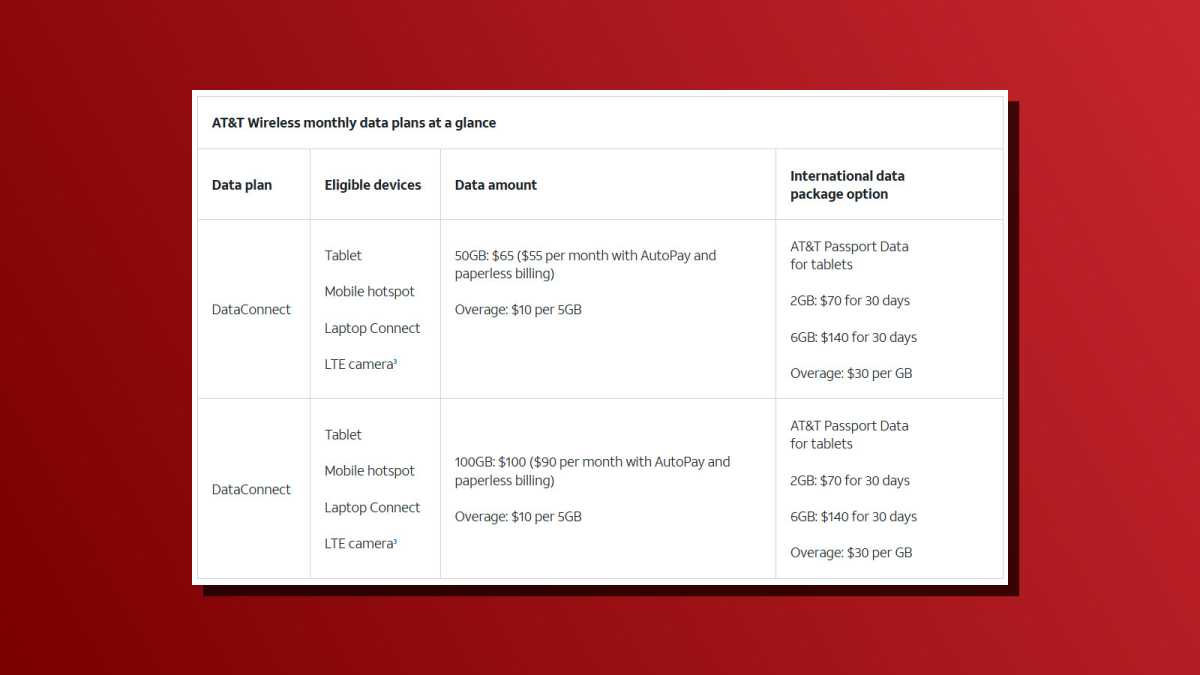
For example, AT&T offers a DataConnect plan for laptops, which is 50GB of data for $55/month or 100GB of data for $90/month. If you run out of data in a month, you’ll pay an additional $10 per 5GB.
Verizon
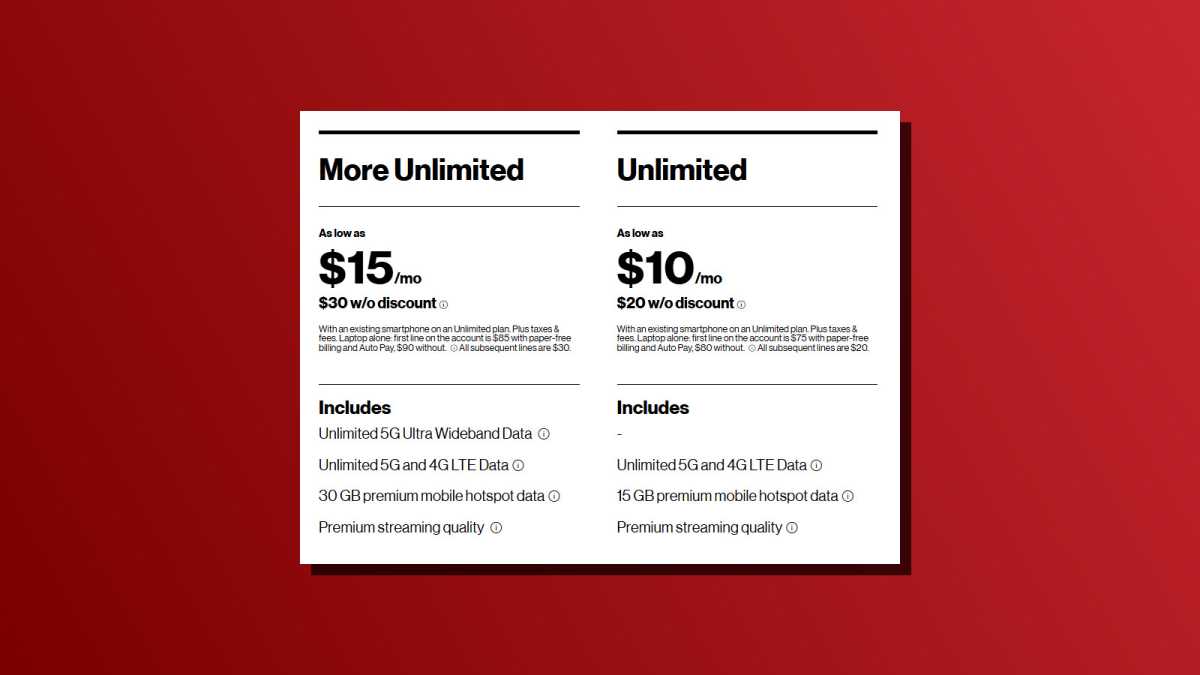
Verizon will let you add a laptop data plan for $10 or $15 extra per month, which sounds like a good deal… but you need to be paying for an Unlimited smartphone plan through Verizon already.
T-Mobile
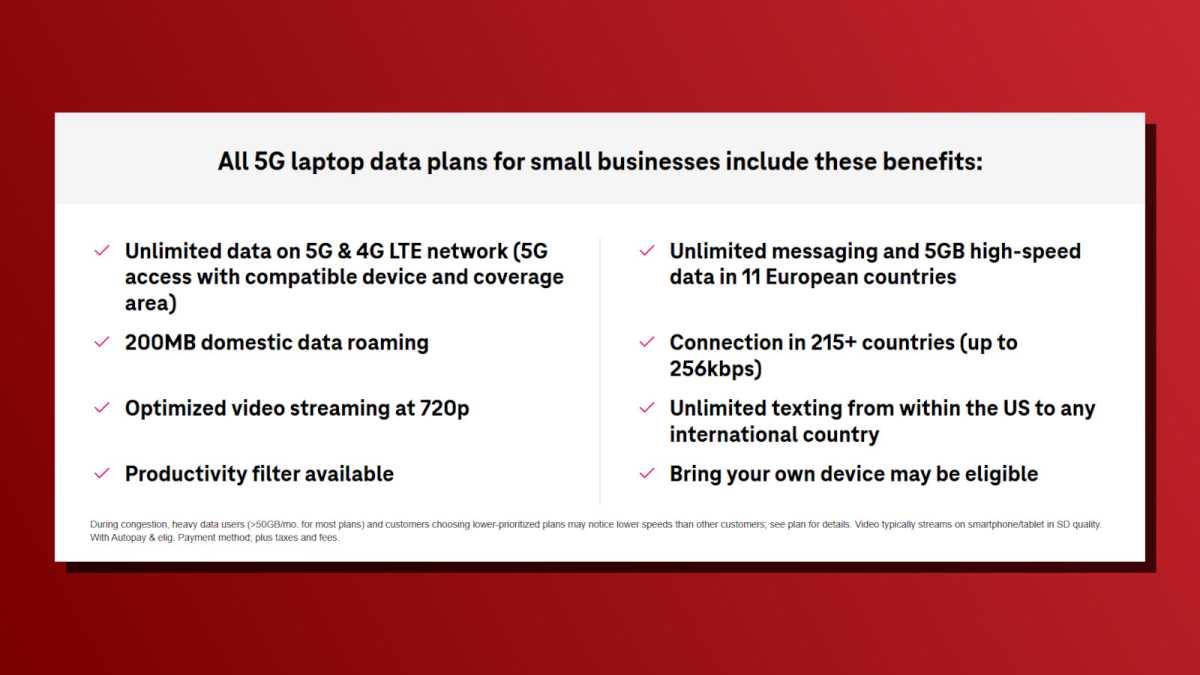
T-Mobile sells laptop data plans for $25 or $40 per line per month, but only to businesses. You may be able to use a T-Mobile tablet data plan with a laptop, but this isn’t officially allowed and T-Mobile could block it.
With those data caps, the dream of never connecting to Wi-Fi again may not be possible yet. But even if you had unlimited high-speed 5G data on your laptop, a solid Wi-Fi network usually offers a more stable connection anyway. And you almost certainly won’t have unlimited high-speed 5G on your laptop—it’s likely to be deprioritized after a certain point, even if the carrier doesn’t charge extra for using more data.
Your phone’s hotspot might be better
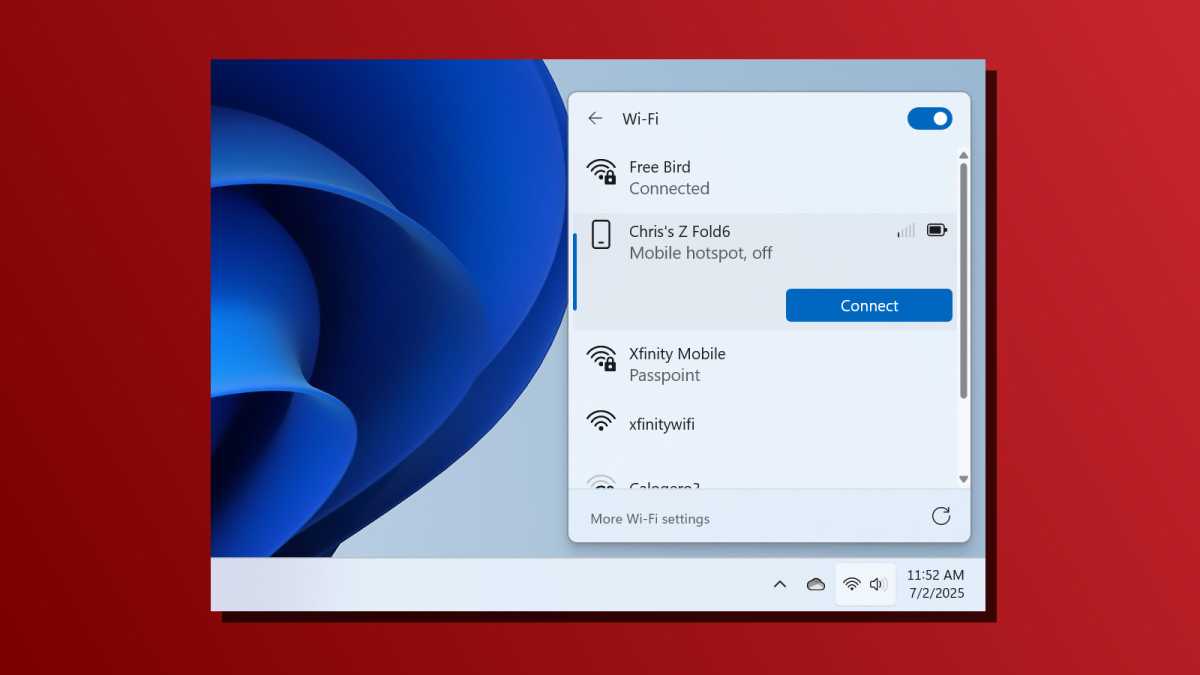
Your smartphone has a built-in mobile hotspot feature, which basically lets your laptop piggyback off its own 5G data connection. Unless you have a budget cell phone plan that blocks hotspot data, this should work out pretty well—it’s what most people do these days.
Chris Hoffman / Foundry
This can be clunky, of course, since you have to activate the hotspot every time you want to use it… but it doesn’t have to be! If you use a Samsung Galaxy phone, or any other phone that includes Microsoft’s more powerful Link to Windows (pre-installed) software, you can use the convenient “instant hotspot” feature that makes it much easier to activate your phone’s hotspot with just a few clicks from your PC.
Note that hotspot mode can drain your smartphone’s battery fast. But if you charge your phone while tethered, it’s a pretty nifty and convenient experience. Is it as seamless as if your laptop had built-in 5G? No, but using your phone’s hotspot is significantly cheaper.
A dedicated 5G hotspot device can be the best of both worlds
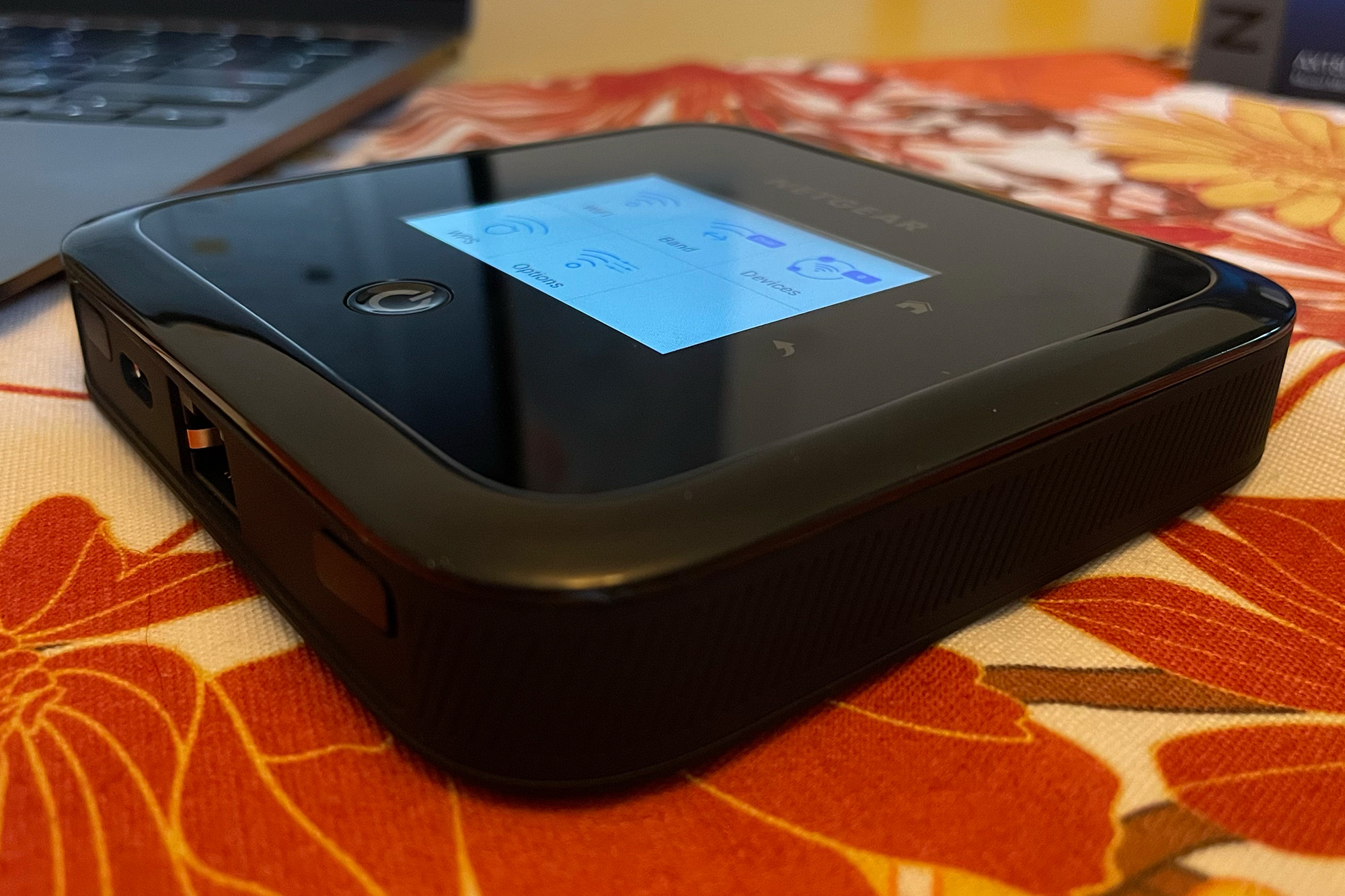
A dedicated 5G hotspot device—like a Netgear Nighthawk M6—may be a better solution if you need constant internet connection for your laptop everywhere you go and you’re often beyond the reach of Wi-Fi.
Wes Davis / Foundry
A standalone hotspot connects to the cellular network, creates a local Wi-Fi network, then lets you connect your devices to it—laptop, tablet, phone, and anything else. These portable hotspots generally have more powerful antennas than the ones in a laptop or smartphone, so you get a stronger signal. They don’t drain your battery as fast, either.
Of course, a dedicated 5G hotspot would be another device you have to lug around and keep charged. You’ll also need a 5G plan for the hotspot, but at least you can share its data with multiple devices.
Dedicated 5G hotspots are generally marketed to consumers while laptop plans aren’t. They’re a better deal because you can connect multiple devices, and you don’t have to hunt down rare business-only 5G devices. You can use them with any device you want.
5G doesn’t guarantee always-on internet
5G feels like magic when it works… but it doesn’t always work in the real world. When you pull over on a road trip and open your laptop where there aren’t any Wi-Fi hotspots, you may not get a 5G signal either. And even if your laptop does get a signal, it’s still just 5G.
We know from our phones that 5G isn’t perfect, and those much-hyped 5G speeds aren’t guaranteed everywhere. 5G may not be perfect indoors, either! If you hope to use 5G instead of Wi-Fi, you may find yourself connecting to Wi-Fi anyway if you’re somewhere where the cellular signal can’t properly penetrate the building’s walls.
It’s easy to tolerate issues like these in a pinch if you’re tethering with your smartphone’s data—it is what it is, and you can move somewhere else for a better signal. But if you spent a bunch of cash on a 5G laptop and you’re shelling out for an extra data plan every month, you may start wondering why you bought a 5G laptop in the first place. After all, your phone’s hotspot works just as well in most situations!
So, should you buy a 5G laptop?
Most people should not buy a 5G laptop. Your smartphone’s data connection works pretty well, and there’s a good chance you already have hotspot data bundled with your phone plan. If you want more than that, a dedicated hotspot is the ideal solution that gives you a lot more flexibility. That’s the upgrade I’d recommend for most people.
If you spend a lot of time on the road and you want a cellular connection to “just work” without any extra setup, a 5G laptop can work. But you’ll be spending extra for less flexibility. In most cases, phone tethering or a dedicated hotspot are better options overall.
That said, I look forward to a future where every laptop has 5G cellular data (or better) and the cellular networks are robust enough to support them! We just aren’t there yet… and it might be a while.
Further reading: The best laptops that we’ve tested
