

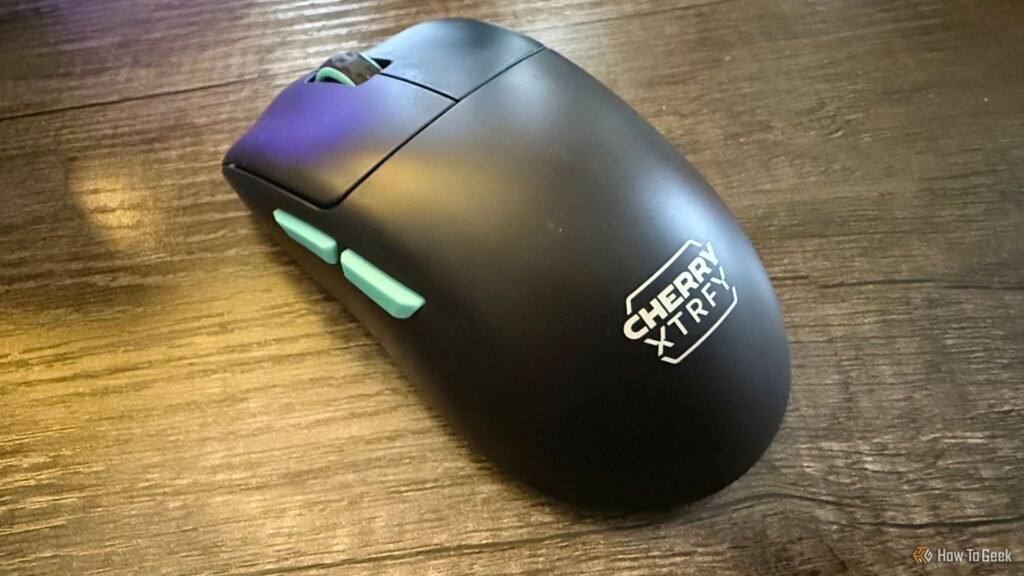
I’m a sucker for tech that forgoes frills in favor of refinement. The Cherry XTRFY M68 Wireless exemplifies this, except unlike the high-end gaming mice it’s comparable to, it makes smart cuts to maintain a midrange price point. The result is close to perfect, so long as you don’t need Bluetooth.
- Weight
-
53 grams
- Sensor
-
Pixart 3395
- Wireless?
-
Yes (2.4 GHz only)
- Brand
-
Cherry
An ultralight wireless gaming mouse with low-profile mouse buttons that connects using 2.4 GHz wireless (no Bluetooth). It weighs 53 grams and is great for people with small hands.
- Comparable performance to more expensive mice
- No unnecessary frills
- Completely customizable without software
- Great for small hands
- Not practical to use wired
- No Bluetooth means limited compatibility
Price and Availability
The Cherry XTRFY M68 Wireless retails for $99 and comes in three colors: black (mint accents), white (mint accents), and blue (brown accents). Included in the box are a USB-A to USB-C cable, a 2.4 GHz receiver, a dongle to connect the receiver to the cable, and a set of replacement skates.
- Weight
-
53 grams
- Sensor
-
Pixart 3395
- Wireless?
-
Yes (2.4 GHz only)
- Brand
-
Cherry
- Dimensions
-
4.85 x 2.52 x 1.56 inches
- Battery
-
300 mA
- Compatability
-
PC and Mac
- Color Options
-
Black, White, Blue
- Connectivity
-
2.4 GHz wireless, Wired
- Maximum DPI
-
26000
- Battery life
-
Up to 75 hours
- Maximum speed
-
650 IPS
- Polling Rate
-
1000 Hz
A Compact Workhorse

While Cherry made some bold cuts to common features like Bluetooth and software customization, it didn’t compromise one iota on performance. Everything here is undeniably high quality, be it the mouse’s sensor, optical switches, smooth skates, or innovative low-profile design.
That last point was the first thing I noticed about the XTRFY M68 Wireless. The mouse buttons are angled down to the point where they nearly touch the desk. Combined with the compact size of the mouse, this had me worried at first that my larger hands would feel uncomfortable when trying to grip it, but instead I found these qualities helped with precision during quick actions. I figure this will be even more true for people with smaller hands who find most gaming mice too bulky.
It helps that the components Cherry used are best-in-class. The Pixart 3395 sensor with its 650 IPS and 50 G acceleration is one of the best on the market, only outclassed by the most expensive mice (and not in a capacity the average person will notice). Meanwhile, the optical sensors used by the mouse buttons bring a softness to each click that will particularly appease anyone wanting to cut down on noise.
The scroll wheel and side buttons also do their job without fuss. I usually prefer a larger wheel, but the smaller one works well in the context of this mouse as it sticks out of the casing enough for easy access.

Perhaps the most impressive part of the mouse is its stunningly light 53-gram weight. This makes it (by one whole gram) the lightest mouse I’ve tested for How-To Geek. Whether this is a pro or con will be up to your personal preference, but for me, that weightless sensation is bliss in the form of negating fatigue. Outside of novelty mice, you’d be hard-pressed to find an ultralight mouse notably lighter than this.
No Bluetooth, (Probably) No Problem
The omitted feature that will make or break this mouse for many people is its lack of Bluetooth. On the one hand, yes, it’s an industry standard for wireless gaming mice to include this functionality. On the other hand, because nearly every mouse has Bluetooth, it’s perfectly acceptable to have a PC-centric product that breaks this mold in favor of lowering costs and a small weight reduction. After all, most PC gamers opt for the far lower latency of 2.4 GHz connectivity.
The XTRFY M68 Wireless’ 2.4 GHz wireless connection worked entirely as intended for me. The polling rate maxes out at 1000 Hz, which is all most people will need, though Cherry does offer a “Pro” version with an 8000 Hz polling rate as well. If you ask me, that’s not worth the $40 upcharge.
If there’s one thing that the mouse loses in cutting Bluetooth, it’s the flexibility to connect with non-PC or Mac platforms. This is a minor shame as the compactness of the mouse would pair well with a tablet. While I personally don’t think Bluetooth’s omission is an inherent con, it does feel like some potential was left on the cutting room floor.

The real weak link here is wired play. While you can technically use the XTRFY M68 Wireless in this mode, the USB-C port’s location on the side of the mouse makes it awkward to the point where it was virtually unusable for me. In practice, this meant the mouse wasn’t comfortably usable when charging. It’s an unfortunate side effect of the low-profile mouse button design, though at least the battery lasts long enough that it shouldn’t be an issue if you charge weekly.
Software-Free Customization Rules
Software customization is convenient, but it’s also a hassle to load it up every time you want to make an adjustment. The XTRFY M68 Wireless refreshingly lets you make those changes directly on the mouse.
The power switch on the mouse’s underside doubles as a toggle between adjusting the sensitivity, polling rate, and debounce time. Once the intended setting is selected, a button swaps between presets, each identifiable by the associated color on the power indicator light. Settings with only two modes—like lift-off distance and motion sync—can be toggled between by holding down button combinations.
While this system isn’t complicated, it does require having the manual on hand to check what color indicates. On the upside, if you’re the type of person who uses the same settings for every game, you’ll never need to download software to make that one-time tweak.
Should You Buy the Cherry XTRFY M68 Wireless?

The Cherry XTRFY M68 Wireless is an easy recommendation for anyone who doesn’t need Bluetooth functionality. Its no-frills approach results in a mouse that’s astonishingly light and performant, with a unique design approach that will delight anyone who finds most gaming mice bulky. Few mice nail all the fundamentals like this one does.

- Weight
-
53 grams
- Sensor
-
Pixart 3395
- Wireless?
-
Yes (2.4 GHz only)
- Brand
-
Cherry
An ultralight wireless gaming mouse with low-profile mouse buttons that connects using 2.4 GHz wireless (no Bluetooth). It weighs 53 grams and is great for people with small hands.
