Close Menu
GeekBlog

    Subscribe to Updates

    Get the latest creative news from FooBar about art, design and business.

    What's Hot

    Stop falling for scams when Norton’s antivirus software is 70% off right now

    March 28, 2026

    Acer Promo Codes and Deals: Save 40% on Bundles

    March 28, 2026

    Playing Wolfenstein 3D with one hand in 2026

    March 28, 2026
    Facebook X (Twitter) Instagram Threads
    GeekBlog
    • Home
    • Mobile
    • Tech News
    • Blog
    • How-To Guides
    • AI & Software
    Facebook
    GeekBlog
    Home»Tech News»I created the ultimate Wi-Fi password key with the most unexpected gadget – how it works
    Tech News

    I created the ultimate Wi-Fi password key with the most unexpected gadget – how it works

    Michael ComaousBy Michael ComaousFebruary 10, 20263 Mins Read
    Share Facebook Twitter Pinterest LinkedIn Tumblr Email Copy Link
    I created the ultimate Wi-Fi password key with the most unexpected gadget - how it works
    Share
    Facebook Twitter LinkedIn Pinterest Email Copy Link

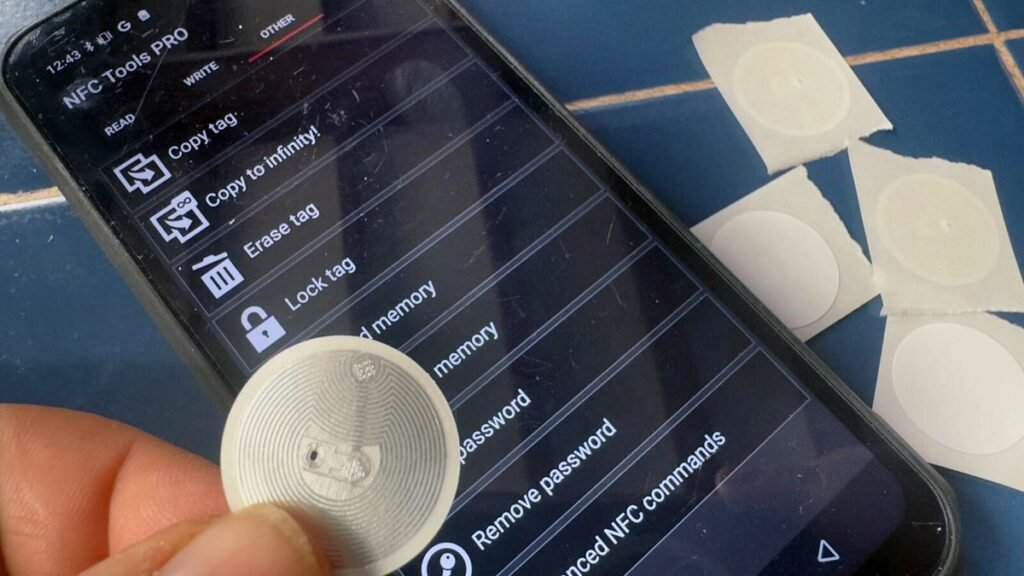
    Writing NFC tags with a smartphone.

    Adrian Kingsley-Hughes/ZDNET

    Follow ZDNET: Add us as a preferred source on Google.


    One of my favorite technologies is NFC. I’m blown away that I can write data to a little chip and then access that using a phone or tablet. I’ve embedded NFC tags into all sorts of things, from documents to business cards to 3D-printed objects.

    And it’s easy!

    What you’ll need

    You need two things:

    • NFC tags: These come in all sorts of shapes and sizes, from stickers to keychain disks to plastic cards. I go for NTAG215 compatible tags, because they are widely available, cheap, have enough on-board memory for my needs (504 bytes ought to be enough for anybody), and they have a data-retention lifespan of at least 10 years or 100,000 writing/rewriting cycles. You can find NTAG213 NFC tags that are cheaper, but these are limited to 137 bytes, and I’ve had website URLs that exceed this length.
    • NFC reader/writer app: I use NFC Tools, available on both iOS and Android.
    The NTAG215 stickers are cheap and perfect for disposable applications.

    The NTAG215 stickers are cheap and perfect for disposable applications.

    Adrian Kingsley-Hughes/ZDNET

    How to create an NFC tag

    Writing a few dozen tags with a smartphone app is fine, but if you find yourself wanting to write a lot, you’re moving into the realm of an industrial setup like the Sato CT4-LX.

    Also: I found AirTag alternatives that are tough, loud, and compatible with Android phones

    You have the tags, the app is installed, and you’re ready to write your first tag. To write a tag that opens a webpage, tap Write, then Add a record, tap URL/URI, enter the address of the web page you want to open in the box, and tap OK.

    NFC Tools app is packed with features.

    NFC Tools app is packed with features.

    Adrian Kingsley-Hughes/ZDNET

    Now, to write to the tag: tap Write, then bring the tag to the back of the smartphone. It should detect the tag and write the data to it. It’s that easy!

    How to test your NFC tag

    To test the tag, exit the app, bring the tag up to the back of the smartphone, and it should be picked up and prompt you to go to the web page.

    Also: Finally, Bluetooth trackers for Android users that function even better than AirTags

    But you’re not done. Remember that NFC tags are rewritable, and you don’t want others fiddling with tags you’ve placed on things, as this could be a big security issue.

    You have two options, both available in the NFC Tools app. You can password-protect the tag or lock it.

    With stickers, I tend to lock these, as it’s quicker (you don’t need to create or remember a password), but for reusable tags and cards, the password option allows for future reuse.

    Password protecting a tag allows it to be re-written in the future, but prevents unauthorized tampering.

    Password protecting a tag allows it to be re-written in the future, but prevents unauthorized tampering.

    Adrian Kingsley-Hughes/ZDNET

    The choice is yours, but you need to do one or the other to protect the tag from being altered. 

    And there you are. Done. Working with NFCs is that easy.

    Pro tip: A handy way I use NFC tags

    You can create an NFC tag to share your Wi-Fi password. If you want to do this, in NFC Tools, you’d add a record for Wi-Fi Network and enter your network’s details. I find this a super handy way to share the password for my guest Wi-Fi.

    Also: How to find out if an AirTag is tracking you – and what to do about it

    Experiment with what the app offers; there’s a lot in there.


    Source: www.zdnet.com

    created gadget Key password Ultimate Unexpected WiFi works
    Share. Facebook Twitter Pinterest LinkedIn Tumblr Telegram Email Copy Link
    Previous ArticleH&R Block Coupons and Deals: 20% Off Tax Prep in 2026
    Next Article Kimbal Musk Posts His Explanation for All Those Epstein Emails
    Michael Comaous
    • Website

    Michael Comaous is a dedicated professional with a passion for technology, innovation, and creative problem-solving. Over the years, he has built experience across multiple industries, combining strategic thinking with hands-on expertise to deliver meaningful results. Michael is known for his curiosity, attention to detail, and ability to explain complex topics in a clear and approachable way. Whether he’s working on new projects, writing, or collaborating with others, he brings energy and a forward-thinking mindset to everything he does.

    Related Posts

    3 Mins Read

    Stop falling for scams when Norton’s antivirus software is 70% off right now

    4 Mins Read

    Acer Promo Codes and Deals: Save 40% on Bundles

    2 Mins Read

    Playing Wolfenstein 3D with one hand in 2026

    7 Mins Read

    Whoop has LeBron – now it wants your mom

    1 Min Read

    Sony temporarily suspends memory card sales due to shortages

    2 Mins Read

    Apple TV is now home to CrunchyRoll anime

    Top Posts

    The Mesh Router Placement Strategy That Finally Gave Me Full Home Coverage

    August 4, 2025982 Views

    Discord will require a face scan or ID for full access next month

    February 9, 2026767 Views

    Best Stores for Buying MP3 and Digital Music You Can Keep Forever

    August 2, 2025373 Views
    Stay In Touch
    • Facebook

    Subscribe to Updates

    Get the latest tech news from FooBar about tech, design and biz.

    Most Popular

    The Mesh Router Placement Strategy That Finally Gave Me Full Home Coverage

    August 4, 2025982 Views

    Discord will require a face scan or ID for full access next month

    February 9, 2026767 Views

    Best Stores for Buying MP3 and Digital Music You Can Keep Forever

    August 2, 2025373 Views
    Our Picks

    Stop falling for scams when Norton’s antivirus software is 70% off right now

    March 28, 2026

    Acer Promo Codes and Deals: Save 40% on Bundles

    March 28, 2026

    Playing Wolfenstein 3D with one hand in 2026

    March 28, 2026

    Subscribe to Updates

    Get the latest creative news from FooBar about art, design and business.

    Facebook
    • About Us
    • Contact us
    • Privacy Policy
    • Disclaimer
    • Terms and Conditions
    © 2026 GeekBlog

    Type above and press Enter to search. Press Esc to cancel.

    Ad Blocker Enabled!
    Ad Blocker Enabled!
    Our website is made possible by displaying online advertisements to our visitors. Please support us by disabling your Ad Blocker.