

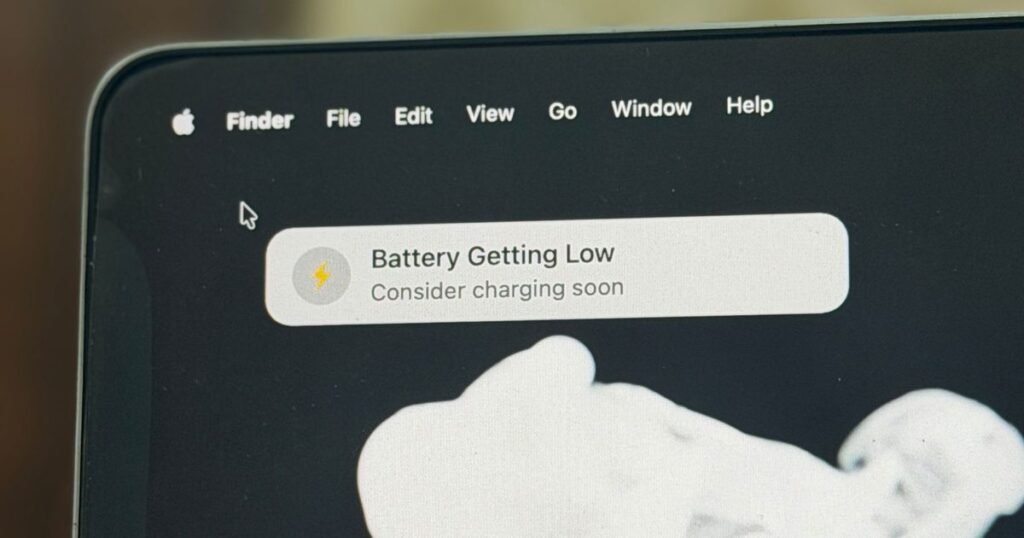
I have lost count of the number of times that my laptop died in the middle of work. On a few occasions, I simply missed the low battery alert. There have been instances where I saw the alert, and then forgot to plug in the charging cable.
In the most recent fiasco, I was working on a 7% battery level while nestled comfortably on a bean bag, and I thought I would just finish the current task and run to get the power bank. I overestimated the pace of my work, and my MacBook Air died in the middle of the task. Thankfully, cloud sync saved the work progress.
But not everyone has that luxury in their work software. Simply put, folks like me needed a more persistent – and conspicuous – reminder for low battery situations. Thankfully, I just found a lightweight Mac utility perfect for those low-power panic moments.
This is a savior
The app in question is called Plug That In: Battery Monitor. It handles low battery reminders in a rather unique fashion. Instead of showing a pop-up notification banner, or flashing an icon in the cluttered menu bar, it attaches the power alert to the touchpad or mouse cursor.
Wherever the cursor goes, the battery level alert follows the cursor. Moreover, it will also play a sound alert to make sure that even if your work doesn’t involve cursor movement, or it’s simply resting on an external display that you’re not paying attention to, you can still get an audible nudge.
Now, the idea behind Plug That In is fairly simple. Make it impossible to miss a low battery alert. And it might sound a tad vexing, too. But the developer behind it has executed the whole idea in an extremely minimalist, yet thoughtful manner.

To begin with, the app runs entirely as a menu bar utility, just like Loook for eye health and the Maccy clipboard app. It’s less than 2 MB in size, so it won’t hog any storage space, nor will it slow down the system. And finally, it doesn’t require any intrusive permissions to get the job done. Think of it as a silent low battery guardian for your Mac with barely any resource overhead.
Now, you might think that an app that merely attaches a low battery alert to the cursor is a barebones utility. Well, Plug That In is fairly customizable if you plan to go beyond its vanilla alert sending role.
Deeply customizable
To begin with, you can set it to automatically launch at system startup. You can choose to see only the app’s icon in the menu bar, the battery percentage, or both. Now, let’s move on to the core low battery alerts.

You can choose the exact battery level at which the app starts blasting audio-visual alerts. You can start at 5% and go all the way up to 80%, with a uniform gap of 5% at each stop. The default setting sets the threshold for alerts at the 30% mark.
Users can also customize the duration of notifications, which can vary between 1 and 10 seconds. If you’re engaged in focused work, however, you can choose to disable audio alerts and only go with the visual cues.

There’s also a dedicated Reminder mode that works more like the urgency phase. The vanilla notifications are less intrusive, while the Reminders kick into action when the battery reserves are running low.
Once you have specified the battery level at which the Reminders kick into action, you will also be able to control the duration for which the visual notification appears on the screen. It could be 15, 30, or 60 seconds. More importantly, you can choose to play sounds at an interval of 5 seconds so that you absolutely don’t miss the reminders.
An added dash of thoughtfulness

Now, the idea of seeing a visual alert tagging alongside the cursor — and audible beeps — sounds like a strong nudge to move and plug in the charging cable. Yet, you don’t want it to disturb your work zen, especially if you’re in the middle of a video call, presentation, or a general phone call routed through the iPhone.
For such scenarios, Plug That In offers a Smart DND feature. This dashboard lets you separately disable the low-battery alerts when the camera is active. Additionally, you can mute the alerts when the mic is being used for calls or recordings, or when media playback is active.

What I love the most is the localization system. Between 5% and 30% battery levels – spaced evenly with a 5% gap — you can set a custom title and message for the low battery reminder. You can get playful with each step, as well, or just make the alerts carry more urgency with each drop.
Now, you might think that you don’t need it. And the criticism is somewhat justified. MacBooks offer incredible battery life, and even with 20% juice left in the tank, you can still get a healthy few hours of work done.

But not all workflows are the same. If you’re primarily engaged in web-based work, you can manage a bit of casual delay. But for tasks such as video editing, AI-driven tasks, or workflows with plenty of background activity, the battery drop is pretty quick.
The problem is exacerbated on older MacBooks with an ageing battery. A new machine can last you an hour or two with 5-10% juice, but a depleting battery that has been used on a Mac for years can’t quite pull that off.
On the contrary, due to the local throttling and aggressive power optimization, older batteries empty at a much faster pace. I have experienced it, and it’s extremely vexing.

I love my 12-inch MacBook, and often take it out for a few hours of focused work in a park or cafe. I love the in-hand feel of this slim and light laptop, but as soon as it enters the sub-30% range, it’s like playing a risky game because the battery comes crashing down at an unpredictable pace.
And yeah, I’ve been left stranded and lost work progress due to this sudden crash. For most users who are still holding on tightly to their ageing Intel-powered Mac, and haven’t had a battery replacement, they know the drill. For such devices, an app like Plug That In is a godsend.
It costs just $0.99 and is available from the Mac App Store. Yeah, paying for a battery reminder utility may not sound particularly appealing if you’re a desk-bound warrior, but for anyone who doesn’t carry the charging gear or can’t access a power plug, Plug That In is a must-have utility.
Source: www.digitaltrends.com
