Close Menu
GeekBlog

    Subscribe to Updates

    Get the latest creative news from FooBar about art, design and business.

    What's Hot

    Amazon Has Been Writing Down Guesses About Your Body. The Page Is Two Taps Away.

    October 7, 2026

    Apple Watch Series 12 Hits a Record Low $349.99 on Prime Day, and the Ultra 4 Is $100 Off

    October 7, 2026

    YouTubers Are Getting Paid to Make You Afraid of AI. The Word “Secretly” Is Doing a Lot of Work.

    October 7, 2026
    Facebook
    GeekBlog
    • Home
    • Mobile
    • Tech News
    • Blog
    • Gaming
    • Smartwatch
    • How-To Guides
    • AI & Software
    Facebook
    GeekBlog
    Home»Tech News»The latest Instax printer is a pricey but worthy upgrade
    Tech News

    The latest Instax printer is a pricey but worthy upgrade

    Michael ComaousBy Michael ComaousJanuary 31, 20266 Mins Read
    Share Facebook Twitter Pinterest LinkedIn Tumblr Email Copy Link
    The latest Instax printer is a pricey but worthy upgrade
    Share
    Facebook Twitter LinkedIn Pinterest Email Copy Link

    Recommended for you:

    What to expect from Samsung Unpacked 2026: 5 biggest rumors on Galaxy S26 Ultra, Buds 4 Pro, more
    Tech News·Feb 1, 2026

    What to expect from Samsung Unpacked 2026: 5 biggest rumors on Galaxy S26 Ultra, Buds 4 Pro, more

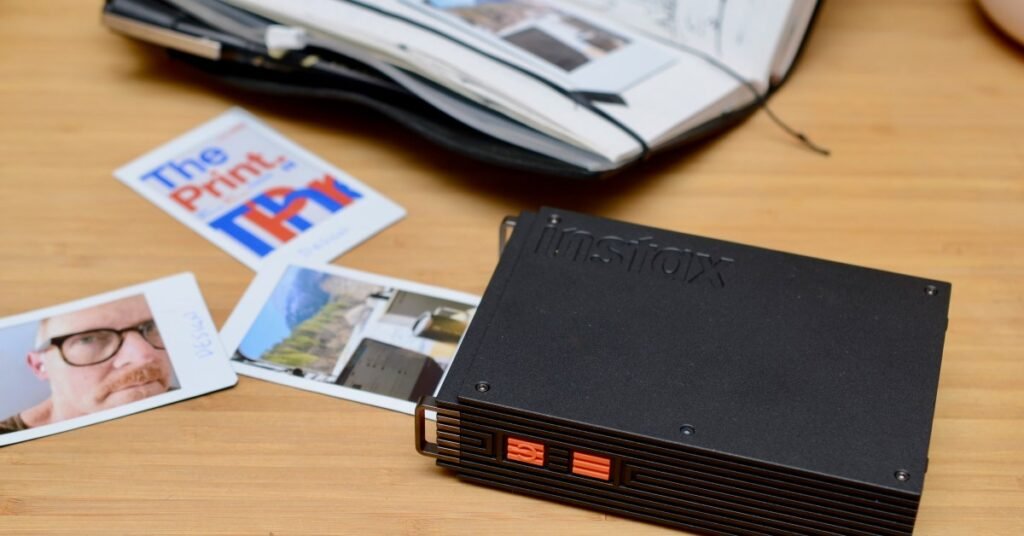
    FujiFilm’s Instax Mini Link 3 printer is a much-loved $100 accessory in my travel journal kit. I often tape a printed image next to my handwritten thoughts to preserve a moment in time. The prints produced by the instant film can, however, be soft and muddy — something the new $169.95 Instax Mini Link+ promises to improve.

    The big upgrade is a new Design Print mode. It’s supposed to make text and intricate illustrations crisp and legible, but I didn’t see much of an improvement, despite that being a big selling point. I did, however, find that the improved processing inside the Mini Link+ enhanced contrast, colors, and sharpness, to reveal more details in a wide variety of photos, and I think that’s more important to most people.

    From my testing, the new Mini Link+ is definitely an upgrade, but don’t expect this, or any instant film Instax printer to perform miracles, especially for images measuring just 62 x 46mm (2.44 x 1.81 inches).

    $170

    The Good

    • Best Instax Mini printer yet
    • Improved colors, sharpness, and contrast on most photos
    • Fun for creatives

    The Bad

    • Little improvement on text heavy illustrations
    • Expensive
    • App is overwrought

    FujiFilm’s Instax printers all use its Instax Mini instant film which typically costs around $30 for 20 sheets, or about $1.50 per photo. To print, you need to download the “Instax Mini Link” app available for both iOS and Android.

    The app is overwrought with features that let you visualize your photos in real space with VR and use the printer as a remote camera shutter. It also helps you organize your images; imagine your prints in frames, on shelves, or as a collage taped to the wall; and prettify them with text, stickers, and filters. You can even connect your Pinterest account if you want. Fun, I suppose, but I’m not twelve-years old – I’m a full-grown man, damnit, and I just want to print photos in my iPhone’s photo library, and do it quickly!

    It comes with a lanyard.

    The Mini Link+ (left) is only slightly larger than the Mini Link 3 (right).

    It uses the same Instax Mini instant film. Each cartridge holds 10 sheets.

    It can even be used as a remote shutter button for your phone.

    To do that, I have to first import the image into the Instax Mini Link app, hit print, choose either the Simple or Design mode, then wait 20 seconds for the printout. Simple print promises “smooth color tones for everyday images” and produces softer images that, in general, are still an improvement over most anything the Mini Link 3 can print. Design mode is exclusive to the Mini Link+ and the reason you might want it.

    I tested the different modes with a variety of images and generally found Design prints made on the Mini Link+ were superior for faces, landscapes, high contrast images, and macro shots of nature. Everything, really, other than text-heavy illustrations, where I saw no obvious improvement.

    Link+ Design mode (left), Mini Link 3 (center), Link+ Simple mode (right).

    Link+ Design mode (left), Mini Link 3 (center), Link+ Simple mode (right).

    For example, look at my stupid face. Photos with intense lighting were susceptible to blowout when printed on the older Mini Link 3. The Simple and Design prints from the Mini Link+ handled the lighting better, with improved contrast, more detail in the eye, and more accurate colors and skin texture.

    Link+ Design mode (left), Mini Link 3 (center), Link+ Simple mode (right).

    Link+ Design mode (left), Mini Link 3 (center), Link+ Simple mode (right).

    In the example above, everything in the Mini Link 3 print is super soft and blends together in a muddled mess. The Mini Link+ again offers improved contrast, with visible textures on the rock faces, tree branches, and improved colors throughout. The wooden slats on the barn, lines of individual trees, and wheel detail are more pronounced on the Design print, with less saturation on that big pine to the left.

    Link+ Design mode (left), Mini Link 3 (right).

    Link+ Design mode (left), Mini Link 3 (right).

    Here, the Mini Link 3 struggles to depict the snow as anything but a white smear, while you can make out individual snowflakes and depth on the Mini Link+ Design print.

    Link+ Design mode (left), Mini Link 3 (center), Link+ Simple mode (right).

    Link+ Design mode (left), Mini Link 3 (center), Link+ Simple mode (right).

    In this example, the Mini Link 3 really flattens the sky and removes the texture from the distant mountain. The greens and blues are more brilliant with the Simple and Design prints, while the separation between bits of gravel and blades of grass is more apparent in Design mode.

    Instax Mini Link 3 (left) versus Link+ Design mode (right).

    In this Spotify screenshot, Design mode sharpens the lettering and artificially enhances the white text with a black outline, most visible on the letters “a” and “s.” Simple mode doesn’t do this. The outlining does make the lettering pop.

    Link+ Design mode (left), Mini Link 3 (center), Link+ Simple mode.

    Link+ Design mode (left), Mini Link 3 (center), Link+ Simple mode.

    Link+ Design mode (bottom), Mini Link 3 (top).

    Link+ Design mode (left), Mini Link 3 (right).

    I find surprisingly little difference between these illustrations printed by the Mini Link 3 and the Mini Link+, even in Design mode. Strange because this is where FujiFilm’s new printer is supposed to excel. Nevertheless, they all look good enough for hobbyists, and anyone looking to spice up a journal or decorate a room.

    1/7

    USB-C charging with a user-replaceable battery if you live in Europe.

    After printing 15 photos over the last few days, the battery on the Instax Mini Link+ is still at 80 percent. The battery charges over USB-C, and, if you’re in Europe, the FujiFilm NP-70S battery can be user-replaced when it no longer holds a charge.

    From my testing, I think it’s clear that if you want the best photo quality available in an Instax printer, then the $169.95 Mini Link+ is the one to get. It also makes the case for being a worthy upgrade for some Mini Link 3 owners, so long as you’re not expecting improved prints of text-heavy illustrations.

    But its price puts the Mini Link+ into direct competition with dye-sublimation printers like the Canon Selphy QX20 which yields prints that are sharp and accurate with better resistance to water and fading. Otherwise, the Mini Link 3 is still a great printer for the price, and the soft, moody images it prints is a vibe worth $100.

    Photography by Thomas Ricker / The Verge

    Follow topics and authors from this story to see more like this in your personalized homepage feed and to receive email updates.

    • Thomas Ricker

      Thomas Ricker

      Thomas Ricker

      Posts from this author will be added to your daily email digest and your homepage feed.

      See All by Thomas Ricker

    • Accessory Reviews

      Posts from this topic will be added to your daily email digest and your homepage feed.

      See All Accessory Reviews

      Recommended for you:

      Hlynur Pálmason: The Love That Remains interview
      Tech News·Jan 30, 2026

      Hlynur Pálmason: The Love That Remains interview

    • Reviews

      Posts from this topic will be added to your daily email digest and your homepage feed.

      See All Reviews

    • Tech

      Posts from this topic will be added to your daily email digest and your homepage feed.

      See All Tech

    Source: www.theverge.com

    About this article: GeekBlog covers U.S. technology news, AI, phones, smartwatches and gaming. Every story is written and checked under our Editorial Policy. Spotted a mistake or have a story tip? Contact our editors.

    Share. Facebook Twitter Pinterest LinkedIn Tumblr Telegram Email Copy Link
    Previous ArticleA well-balanced Ryzen 9700X + RTX 5060 Ti desktop is $150 off right now
    Next Article Cordless Stick Vacuum Throw Down: Bosch, Shark, Dyson (2026)
    Michael Comaous

      Michael Comaous is a dedicated professional with a passion for technology, innovation, and creative problem-solving. Over the years, he has built experience across multiple industries, combining strategic thinking with hands-on expertise to deliver meaningful results. Michael is known for his curiosity, attention to detail, and ability to explain complex topics in a clear and approachable way. Whether he’s working on new projects, writing, or collaborating with others, he brings energy and a forward-thinking mindset to everything he does.

      Related Posts

      10 Mins Read

      Amazon Has Been Writing Down Guesses About Your Body. The Page Is Two Taps Away.

      13 Mins Read

      YouTubers Are Getting Paid to Make You Afraid of AI. The Word “Secretly” Is Doing a Lot of Work.

      10 Mins Read

      20 Million Android Owners Are Already Inside a £1.2 Billion Case Against Google. Nobody Signed Up.

      12 Mins Read

      OpenAI Will Sign Every ChatGPT Reply in the EU. Swapping One Word in Four Erases It.

      6 Mins Read

      OpenAI Is Hiding a Watermark in ChatGPT Text in the EU. Swap 10% of the Words and It Weakens.

      6 Mins Read

      Mistral Large 4 Has 1 Trillion Parameters. You Cannot Download It Yet.

      Top Posts

      Every iPhone Camera Ranked in 2026 (Best to Worst)

      July 6, 2026116 Views

      Best Stores for Buying MP3 and Digital Music You Can Keep Forever (2026)

      August 2, 202550 Views

      Windows 11 vs Windows 10: Should You Upgrade in 2026?

      July 7, 202642 Views
      Stay In Touch
      • Facebook

      Subscribe to Updates

      Get the latest tech news from FooBar about tech, design and biz.

      Most Popular

      iPhone Battery Replacement Cost: Every Model, Apple vs Repair Shop

      October 6, 202629 Views

      Best Offline Music App in 2026: Free and Paid Picks

      October 7, 202620 Views

      iPhone 18 Pro Max Price: Every Storage Tier and How to Pay Less

      October 6, 202618 Views
      Our Picks

      Amazon Has Been Writing Down Guesses About Your Body. The Page Is Two Taps Away.

      October 7, 2026

      Apple Watch Series 12 Hits a Record Low $349.99 on Prime Day, and the Ultra 4 Is $100 Off

      October 7, 2026

      YouTubers Are Getting Paid to Make You Afraid of AI. The Word “Secretly” Is Doing a Lot of Work.

      October 7, 2026

      Subscribe to Updates

      Get the latest creative news from FooBar about art, design and business.

      HEICJPG.online - Convert HEIC to JPG online
      Facebook
      • About Us
      • Contact us
      • Privacy Policy
      • Disclaimer
      • Terms and Conditions
      • Editorial Policy
      • Cookie Policy
      • Your Privacy Choices
      © 2026 GeekBlog

      Type above and press Enter to search. Press Esc to cancel.