Close Menu
GeekBlog

    Subscribe to Updates

    Get the latest creative news from FooBar about art, design and business.

    What's Hot

    Stop falling for scams when Norton’s antivirus software is 70% off right now

    March 28, 2026

    Acer Promo Codes and Deals: Save 40% on Bundles

    March 28, 2026

    Playing Wolfenstein 3D with one hand in 2026

    March 28, 2026
    Facebook X (Twitter) Instagram Threads
    GeekBlog
    • Home
    • Mobile
    • Tech News
    • Blog
    • How-To Guides
    • AI & Software
    Facebook
    GeekBlog
    Home»Uncategorized»Finally! I Found Something That Actually Blocks Those Annoying LED Lights on My Devices
    Uncategorized

    Finally! I Found Something That Actually Blocks Those Annoying LED Lights on My Devices

    Michael ComaousBy Michael ComaousAugust 1, 20252 Mins Read
    Share Facebook Twitter Pinterest LinkedIn Tumblr Email Copy Link
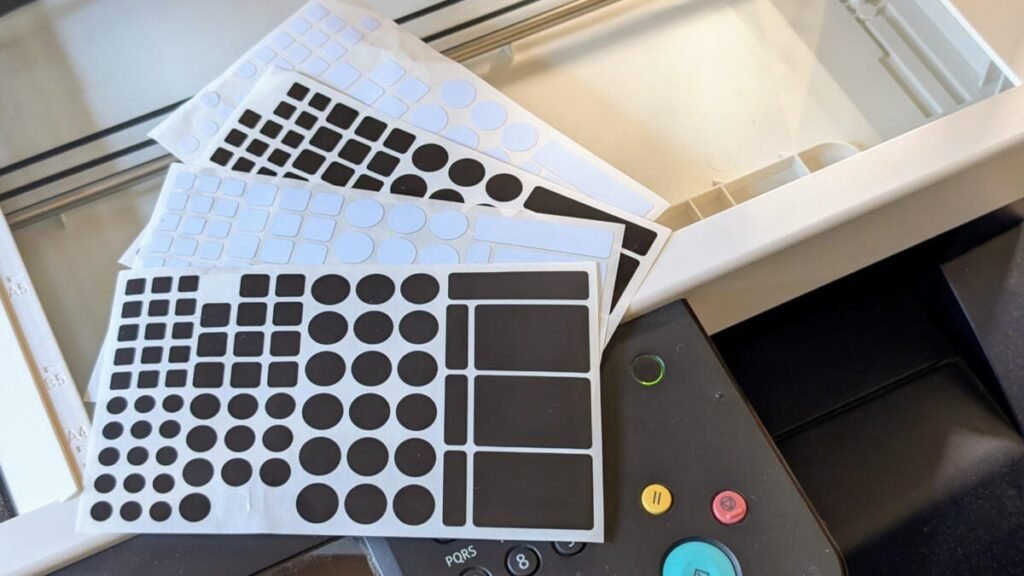
    jieheng light blocking and dimming stickers
    Share
    Facebook Twitter LinkedIn Pinterest Email Copy Link

    There’s nothing more annoying than crawling into my cozy bed, turning off my smart lights and seeing a faint glow on the wall of what should be a pitch-black bedroom. The culprit is almost always some new device I’m testing out with an LED indicator light that shines brighter than a full moon. Whenever this happens, I trudge to the toolbox, grab my trusty roll of electrical tape and cut off a piece to haphazardly stick over the offending LED, sometimes two if it’s especially bright. 

    That was until recently, when I discovered the impossibly simple — and cheap — Jieheng LED light blocking and dimming stickers on Amazon. They cost only $8 and I don’t know how I went so long without them. 

    Here’s why these stickers are so life-changing.

    What I love about these stickers

    These precut stickers come in various shapes and sizes, which makes them ideal for covering indicator lights throughout my apartment. Of the two types of blackout stickers in the pack, I love the 50% dimming variant for smart home hubs, surge protectors and other devices where I occasionally need to check their operational status. They’re great for taking the edge off the bright displays on some kitchen appliances. I’ve also doubled up stickers to increase the dimming effect on the worst offenders without blocking them entirely.

    I use the 100% blocking stickers on everything else, including a large green button on my laser printer. For years, I draped a thick piece of plastic over this button because tape would cause the button to stick. Now, a well-placed, perfectly sized blackout sticker turns the button into a tiny ring of light without affecting its movement.

    One of the biggest advantages of these Jieheng stickers is that they come in black and white colors, so you can match them to your device. I’ve seen a few brands selling multiple colors, including silver. Most competitors sell the stickers in black only, or they sell the white stickers separately.

    There are many simple ways to improve your sleep just like this. For more ideas, read our editor’s advice for using smart lights to get better sleep or check out our complete list of expert-recommended tips for boosting sleep quality. And to see some of the products we’ve personally tested, find our editor-curated lists of the best sleep trackers, best earplugs for sleeping or best headphones for sleeping.

    Source link

    Annoying Blocks Devices Finally LED Lights
    Share. Facebook Twitter Pinterest LinkedIn Tumblr Telegram Email Copy Link
    Previous ArticleAnthropic Revokes OpenAI’s Access to Claude
    Next Article Acer Predator Helios 18 AI review: an absurdly powerful gaming laptop, but I can’t recommend anyone spend this much on one
    Michael Comaous
    • Website

    Michael Comaous is a dedicated professional with a passion for technology, innovation, and creative problem-solving. Over the years, he has built experience across multiple industries, combining strategic thinking with hands-on expertise to deliver meaningful results. Michael is known for his curiosity, attention to detail, and ability to explain complex topics in a clear and approachable way. Whether he’s working on new projects, writing, or collaborating with others, he brings energy and a forward-thinking mindset to everything he does.

    Related Posts

    2 Mins Read

    Samsung adds native AirDrop support to Galaxy S26 devices

    2 Mins Read

    Samsung’s next mid-range Galaxy A57 and Galaxy A37 finally get a launch date

    2 Mins Read

    The Stunning ‘Expedition 33’ Art Book Is Finally Coming West

    3 Mins Read

    Microsoft Is Finally Ready to Make Windows 11 Less Terrible After Bloating It With AI Crap

    2 Mins Read

    OnePlus 15T finally gets a launch date, bringing big things in a small package

    2 Mins Read

    Google Chrome is coming to Arm-powered Linux devices later this year

    Top Posts

    The Mesh Router Placement Strategy That Finally Gave Me Full Home Coverage

    August 4, 2025979 Views

    Discord will require a face scan or ID for full access next month

    February 9, 2026767 Views

    Best Stores for Buying MP3 and Digital Music You Can Keep Forever

    August 2, 2025373 Views
    Stay In Touch
    • Facebook

    Subscribe to Updates

    Get the latest tech news from FooBar about tech, design and biz.

    Most Popular

    The Mesh Router Placement Strategy That Finally Gave Me Full Home Coverage

    August 4, 2025979 Views

    Discord will require a face scan or ID for full access next month

    February 9, 2026767 Views

    Best Stores for Buying MP3 and Digital Music You Can Keep Forever

    August 2, 2025373 Views
    Our Picks

    Stop falling for scams when Norton’s antivirus software is 70% off right now

    March 28, 2026

    Acer Promo Codes and Deals: Save 40% on Bundles

    March 28, 2026

    Playing Wolfenstein 3D with one hand in 2026

    March 28, 2026

    Subscribe to Updates

    Get the latest creative news from FooBar about art, design and business.

    Facebook
    • About Us
    • Contact us
    • Privacy Policy
    • Disclaimer
    • Terms and Conditions
    © 2026 GeekBlog

    Type above and press Enter to search. Press Esc to cancel.

    Ad Blocker Enabled!
    Ad Blocker Enabled!
    Our website is made possible by displaying online advertisements to our visitors. Please support us by disabling your Ad Blocker.