Close Menu
GeekBlog

    Subscribe to Updates

    Get the latest creative news from FooBar about art, design and business.

    What's Hot

    OpenAI’s Astra Just Crossed a Line No AI Model Has Crossed Before. It Found Two Zero Days on Its Own.

    September 3, 2026

    The Pentagon Had to Confirm the Bombing Never Happened. The Video Came From the President’s Account.

    September 3, 2026

    Sonos Built Headphones You Can Actually Repair, and They Cost $100 Less Than AirPods Max

    September 3, 2026
    Facebook X (Twitter) Instagram Threads
    GeekBlog
    • Home
    • Mobile
    • Tech News
    • Blog
    • Gaming
    • Smartwatch
    • How-To Guides
    • AI & Software
    Facebook
    GeekBlog
    Home»Gaming»Microsoft is testing a Gaming Copilot AI on the Windows Game Bar
    Gaming

    Microsoft is testing a Gaming Copilot AI on the Windows Game Bar

    Michael ComaousBy Michael ComaousAugust 7, 2025Updated:September 3, 20262 Mins Read
    Share Facebook Twitter Pinterest LinkedIn Tumblr Email Copy Link
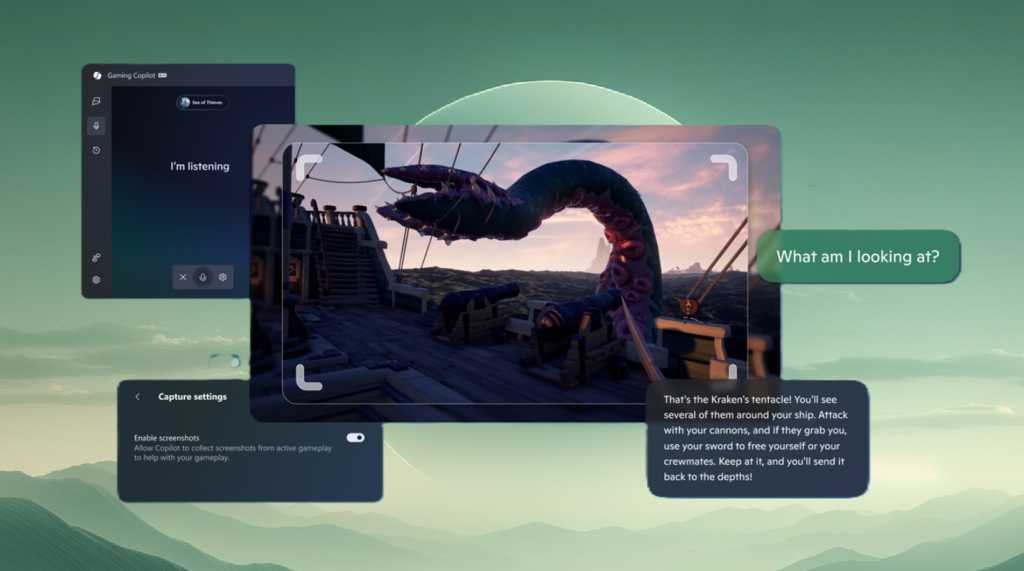
    Microsoft Copilot Gaming on Game Bar for Windows
    Share
    Facebook Twitter LinkedIn Pinterest Email Copy Link

    Stuck on a boss? Don’t know how to “perfect parry?” Microsoft is adding its AI assistant, Copilot, to help you with your games via an addition to the Windows Game Bar application.

    Right now, what Microsoft is calling “Gaming Copilot (Beta)” will show up only for those enrolled in previews for Xbox Insiders on the PC platform. Microsoft has issued a similar update for handheld PCs, too.

    Microsoft says that Gaming Copilot understands what game you’re playing, which makes sense. A Voice Mode allows you to open an oral conversation via the “microphone” widget and then pin the widget to your screen as you play. You can also snap a screenshot of your screen and then let Gaming Copilot “look” at it for additional help.

    To use the new Copilot-equipped Game Bar, you’ll need to be enrolled in the program, launch Game Bar (the Windows key+G) and then look for the Gaming Copilot logo on the home bar to open the widget, Microsoft says. It’s available for Xbox Insiders in the United States, but only if you’re 18 or older. Microsoft doesn’t explain the last requirement.

    Oddly, Microsoft already has a technology to “see” your entire screen and help you out: Copilot Vision, which Microsoft says is out of beta and is available for all PCs in the United States. But Copilot Vision’s vision was pretty lousy when I tested it on games like Solitaire, let alone quick first-person games.

    Microsoft may have improved its “vision” capabilities with the new Copilot Game Bar, but I wouldn’t expect it to be as helpful as an online guide or just a nearby buddy. But with the Copilot application cropping up everywhere — within Windows, the Edge browser, even applications like Microsoft Excel — expect Copilot’s march to continue into pretty much every PC application that Microsoft owns.

    Copilot Gaming Microsoft Windows
    Share. Facebook Twitter Pinterest LinkedIn Tumblr Telegram Email Copy Link
    Previous ArticleHow to run OpenAI’s gpt-oss AI models on your laptop or phone
    Next Article Dreame’s Three New L40 Robot Vacuums Don’t Get Stuck Easily
    Michael Comaous
    • Website

    Michael Comaous is a dedicated professional with a passion for technology, innovation, and creative problem-solving. Over the years, he has built experience across multiple industries, combining strategic thinking with hands-on expertise to deliver meaningful results. Michael is known for his curiosity, attention to detail, and ability to explain complex topics in a clear and approachable way. Whether he’s working on new projects, writing, or collaborating with others, he brings energy and a forward-thinking mindset to everything he does.

    Related Posts

    7 Mins Read

    Splitgate’s Servers Just Went Dark, and It’s One of Six Games PlayStation Owners Are Losing This September

    11 Mins Read

    How to Spot AI Generated Images in 2026 (The Old Tricks Stopped Working)

    9 Mins Read

    Check Which Apps Can Read Your Gmail, and Cut Them Off in 60 Seconds

    11 Mins Read

    Can Your Employer See Your ChatGPT Chats? What IT Actually Logs

    7 Mins Read

    PlayStation’s September State of Play Is Live Today: Everything to Expect

    13 Mins Read

    The Blood of Dawnwalker Review: The Witcher 3 Team Just Nailed Its Vampire RPG

    Top Posts

    How to Change HEIC to JPG on iPhone, Mac, Android and Windows (No Software Needed)

    September 3, 20263 Views

    How to Spot AI Generated Images in 2026 (The Old Tricks Stopped Working)

    September 3, 20262 Views

    Check Which Apps Can Read Your Gmail, and Cut Them Off in 60 Seconds

    September 3, 20262 Views
    Stay In Touch
    • Facebook

    Subscribe to Updates

    Get the latest tech news from FooBar about tech, design and biz.

    Most Popular

    A Toddler Needed a $20,000 Wheelchair. A High School Robotics Team Built Him One Instead.

    August 5, 20264 Views

    How to Change HEIC to JPG on iPhone, Mac, Android and Windows (No Software Needed)

    September 3, 20263 Views

    The EU AI Act Just Became Enforceable, and Most AI Companies Are Not Ready

    August 6, 20263 Views
    Our Picks

    OpenAI’s Astra Just Crossed a Line No AI Model Has Crossed Before. It Found Two Zero Days on Its Own.

    September 3, 2026

    The Pentagon Had to Confirm the Bombing Never Happened. The Video Came From the President’s Account.

    September 3, 2026

    Sonos Built Headphones You Can Actually Repair, and They Cost $100 Less Than AirPods Max

    September 3, 2026

    Subscribe to Updates

    Get the latest creative news from FooBar about art, design and business.

    HEICJPG.online - Convert HEIC to JPG online
    Facebook
    • About Us
    • Contact us
    • Privacy Policy
    • Disclaimer
    • Terms and Conditions
    • Editorial Policy
    • Cookie Policy
    © 2026 GeekBlog

    Type above and press Enter to search. Press Esc to cancel.