Close Menu
GeekBlog

    Subscribe to Updates

    Get the latest creative news from FooBar about art, design and business.

    What's Hot

    The Hisense A10 Is an E Ink Phone With a Detachable Color Screen, and It Might Be Onto Something

    July 15, 2026

    Best Quickscope Sniper in COD Mobile: DL Q33 vs Locus vs LW3 Tundra

    July 14, 2026

    LinkedIn Declares War on AI Slop, But Can It Actually Tell the Difference?

    July 13, 2026
    Facebook X (Twitter) Instagram Threads
    GeekBlog
    • Home
    • Mobile
    • Tech News
    • Blog
    • How-To Guides
    • AI & Software
    Facebook
    GeekBlog
    Home»Tech News»Google Play Games for PC is getting more premium titles and cross-buy with Android
    Tech News

    Google Play Games for PC is getting more premium titles and cross-buy with Android

    Michael ComaousBy Michael ComaousMarch 12, 20262 Mins Read
    Share Facebook Twitter Pinterest LinkedIn Tumblr Email Copy Link
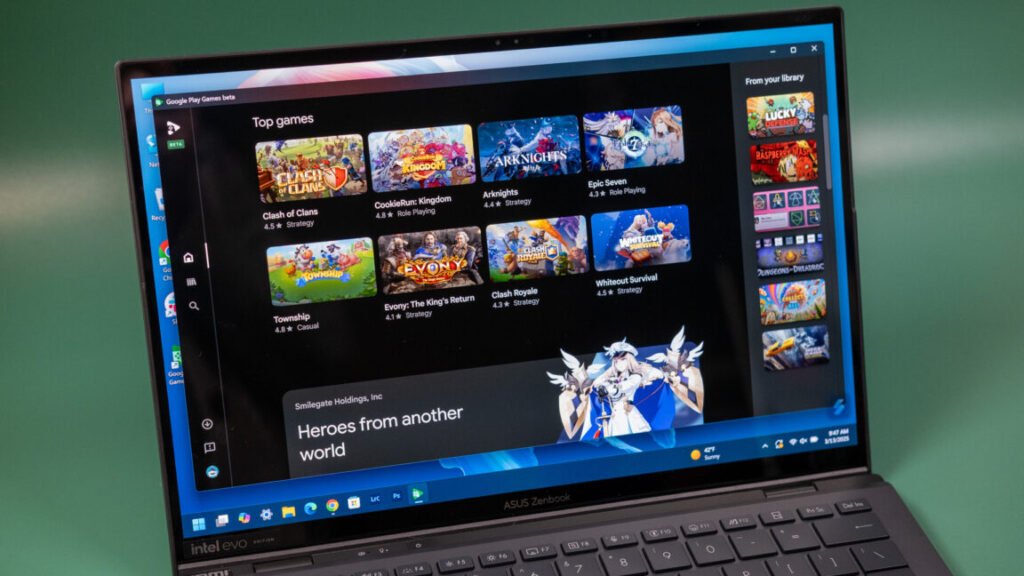
    Google Play Games running on a Windows PC.
    Share
    Facebook Twitter LinkedIn Pinterest Email Copy Link

    Buy once (or more) to play anywhere

    While Google announced last year it was opening the door to all Android games on Windows, things haven’t exactly worked out like that. It should have been easy, though. None of these “Windows” games is actually built for Windows—Play Games uses virtualization to run a lightweight Android OS in a container for the games. Hypothetically, all Android games should work, but there are still some big gaps.

    For example, Play Games for Windows has thus far not supported paid games outside of those on Play Pass, and even some Play Pass content has been absent. In the latter case, that may be because developers have opted out. Google now says developers can choose to have Play Pass content available on both platforms. Regardless, the selection of free-to-play microtransaction factories in Play Games for PC hasn’t exactly screamed “premium experience.”

    We should start seeing more paid games for Windows pop up, but Google’s going about it in an odd way. While these are still Android games at their core, Google is treating Windows as a separate platform. Thus, it has announced, “Buy once, play anywhere.” The idea is that developers can offer premium games in Google Play that include both Android and Windows access.

    On mobile devices, anything you buy is always available on all other Android phones and tablets, but it’s apparently not the same for Windows. Developers have to join this program to offer cross-buy functionality, and it does not work for games you’ve previously purchased on Android. In addition, premium upgrades purchased on Android don’t necessarily carry over. Google says that depend son developer support and is unrelated to the new cross-buy program.

    Google is making strides as it builds its desktop gaming catalog, but it still has a long way to go before it can attract any new players. In the distant past, Google might have just mirrored all mobile games on PC and called it a day, but Play Games on PC isn’t shaping up to be a Wild West. Google today is more deliberative and interested in controlling how apps are distributed. This is just another example of that mentality.

    Updated 3/11 at 9PM ET with additional comment from Google. 

    Source: arstechnica.com

    Android Google
    Share. Facebook Twitter Pinterest LinkedIn Tumblr Telegram Email Copy Link
    Previous ArticleChinese brain interface startup Gestala raises $21M just two months after launch
    Next Article Booking.com Promo Codes and Deals: Up to 20% Off
    Michael Comaous
    • Website

    Michael Comaous is a dedicated professional with a passion for technology, innovation, and creative problem-solving. Over the years, he has built experience across multiple industries, combining strategic thinking with hands-on expertise to deliver meaningful results. Michael is known for his curiosity, attention to detail, and ability to explain complex topics in a clear and approachable way. Whether he’s working on new projects, writing, or collaborating with others, he brings energy and a forward-thinking mindset to everything he does.

    Related Posts

    6 Mins Read

    LinkedIn Declares War on AI Slop, But Can It Actually Tell the Difference?

    9 Mins Read

    Xbox Just Had the Biggest Reset in Its History. Here Is What Actually Changes for Gamers

    7 Mins Read

    The First AI-Run Ransomware Attack Just Happened, and It Barely Needed a Human

    8 Mins Read

    Data Centers Are Leaving Earth: Inside Big Tech’s Orbital AI Bet

    6 Mins Read

    Qualcomm’s New Wearable Chip Solves the Easy Problem. The Hard One Is Still Wide Open

    7 Mins Read

    Why States, Not Washington, May Solve the Data Center Water Fight

    Top Posts

    Best Stores for Buying MP3 and Digital Music You Can Keep Forever

    August 2, 2025100 Views

    How to Block Twitch Ads with uBlock Origin (2026 Guide)

    June 15, 202640 Views

    uBlock Origin on Brave: Do You Need It? (2026 Setup Guide)

    June 15, 202629 Views
    Stay In Touch
    • Facebook

    Subscribe to Updates

    Get the latest tech news from FooBar about tech, design and biz.

    Most Popular

    Best Stores for Buying MP3 and Digital Music You Can Keep Forever

    August 2, 2025821 Views

    Discord will require a face scan or ID for full access next month

    February 9, 2026770 Views

    Trade in your old phone and get up to $1,100 off a new iPhone 17 at AT&T – here’s how

    September 10, 2025378 Views
    Our Picks

    The Hisense A10 Is an E Ink Phone With a Detachable Color Screen, and It Might Be Onto Something

    July 15, 2026

    Best Quickscope Sniper in COD Mobile: DL Q33 vs Locus vs LW3 Tundra

    July 14, 2026

    LinkedIn Declares War on AI Slop, But Can It Actually Tell the Difference?

    July 13, 2026

    Subscribe to Updates

    Get the latest creative news from FooBar about art, design and business.

    Facebook
    • About Us
    • Contact us
    • Privacy Policy
    • Disclaimer
    • Terms and Conditions
    © 2026 GeekBlog

    Type above and press Enter to search. Press Esc to cancel.