Close Menu
GeekBlog

    Subscribe to Updates

    Get the latest creative news from FooBar about art, design and business.

    What's Hot

    Stop falling for scams when Norton’s antivirus software is 70% off right now

    March 28, 2026

    Acer Promo Codes and Deals: Save 40% on Bundles

    March 28, 2026

    Playing Wolfenstein 3D with one hand in 2026

    March 28, 2026
    Facebook X (Twitter) Instagram Threads
    GeekBlog
    • Home
    • Mobile
    • Tech News
    • Blog
    • How-To Guides
    • AI & Software
    Facebook
    GeekBlog
    Home»How-To Guides»Microsoft is testing a Gaming Copilot AI on the Windows Game Bar
    How-To Guides

    Microsoft is testing a Gaming Copilot AI on the Windows Game Bar

    Michael ComaousBy Michael ComaousAugust 7, 20252 Mins Read
    Share Facebook Twitter Pinterest LinkedIn Tumblr Email Copy Link
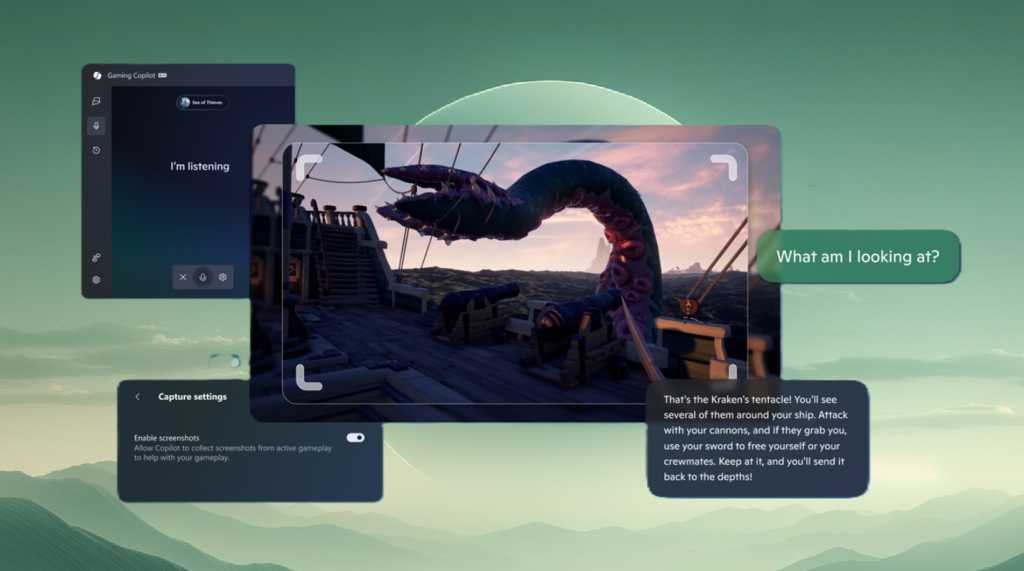
    Microsoft Copilot Gaming on Game Bar for Windows
    Share
    Facebook Twitter LinkedIn Pinterest Email Copy Link

    Stuck on a boss? Don’t know how to “perfect parry?” Microsoft is adding its AI assistant, Copilot, to help you with your games via an addition to the Windows Game Bar application.

    Right now, what Microsoft is calling “Gaming Copilot (Beta)” will show up only for those enrolled in previews for Xbox Insiders on the PC platform. Microsoft has issued a similar update for handheld PCs, too.

    Microsoft says that Gaming Copilot understands what game you’re playing, which makes sense. A Voice Mode allows you to open an oral conversation via the “microphone” widget and then pin the widget to your screen as you play. You can also snap a screenshot of your screen and then let Gaming Copilot “look” at it for additional help.

    To use the new Copilot-equipped Game Bar, you’ll need to be enrolled in the program, launch Game Bar (the Windows key+G) and then look for the Gaming Copilot logo on the home bar to open the widget, Microsoft says. It’s available for Xbox Insiders in the United States, but only if you’re 18 or older. Microsoft doesn’t explain the last requirement.

    Oddly, Microsoft already has a technology to “see” your entire screen and help you out: Copilot Vision, which Microsoft says is out of beta and is available for all PCs in the United States. But Copilot Vision’s vision was pretty lousy when I tested it on games like Solitaire, let alone quick first-person games.

    Microsoft may have improved its “vision” capabilities with the new Copilot Game Bar, but I wouldn’t expect it to be as helpful as an online guide or just a nearby buddy. But with the Copilot application cropping up everywhere — within Windows, the Edge browser, even applications like Microsoft Excel — expect Copilot’s march to continue into pretty much every PC application that Microsoft owns.

    Bar Copilot game Gaming Microsoft testing Windows
    Share. Facebook Twitter Pinterest LinkedIn Tumblr Telegram Email Copy Link
    Previous ArticleThe best earbuds we’ve tested for 2025
    Next Article Why I stopped recommending pre-built SSDs for Windows PCs – and what to buy instead
    Michael Comaous
    • Website

    Michael Comaous is a dedicated professional with a passion for technology, innovation, and creative problem-solving. Over the years, he has built experience across multiple industries, combining strategic thinking with hands-on expertise to deliver meaningful results. Michael is known for his curiosity, attention to detail, and ability to explain complex topics in a clear and approachable way. Whether he’s working on new projects, writing, or collaborating with others, he brings energy and a forward-thinking mindset to everything he does.

    Related Posts

    2 Mins Read

    Rivian and VW Group complete winter testing of new zonal architecture

    3 Mins Read

    Apple Is Testing Features That Will Put Siri All Over Your iPhone Experience

    5 Mins Read

    Opera GX for Linux is way more than great gaming browser – here’s why

    3 Mins Read

    A Billionaire-Backed Startup Wants to Grow ‘Organ Sacks’ to Replace Animal Testing

    2 Mins Read

    Microsoft keeps insisting that it’s deeply committed to the quality of Windows 11

    2 Mins Read

    Microsoft is cutting down Copilot “bloat” in Windows 11

    Top Posts

    The Mesh Router Placement Strategy That Finally Gave Me Full Home Coverage

    August 4, 2025806 Views

    Discord will require a face scan or ID for full access next month

    February 9, 2026765 Views

    Trade in your old phone and get up to $1,100 off a new iPhone 17 at AT&T – here’s how

    September 10, 2025330 Views
    Stay In Touch
    • Facebook

    Subscribe to Updates

    Get the latest tech news from FooBar about tech, design and biz.

    Most Popular

    The Mesh Router Placement Strategy That Finally Gave Me Full Home Coverage

    August 4, 2025806 Views

    Discord will require a face scan or ID for full access next month

    February 9, 2026765 Views

    Trade in your old phone and get up to $1,100 off a new iPhone 17 at AT&T – here’s how

    September 10, 2025330 Views
    Our Picks

    Stop falling for scams when Norton’s antivirus software is 70% off right now

    March 28, 2026

    Acer Promo Codes and Deals: Save 40% on Bundles

    March 28, 2026

    Playing Wolfenstein 3D with one hand in 2026

    March 28, 2026

    Subscribe to Updates

    Get the latest creative news from FooBar about art, design and business.

    Facebook
    • About Us
    • Contact us
    • Privacy Policy
    • Disclaimer
    • Terms and Conditions
    © 2026 GeekBlog

    Type above and press Enter to search. Press Esc to cancel.

    Ad Blocker Enabled!
    Ad Blocker Enabled!
    Our website is made possible by displaying online advertisements to our visitors. Please support us by disabling your Ad Blocker.