Close Menu
GeekBlog

    Subscribe to Updates

    Get the latest creative news from FooBar about art, design and business.

    What's Hot

    Telecom Giants Form C2 ISAC to Fight the Next Salt Typhoon

    July 21, 2026

    Which iPhone Has the Best Camera Quality? (2026)

    July 21, 2026

    Windows 11 vs Windows 10: Should You Upgrade?

    July 21, 2026
    Facebook X (Twitter) Instagram Threads
    GeekBlog
    • Home
    • Mobile
    • Tech News
    • Blog
    • How-To Guides
    • AI & Software
    Facebook
    GeekBlog
    Home»How-To Guides»Proton Just Launched Its Own Privacy-Focused Authenticator App
    How-To Guides

    Proton Just Launched Its Own Privacy-Focused Authenticator App

    Michael ComaousBy Michael ComaousAugust 2, 20253 Mins Read
    Share Facebook Twitter Pinterest LinkedIn Tumblr Email Copy Link
    Proton Just Launched Its Own Privacy-Focused Authenticator App
    Share
    Facebook Twitter LinkedIn Pinterest Email Copy Link


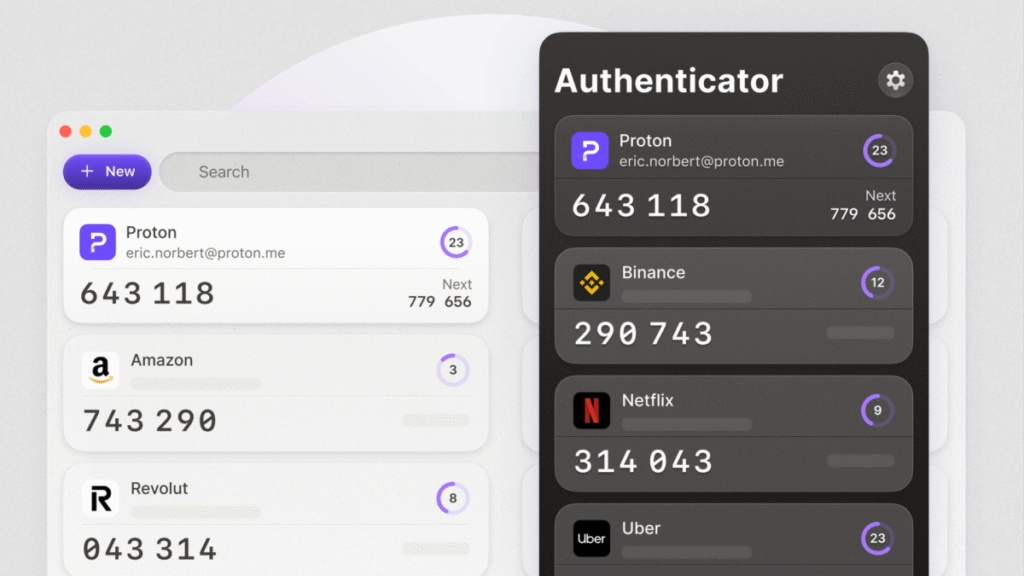
    Authenticators from Google and Microsoft are already well-established, but the newly released Proton Authenticator may be worth the switch. Proton is the company behind Proton Pass, our top password manager for those who prioritize privacy, as well as other services like Proton Mail and Proton VPN. While Proton Pass has an integrated two-factor authentication (2FA) feature on its premium tier, anyone can use Proton Authenticator at no cost, even if you rely on a different service for password management.

    How Proton compares to other authenticator apps

    Functionally, Proton Authenticator isn’t that different than other popular apps like Google Authenticator and Microsoft Authenticator or alternatives like Duo and Authy. You can add time-based one-time passwords (TOTPs) manually or by scanning a QR code as well as import some or all of your existing codes from authenticator apps that offer this feature (Google does, Microsoft does not). In my testing, it was easy to screenshot and save the QR codes from Google Authenticator and upload them from my photos into Proton Authenticator, which quickly populated all of my codes.

    For added security, Proton Authenticator can be locked behind biometrics like Face ID and hide your codes from view (which is helpful if you simply need to copy and paste on the same device). Codes refresh every 30 seconds, and Proton shows you both the current TOTP and the one that will populate next. While most authenticators are limited to iOS and Android, Proton also supports Windows, macOS, and Linux with encrypted syncing between devices.

    Again, authenticator apps are largely similar in both form and function, but Proton Authenticator has a potential advantage in that it comes from a privacy-first company. Unlike most competitors, the platform is open source and doesn’t include any ads or tracking, so it’s well worth considering if you want to move away from services from Google and Microsoft. (Bitwarden, another excellent open-source password manager, also offers a free, standalone authenticator app.)


    What do you think so far?

    Given the regularity of data breaches and the ubiquity of phishing schemes that aim to compromise your data, you should have multi-factor authentication (MFA) enabled on any account that offers this extra layer of security. As I’ve written, some authentication methods—like SMS codes—are still easily compromised via phishing methods like adversary-in-the-middle attacks. Biometrics and hardware keys are some of the most secure alternatives, but an authenticator app is also preferable to SMS because TOTPs are generated locally on your device and change every 30 to 60 seconds rather than sent via unencrypted text.

    Share. Facebook Twitter Pinterest LinkedIn Tumblr Telegram Email Copy Link
    Previous ArticleThe best fitness trackers and watches we’ve tested for 2025
    Next Article Amazon is considering shoving ads into Alexa+ conversations
    Michael Comaous
    • Website

    Michael Comaous is a dedicated professional with a passion for technology, innovation, and creative problem-solving. Over the years, he has built experience across multiple industries, combining strategic thinking with hands-on expertise to deliver meaningful results. Michael is known for his curiosity, attention to detail, and ability to explain complex topics in a clear and approachable way. Whether he’s working on new projects, writing, or collaborating with others, he brings energy and a forward-thinking mindset to everything he does.

    Related Posts

    8 Mins Read

    Windows 11 vs Windows 10: Should You Upgrade?

    8 Mins Read

    Why Is My Phone Lagging All of a Sudden? (Fixes)

    7 Mins Read

    How to Block Twitch Ads With uBlock Origin (2026)

    8 Mins Read

    How to Clear Cache on Android (Any Phone)

    8 Mins Read

    How to Use Zoom: Complete Beginner’s Guide

    8 Mins Read

    How to Reset AirPods: Every Model, Step by Step

    Top Posts

    Best Stores for Buying MP3 and Digital Music You Can Keep Forever

    August 2, 202573 Views

    Best Free Online Music Apps in 2026

    July 7, 202653 Views

    Every iPhone Camera Ranked in 2026 (Best to Worst)

    July 6, 202645 Views
    Stay In Touch
    • Facebook

    Subscribe to Updates

    Get the latest tech news from FooBar about tech, design and biz.

    Most Popular

    Best Stores for Buying MP3 and Digital Music You Can Keep Forever

    August 2, 2025890 Views

    Discord will require a face scan or ID for full access next month

    February 9, 2026770 Views

    Trade in your old phone and get up to $1,100 off a new iPhone 17 at AT&T – here’s how

    September 10, 2025381 Views
    Our Picks

    Telecom Giants Form C2 ISAC to Fight the Next Salt Typhoon

    July 21, 2026

    Which iPhone Has the Best Camera Quality? (2026)

    July 21, 2026

    Windows 11 vs Windows 10: Should You Upgrade?

    July 21, 2026

    Subscribe to Updates

    Get the latest creative news from FooBar about art, design and business.

    Facebook
    • About Us
    • Contact us
    • Privacy Policy
    • Disclaimer
    • Terms and Conditions
    © 2026 GeekBlog

    Type above and press Enter to search. Press Esc to cancel.