Close Menu
GeekBlog

    Subscribe to Updates

    Get the latest creative news from FooBar about art, design and business.

    What's Hot

    Apple’s Foldable Is Getting Magnets. Samsung Still Puts Them in the Case.

    September 4, 2026

    How to Integrate Social Media With Your Marketing Strategy

    September 4, 2026

    How to Set Up a Facebook Ad Campaign Step by Step

    September 4, 2026
    Facebook X (Twitter) Instagram Threads
    GeekBlog
    • Home
    • Mobile
    • Tech News
    • Blog
    • Gaming
    • Smartwatch
    • How-To Guides
    • AI & Software
    Facebook
    GeekBlog
    Home»Tech News»Apple AirPods Pro 3 Review: Still The Best for iOS
    Tech News

    Apple AirPods Pro 3 Review: Still The Best for iOS

    Michael ComaousBy Michael ComaousSeptember 27, 20252 Mins Read
    Share Facebook Twitter Pinterest LinkedIn Tumblr Email Copy Link
    Apple AirPods Pro 3 Review: Still The Best for iOS
    Share
    Facebook Twitter LinkedIn Pinterest Email Copy Link

    Recommended for you:

    Huawei Connect 2025: Everything I didn’t know about Huawei
    Tech News·Sep 29, 2025

    Huawei Connect 2025: Everything I didn’t know about Huawei

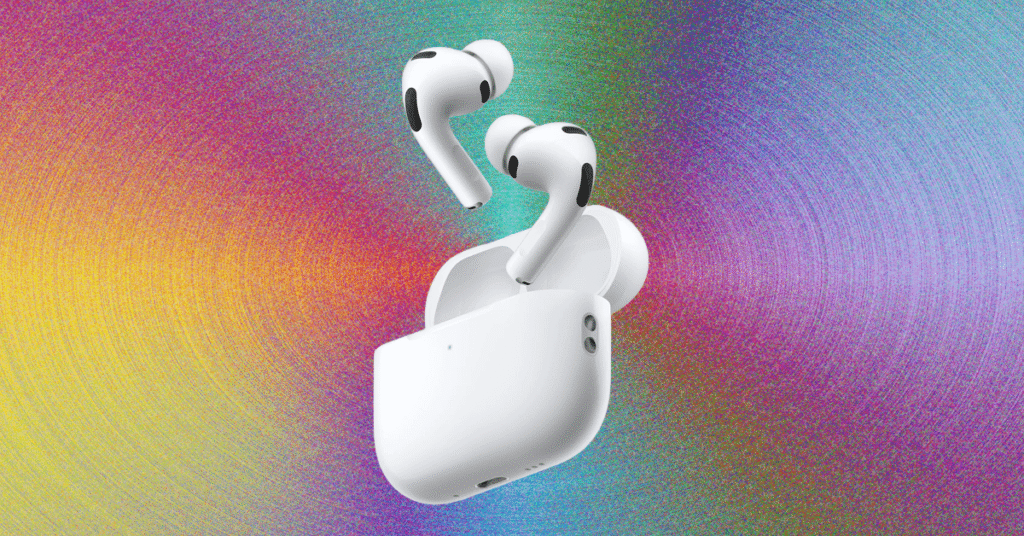
    The same mildly flat indent on the stem of each bud indicates the location of the touch/squeeze controls, and there are black spots where heart rate sensors, wear detection sensors, and microphone ports hide. As with previous models, silvery tips bless the end of each elephant trunk, where a beamforming mic aims at your lips for maximum fidelity. These are all familiar, refined design cues from previous AirPods, and they are better executed than ever, even with such slight changes.

    Well-Supported

    Review: Apple AirPods Pro 3

    I’ve been very impressed with Apple’s software support when it comes to AirPods Pro; last year it added a bunch of free hearing health features as a software update. That trend continues here with the addition of real-time translation and heart rate monitoring on these buds.

    The translation can be activated by squeezing both of the buds at once, at which time any Apple Intelligence-enabled iPhone (any iPhone 16 Pro or later with the feature on) will pull up the Translate app on iOS. Siri will then listen to the speaker in front of you and translate what they are saying in real time, provided they are speaking English, Spanish, German, French, or Portuguese. I tested this with my multilingual wife, who found it to be very accurate with her Spanish phrases.

    This is great for multilingual work or education environments in the United States in particular, as well as for travel, and should help folks who struggle with more advanced phrases or need to deliver a more nuanced message in their native language.

    I’ve seen this feature enabled on headphones like the Google Pixel Buds Pro 2 (which do this, but using Google Translate). Side by side, Google’s Buds and associated app offer many more languages and bit better translation (my Thai mother-in-law was very excited at how well it worked with Thai, which isn’t available on AirPods Pro 3), but Apple’s version is still more than welcome.

    AirPods Apple iOS
    Share. Facebook Twitter Pinterest LinkedIn Tumblr Telegram Email Copy Link
    Previous ArticleCan AI detect hedgehogs from space? Maybe if you find brambles first.
    Next Article How to watch New Zealand vs Australia FREE online
    Michael Comaous
    • Website

    Michael Comaous is a dedicated professional with a passion for technology, innovation, and creative problem-solving. Over the years, he has built experience across multiple industries, combining strategic thinking with hands-on expertise to deliver meaningful results. Michael is known for his curiosity, attention to detail, and ability to explain complex topics in a clear and approachable way. Whether he’s working on new projects, writing, or collaborating with others, he brings energy and a forward-thinking mindset to everything he does.

    Related Posts

    9 Mins Read

    Apple’s Foldable Is Getting Magnets. Samsung Still Puts Them in the Case.

    8 Mins Read

    OpenAI’s Astra Just Crossed a Line No AI Model Has Crossed Before. It Found Two Zero Days on Its Own.

    9 Mins Read

    The Pentagon Had to Confirm the Bombing Never Happened. The Video Came From the President’s Account.

    8 Mins Read

    Sonos Built Headphones You Can Actually Repair, and They Cost $100 Less Than AirPods Max

    9 Mins Read

    Samsung Locked People Out of Their Own Phones. Support Cannot Say Why.

    10 Mins Read

    Your Locked Android Phone Will Hand Over Your Photos. All It Takes Is a WhatsApp Call.

    Top Posts

    How to Change HEIC to JPG on iPhone, Mac, Android and Windows (No Software Needed)

    September 3, 20263 Views

    How to Spot AI Generated Images in 2026 (The Old Tricks Stopped Working)

    September 3, 20262 Views

    Check Which Apps Can Read Your Gmail, and Cut Them Off in 60 Seconds

    September 3, 20262 Views
    Stay In Touch
    • Facebook

    Subscribe to Updates

    Get the latest tech news from FooBar about tech, design and biz.

    Most Popular

    How to Change HEIC to JPG on iPhone, Mac, Android and Windows (No Software Needed)

    September 3, 20263 Views

    The EU AI Act Just Became Enforceable, and Most AI Companies Are Not Ready

    August 6, 20263 Views

    How to Spot AI Generated Images in 2026 (The Old Tricks Stopped Working)

    September 3, 20262 Views
    Our Picks

    Apple’s Foldable Is Getting Magnets. Samsung Still Puts Them in the Case.

    September 4, 2026

    How to Integrate Social Media With Your Marketing Strategy

    September 4, 2026

    How to Set Up a Facebook Ad Campaign Step by Step

    September 4, 2026

    Subscribe to Updates

    Get the latest creative news from FooBar about art, design and business.

    HEICJPG.online - Convert HEIC to JPG online
    Facebook
    • About Us
    • Contact us
    • Privacy Policy
    • Disclaimer
    • Terms and Conditions
    • Editorial Policy
    • Cookie Policy
    © 2026 GeekBlog

    Type above and press Enter to search. Press Esc to cancel.