Close Menu
GeekBlog

    Subscribe to Updates

    Get the latest creative news from FooBar about art, design and business.

    What's Hot

    This Clock Would Take 260 Billion Years to Lose One Second. The Universe Is 13.8 Billion Years Old.

    October 4, 2026

    One UI 9 Watch Beta Now Covers Three Galaxy Watch Generations: What You Get and How to Join

    October 4, 2026

    NASA Found Possible Signs of Life on Mars. To Check, It Went to a Beach in Scotland.

    October 4, 2026
    Facebook
    GeekBlog
    • Home
    • Mobile
    • Tech News
    • Blog
    • Gaming
    • Smartwatch
    • How-To Guides
    • AI & Software
    Facebook
    GeekBlog
    Home»Tech News»Do I really need a webcam? Yes, yes I do – here are 3 reasons why
    Tech News

    Do I really need a webcam? Yes, yes I do – here are 3 reasons why

    Michael ComaousBy Michael ComaousAugust 12, 20254 Mins Read
    Share Facebook Twitter Pinterest LinkedIn Tumblr Email Copy Link
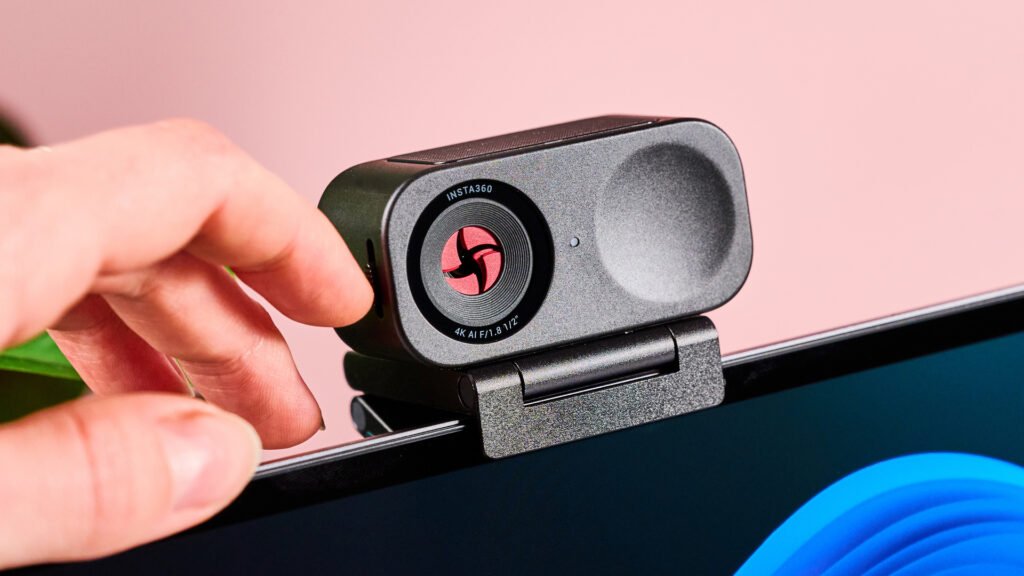
    Insta360 Link 2C with shutter partially closed
    Share
    Facebook Twitter LinkedIn Pinterest Email Copy Link

    In all my years of life, the thought of adding a webcam to my computer hadn’t once occurred to me. I’ve always just stuck with my built-in laptop camera and hoped for the best, and in fairness, that’s usually done an OK job for video calls.

    But recently I reviewed the Insta360 Link 2C, and after integrating it into my setup, I could never ever go back to my standalone laptop cam. If you’re somebody who takes a lot of video calls, streams video, creates content, or teaches online, I’d argue a webcam is an absolute must-have.

    So, what exactly makes an external webcam so special? Here are 3 improvements the Insta 360 Link 2C has made to my work life; the key benefits to acquiring one of the best webcams.


    You may like

    Today’s best Insta360 Link 2C deals

    1. Massively improved picture quality

    (Image credit: Future)

    A lot of laptop webcams lack the higher resolution picture quality that you can get with a top quality external option. My 1080p Windows Surface camera, for example, has nothing on the 4K quality of the Insta360 Link 2C.

    Sure, you won’t see premium 4K video with every video calling platforms, but if you’re a content creator or you simply want a top-tier look, 4K support is going to be a game-changer. If you take a video on the Link 2C, for example, you can get up to 4K 30fps quality – though models like the Elgato Facecam Pro can even offer 4K 60fps recording.

    When switching between my Insta360 webcam and my built-in laptop camera, the former was so much better at highlighting finer details – aspects like individual hair strands, facial hairs, and markings on my face, for instance. So, if you want to show yourself in the best possible light, grabbing a 4K webcam could make a huge difference.

    2. Better tracking and framing

    Insta360 Link 2C with green LED active

    (Image credit: Future)

    I also really appreciate my Insta360 Link 2C’s ability to track my movements and keep my face centered during any video call. The Link 2C makes use of auto-framing and AI tracking technology, which is ideal if, like me, you’re a fidgety person or moving around a large space.

    Sign up for breaking news, reviews, opinion, top tech deals, and more.

    What’s more, the Link 2C makes use of gesture controls, which enhance the quality of tracking. For instance, you can make an L shape with your hand and move it up or down to zoom in or out respectively. On top of that, you can hold your palm up to the webcam, which then frames the shot to your face – pretty useful!

    But wait…I’m not done yet, because the Link 2C makes use of enhanced Phase Detection Auto Focus, which seamlessly captures details of objects you hold up.

    Finally, there’s a whiteboard mode, which keeps anything on which you’re writing squared and in focus. If you need to be animated and use props on camera, say for online tutoring, that kind of functionality is transformative.

    3. Detailed filters and customizability

    Insta360 Link 2C with shutter closed

    (Image credit: Future)

    Finally, I want to shine a light on the high levels of customizability you can unlock with a great webcam like the Insta360 Link 2C.

    If you tap into the Insta360 Link Controller software, you can play around with a variety of picture settings including contrast, exposure, and white balance (all that good stuff). In addition, you can activate a number of filters, including blur, bokeh, and even makeup.

    All of these options are most welcome if you want to optimize your picture for low-lit rooms, say, or if you want more granular control over your appearance on-screen. Luckily, a lot of other webcams offer this degree of personalization – even cheaper alternatives like the Obsbot Meet SE.

    Today’s best Insta360 Link 2C and Obsbot Meet SE deals


    So, do you own a webcam? I’d love to hear how it’s made a difference to your setup, and which models you’ve enjoyed using, so make sure to get chatting in the comments.

    You may also like

    About this article: GeekBlog covers U.S. technology news, AI, phones, smartwatches and gaming. Every story is written and checked under our Editorial Policy. Spotted a mistake or have a story tip? Contact our editors.

    Share. Facebook Twitter Pinterest LinkedIn Tumblr Telegram Email Copy Link
    Previous ArticleChina tells Alibaba, ByteDance to justify purchases of Nvidia AI chips
    Next Article Hurricane Swarms Are a Thing We Have to Worry About Now
    Michael Comaous

      Michael Comaous is a dedicated professional with a passion for technology, innovation, and creative problem-solving. Over the years, he has built experience across multiple industries, combining strategic thinking with hands-on expertise to deliver meaningful results. Michael is known for his curiosity, attention to detail, and ability to explain complex topics in a clear and approachable way. Whether he’s working on new projects, writing, or collaborating with others, he brings energy and a forward-thinking mindset to everything he does.

      Related Posts

      11 Mins Read

      This Clock Would Take 260 Billion Years to Lose One Second. The Universe Is 13.8 Billion Years Old.

      11 Mins Read

      NASA Found Possible Signs of Life on Mars. To Check, It Went to a Beach in Scotland.

      9 Mins Read

      Apple Put Video Into CarPlay and Millions of Drivers Cannot Find It. The Missing Piece Is the Car.

      11 Mins Read

      DoorDash’s AI Will Look Inside Your Fridge and Order Dinner. The Early Build Quoted the Wrong Prices.

      12 Mins Read

      NASA’s $30 Million Rescue Failed. It Turned the Falling Telescope Back On Anyway.

      12 Mins Read

      Nikon Is Investigating Its Contest Winner for Using AI. Its Own Profile Said He Does.

      Top Posts

      Best Free Online Music Apps in 2026

      July 7, 20263 Views

      Samsung Phones With the Best Camera Quality, Ranked

      July 4, 20262 Views

      When Is Anthropic Going Public? IPO Status 2026

      July 4, 20262 Views
      Stay In Touch
      • Facebook

      Subscribe to Updates

      Get the latest tech news from FooBar about tech, design and biz.

      Most Popular

      The Mesh Router Placement Strategy That Finally Gave Me Full Home Coverage

      September 9, 20263 Views

      Best Android Smartwatches in 2026: Which One Actually Fits Your Phone

      September 7, 20262 Views

      Gears of War: E-Day Reviews Are In: Best Gears in 15 Years, but the Campaign Drags

      October 1, 20261 Views
      Our Picks

      This Clock Would Take 260 Billion Years to Lose One Second. The Universe Is 13.8 Billion Years Old.

      October 4, 2026

      One UI 9 Watch Beta Now Covers Three Galaxy Watch Generations: What You Get and How to Join

      October 4, 2026

      NASA Found Possible Signs of Life on Mars. To Check, It Went to a Beach in Scotland.

      October 4, 2026

      Subscribe to Updates

      Get the latest creative news from FooBar about art, design and business.

      HEICJPG.online - Convert HEIC to JPG online
      Facebook
      • About Us
      • Contact us
      • Privacy Policy
      • Disclaimer
      • Terms and Conditions
      • Editorial Policy
      • Cookie Policy
      • Your Privacy Choices
      © 2026 GeekBlog

      Type above and press Enter to search. Press Esc to cancel.