Close Menu
GeekBlog

    Subscribe to Updates

    Get the latest creative news from FooBar about art, design and business.

    What's Hot

    Android App Pinning Is the Most Useful Semi Secret Feature on Your Phone

    September 9, 2026

    32 Cars That Support Wireless Keys in Apple Wallet (Verified September 2026)

    September 9, 2026

    Why Deluge Is Still the Best Free Torrent Client

    September 9, 2026
    Facebook X (Twitter) Instagram Threads
    GeekBlog
    • Home
    • Mobile
    • Tech News
    • Blog
    • Gaming
    • Smartwatch
    • How-To Guides
    • AI & Software
    Facebook
    GeekBlog
    Home»Tech News»Turn Your iPhone 17 Into a Pro Cinema Rig With Blackmagic’s New ProDock
    Tech News

    Turn Your iPhone 17 Into a Pro Cinema Rig With Blackmagic’s New ProDock

    Michael ComaousBy Michael ComaousSeptember 11, 20253 Mins Read
    Share Facebook Twitter Pinterest LinkedIn Tumblr Email Copy Link
    image001
    Share
    Facebook Twitter LinkedIn Pinterest Email Copy Link

    Recommended for you:

    How to watch Coldwater online – stream Andrew Lincoln thriller from anywhere
    Tech News·Sep 12, 2025

    How to watch Coldwater online – stream Andrew Lincoln thriller from anywhere

    The iPhone 17 Pro has already excited me with its upgraded telephoto zoom and the new addition of ProRes raw video recording. It could be a superb tool for capturing stunning video, and Blackmagic’s new ProDock could make it useful on professional cinema productions. 

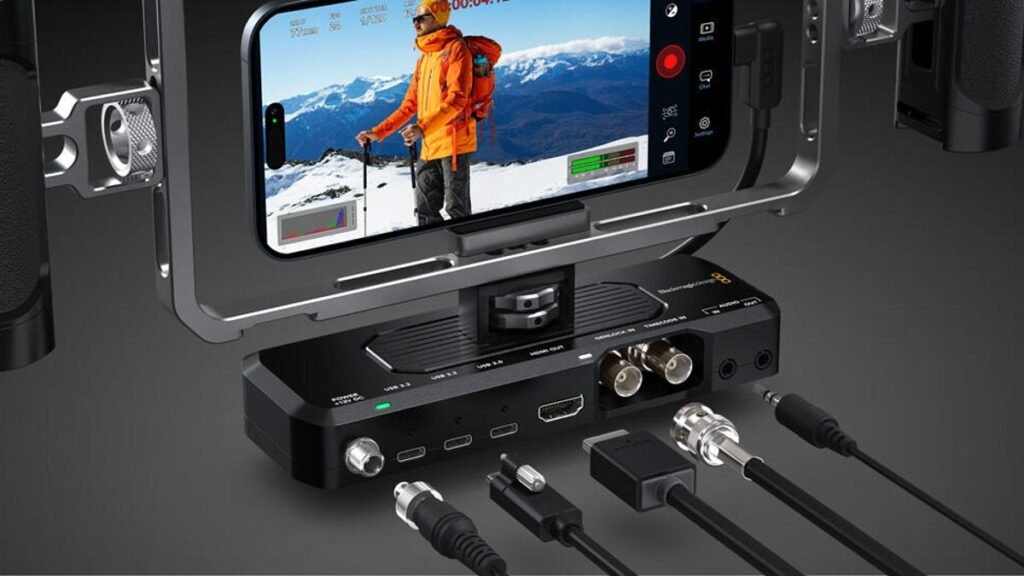
    Costing $295 (£225) from the Apple store, the dock connects to the iPhone 17 Pro over USB C, but features a variety of inputs to expand the phone further for pro video use. There are two USB ports for recording footage directly to external SSD drives — crucial if you’re shooting ProRes raw video which will generate vast file sizes — along with inputs for external audio recording and headphone inputs for monitoring that audio. 

    Read more: I’m a YouTuber and I’m Stoked for the iPhone 17 Pro’s Cameras

    There’s also a handy HDMI output, allowing you to hook the iPhone up to a much bigger external monitor or a big TV. So you, your colleagues, collaborators or clients can see the shots you’re getting as you’re shooting. 

    Further along you’ll find inputs for timecode syncing and genlock — two features Apple added support for on the iPhone 17 Pro. For those of you not familiar with pro production terms like these, they essentially allow the iPhone’s frames and audio to be perfectly synchronized with other cameras and recording devices being used on set. 

    image003

    You’ll need to use the Blackmagic Camera app with the dock, which is free on iOS and I’ve found to be the best way to get pro-level control with your iPhone video.

    Blackmagic Design

    Why is that important? Well, if you’re just shooting a quick YouTube vlog with the one phone, it isn’t. But if you’re using an iPhone — or several of them — on a production set along with other cameras and multiple microphone sources, then having the footage and audio in perfect sync is critical. 

    And with the quality of video that today’s iPhone’s can achieve, using them as part of professional productions is a realistic option. Recent zombie flick 28 Years Later was filmed entirely on iPhones, while Apple filmed its entire keynote video on an iPhone 17 Pro. Their small size makes them versatile to shoot in tight spaces and with the iPhone 17 Pro’s addition of ProRes raw capture and genlock and timecode sync I expect to see iPhones used increasingly in video production. 

    Apple iPhone 17 Pro

    Apple shot its whole keynote on an iPhone 17 Pro. These phones absolutely can be used on professional productions.

    Apple/Screenshot by CNET

    You’ll need some extras with your phone and dock, most notably a cage that will both hold the phone and provide a mounting point for the dock underneath. I use SmallRig’s Mobile Video Kit, which also has side handles to help you get steadier footage, while Moment’s anamorphic lens gives your footage that cinematic widescreen aspect ratio. You’ll also need to shoot using the Blackmagic Camera app, which is free on iOS.

    Recommended for you:

    How to undo OneDrive Backup and restore your personal files to your Windows 11 PC
    Tech News·Sep 9, 2025

    How to undo OneDrive Backup and restore your personal files to your Windows 11 PC

    iPhone
    Share. Facebook Twitter Pinterest LinkedIn Tumblr Telegram Email Copy Link
    Previous ArticleT-Mobile will give you a free iPhone 17 Pro right now – how the preorder deal works
    Next Article How to watch Coldwater online – stream Andrew Lincoln thriller from anywhere
    Michael Comaous
    • Website

    Michael Comaous is a dedicated professional with a passion for technology, innovation, and creative problem-solving. Over the years, he has built experience across multiple industries, combining strategic thinking with hands-on expertise to deliver meaningful results. Michael is known for his curiosity, attention to detail, and ability to explain complex topics in a clear and approachable way. Whether he’s working on new projects, writing, or collaborating with others, he brings energy and a forward-thinking mindset to everything he does.

    Related Posts

    13 Mins Read

    Apple’s Foldable Costs $2,000 and Drops Face ID. Four Other Things Are Missing Too.

    5 Mins Read

    Anthropic’s New Claude Model Just Made Cached AI Tokens 75% Cheaper, and Doubled a Key Benchmark

    6 Mins Read

    Claude Just Finished a 350-Year-Old Math Problem. It Took 11 Days and 13 Million Lines of Code.

    8 Mins Read

    A White House Tech Advisor Says Three Things You Were Taught About Money Are Lies. The Data Says He Is Partly Right.

    8 Mins Read

    MrBeast Hid 91 Locations in a Super Bowl Ad. One Man Cracked the First One Using a Telecom Wiring Chart.

    7 Mins Read

    Apple Pay Finally Lets You Swipe Between Cards, Almost Twelve Years After Launch

    Top Posts

    How to Change HEIC to JPG on iPhone, Mac, Android and Windows (No Software Needed)

    September 3, 20266 Views

    How to Use YouTube: A Beginner’s Guide

    July 7, 20266 Views

    Gal Gadot’s Lawyers Spent Six Months on One AI Clause. Then SAG Called Them for Pointers.

    September 2, 20265 Views
    Stay In Touch
    • Facebook

    Subscribe to Updates

    Get the latest tech news from FooBar about tech, design and biz.

    Most Popular

    How to Change HEIC to JPG on iPhone, Mac, Android and Windows (No Software Needed)

    September 3, 20266 Views

    Gal Gadot’s Lawyers Spent Six Months on One AI Clause. Then SAG Called Them for Pointers.

    September 2, 20265 Views

    Best Android Smartwatches in 2026: Which One Actually Fits Your Phone

    September 7, 20262 Views
    Our Picks

    Android App Pinning Is the Most Useful Semi Secret Feature on Your Phone

    September 9, 2026

    32 Cars That Support Wireless Keys in Apple Wallet (Verified September 2026)

    September 9, 2026

    Why Deluge Is Still the Best Free Torrent Client

    September 9, 2026

    Subscribe to Updates

    Get the latest creative news from FooBar about art, design and business.

    HEICJPG.online - Convert HEIC to JPG online
    Facebook
    • About Us
    • Contact us
    • Privacy Policy
    • Disclaimer
    • Terms and Conditions
    • Editorial Policy
    • Cookie Policy
    © 2026 GeekBlog

    Type above and press Enter to search. Press Esc to cancel.