Close Menu
GeekBlog

    Subscribe to Updates

    Get the latest creative news from FooBar about art, design and business.

    What's Hot

    The EU AI Act Just Became Enforceable, and Most AI Companies Are Not Ready

    August 6, 2026

    HP Unifies HyperX and OMEN Into One Gaming Ecosystem as PC Prices Climb

    August 6, 2026

    A Toddler Needed a $20,000 Wheelchair. A High School Robotics Team Built Him One Instead.

    August 5, 2026
    Facebook X (Twitter) Instagram Threads
    GeekBlog
    • Home
    • Mobile
    • Tech News
    • Blog
    • How-To Guides
    • AI & Software
    Facebook
    GeekBlog
    Home»Tech News»Microsoft just fixed one of Word’s most annoying quirks
    Tech News

    Microsoft just fixed one of Word’s most annoying quirks

    Michael ComaousBy Michael ComaousJanuary 10, 20262 Mins Read
    Share Facebook Twitter Pinterest LinkedIn Tumblr Email Copy Link
    Microsoft just fixed one of Word's most annoying quirks
    Share
    Facebook Twitter LinkedIn Pinterest Email Copy Link

    Recommended for you:

    16 Best Heat Protectant Sprays for Wet and Dry Hair (2026)
    Tech News·Jan 11, 2026

    16 Best Heat Protectant Sprays for Wet and Dry Hair (2026)

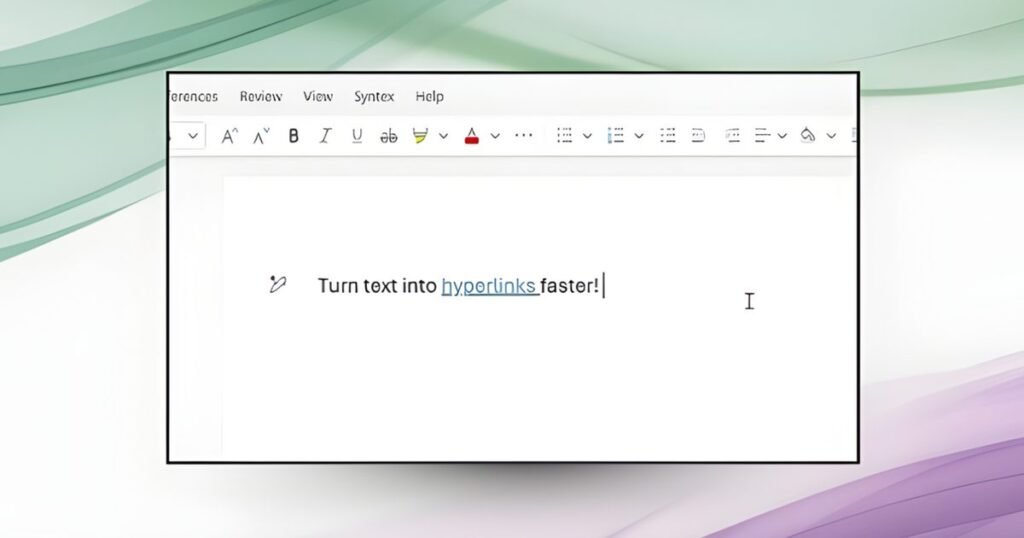
    Microsoft is rolling out a new, faster, and more efficient way to add hyperlinks in Word. Instead of selecting text, opening the Insert Link dialog, and inserting a URL, users can now select text and paste a link directly over it; Word automatically converts it into a hyperlink.

    Whether you’re using the software on a Windows PC/laptop or a MacBook, all you have to do is copy the concerned link, highlight a word or phrase, and press Ctrl + V or Cmd + V, and Word takes care of the rest.

    Digital Trends

    Adding hyperlinks in Word just got a lot faster

    No more pop-ups, no extra menus, and no breaking the typing flow, which is one of the most crucial aspects of writing in a word processing software you’re expected to live in for hours daily. Previously, pasting a link over the selected text would overwrite it entirely.

    According to a Microsoft community post, the new hyperlinking feature is available to all Word for Web users. It is also rolling out to users running Word for Windows (version 2511, Build 19530.20006 or later) and Word for Mac (Version 16.104, Build 25120915 or later).

    Whether you’re a student, a working professional, or someone like me who writes articles for a living and uses the hyperlink feature hundreds of times in a day, the change makes it easier to add references, Google Drive links, YouTube videos, or app store links into the text in Word.

    Microsoft word document.
    justplay1412 / Shutterstock

    It’s a small change, but it eliminates one of the Word’s most frustrating micro-problems. If you’ve ever sighed while opening Word’s Insert Link box for the hundredth time in a day, the new hyperlinking feature is for you.

    Moreover, this is a quality-of-life improvement that makes Word behave more like a contemporary word processing app, faster and smarter.

    Recommended for you:

    CES 2026: 7 biggest news stories across TVs, laptops, and other weird gadgets you missed
    Tech News·Jan 11, 2026

    CES 2026: 7 biggest news stories across TVs, laptops, and other weird gadgets you missed

    Source: www.digitaltrends.com

    Microsoft
    Share. Facebook Twitter Pinterest LinkedIn Tumblr Telegram Email Copy Link
    Previous ArticleThe Best Smart Home Tech at CES 2026
    Next Article Amazon is planning a Super Amazon-mart store near Chicago
    Michael Comaous
    • Website

    Michael Comaous is a dedicated professional with a passion for technology, innovation, and creative problem-solving. Over the years, he has built experience across multiple industries, combining strategic thinking with hands-on expertise to deliver meaningful results. Michael is known for his curiosity, attention to detail, and ability to explain complex topics in a clear and approachable way. Whether he’s working on new projects, writing, or collaborating with others, he brings energy and a forward-thinking mindset to everything he does.

    Related Posts

    8 Mins Read

    The EU AI Act Just Became Enforceable, and Most AI Companies Are Not Ready

    5 Mins Read

    HP Unifies HyperX and OMEN Into One Gaming Ecosystem as PC Prices Climb

    6 Mins Read

    AI’s Memory Boom Is Quietly Crushing the Budget Smartphone

    6 Mins Read

    Meta Wants an AI Agent Managing Your Life. Wall Street Isn’t So Sure

    6 Mins Read

    MakuluLinux’s New AI-OS Wants to Run Your Whole Desktop, Not Just Answer Questions

    7 Mins Read

    AI Tokens Got 98% Cheaper. Corporate AI Bills Are Exploding Anyway

    Top Posts

    Best Stores for Buying MP3 and Digital Music You Can Keep Forever (2026)

    August 2, 202519 Views

    Every iPhone Camera Ranked in 2026 (Best to Worst)

    July 6, 20267 Views

    AI’s Memory Boom Is Quietly Crushing the Budget Smartphone

    August 5, 20266 Views
    Stay In Touch
    • Facebook

    Subscribe to Updates

    Get the latest tech news from FooBar about tech, design and biz.

    Most Popular

    Best Stores for Buying MP3 and Digital Music You Can Keep Forever (2026)

    August 2, 2025930 Views

    Discord will require a face scan or ID for full access next month

    February 9, 2026770 Views

    Trade in your old phone and get up to $1,100 off a new iPhone 17 at AT&T – here’s how

    September 10, 2025383 Views
    Our Picks

    The EU AI Act Just Became Enforceable, and Most AI Companies Are Not Ready

    August 6, 2026

    HP Unifies HyperX and OMEN Into One Gaming Ecosystem as PC Prices Climb

    August 6, 2026

    A Toddler Needed a $20,000 Wheelchair. A High School Robotics Team Built Him One Instead.

    August 5, 2026

    Subscribe to Updates

    Get the latest creative news from FooBar about art, design and business.

    Facebook
    • About Us
    • Contact us
    • Privacy Policy
    • Disclaimer
    • Terms and Conditions
    © 2026 GeekBlog

    Type above and press Enter to search. Press Esc to cancel.