Close Menu
GeekBlog

    Subscribe to Updates

    Get the latest creative news from FooBar about art, design and business.

    What's Hot

    A Toddler Needed a $20,000 Wheelchair. A High School Robotics Team Built Him One Instead.

    August 5, 2026

    AI’s Memory Boom Is Quietly Crushing the Budget Smartphone

    August 5, 2026

    Scientists Didn’t Say Earth Is Becoming Uninhabitable. Here’s What the “Hothouse Earth” Study Actually Says

    August 5, 2026
    Facebook X (Twitter) Instagram Threads
    GeekBlog
    • Home
    • Mobile
    • Tech News
    • Blog
    • How-To Guides
    • AI & Software
    Facebook
    GeekBlog
    Home»Tech News»Best Budget Monitors: I Found 3 Impressive Screens Under $200 (2026)
    Tech News

    Best Budget Monitors: I Found 3 Impressive Screens Under $200 (2026)

    Michael ComaousBy Michael ComaousFebruary 22, 20264 Mins Read
    Share Facebook Twitter Pinterest LinkedIn Tumblr Email Copy Link
    Best Budget Monitors: I Found 3 Impressive Screens Under $200 (2026)
    Share
    Facebook Twitter LinkedIn Pinterest Email Copy Link

    Recommended for you:

    Start Your Surround Sound Journey With $50 off This Klipsch Soundbar
    Tech News·Feb 24, 2026

    Start Your Surround Sound Journey With $50 off This Klipsch Soundbar

    I’ll be honest. Testing out the latest OLED gaming monitor or eye-popping 6K monitor is a lot more fun than the cheap stuff. But I’m not delusional. I know that when it comes to computer monitors, most people just want something affordable that gets the job done. Not miserable to look at or use. But also not expensive.

    The truth is, I don’t come across as many affordable monitors as I’d like. They’re not the hottest and most exciting thing that monitor manufacturers want to talk about. So I had to do a bit of hunting to find cheap monitors that are actually good.

    The Best Monitors Under $200

    When you’re shopping in the “budget” tier for monitors, you’re looking at anything under $200. And in today’s landscape, monitors under $100 will still always be 1920 x 1080 resolution. These are usually 23.8-inch or 27-inch size options, while even the cheapest 32-inch monitors will cost you over $100. (For more information, check out our How to Choose a Monitor guide.)

    I will get to this lower price point in a second, but I think most people should aim to start slightly higher. Here’s where you find lots of different options that give you flexibility to trade higher resolution for a USB-C hub or higher refresh rate or better adjustability. Here are a few options in $100-$200 range that I was really impressed by.

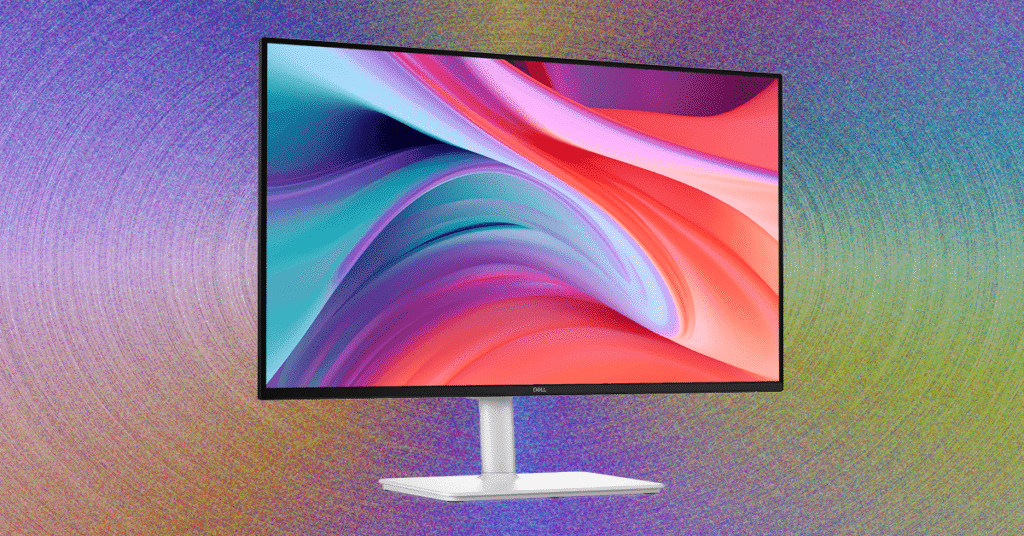
    I have to start with the Dell 27 Plus (S2725HSM). I had a feeling I would like this monitor, as I’m a big fan of the 4K model, which remains at the top of my list for best overall monitor. This cheaper version has everything I liked about that model, including the highly adjustable stand, the sleek white design, and the really solid image quality.

    For $175 (or sometimes on sale as low as $140), it has really solid color performance and hits 300 nits of brightness. The most important feature the Dell 27 Plus has is its stand. You can adjust the height and swivel, with a built-in VESA mount, which would make it a very practical addition to your current workstation. The biggest thing it’s missing is ports. It only has two HDMI ports, so you’ll need to plug accessories directly into your laptops or into a USB hub. Still, when it comes to full-featured 1080p monitors, the Dell 27 Plus ranks among the best for the price.

    The one monitor that compares to the Dell 27 Plus, only with a built-in USB hub, is the Samsung Essential Monitor S4. I haven’t seen it in person yet, but it’s also 1080p and has height adjustability at the same price. It has a lower claimed brightness as the Dell 27 Plus, though, at only 250 nits.

    But like I said, if you’re shopping between $150 and $200, you’re not necessarily stuck with 1080p. I tested out the MSI Pro 27 (MP273QW E14), which has a 2560 x 1440 resolution and sells for $190. Not only does this MSI monitor offer more pixels per inch, it also has really fantastic image quality, almost so good it could be used for content creators and photographers. For a monitor of this price, that’s pretty incredible. It’s also brighter than any other monitor I’ve tested in this range, reaching all the way up to 427 nits.

    The main drawback is the adjustability and ports. No built-in USB ports for connecting peripherals and no ability to adjust the height or swivel. The built-in stand is in a static position, so if the height isn’t perfectly suited for your desk, chair, and body, you’ll need a monitor stand. And while it technically supports VESA to connect it to a monitor arm, it doesn’t come with an included mount.

    The Best Cheap Gaming Monitor

    Another monitor I came across in my journey through cheap displays was the Lenovo Legion R27fc-30. This would my pick for the best budget gaming monitor and really surprised me with its image quality. I’m used to having to complain about the janky screens on cheap gaming laptops, but this far exceeded my expectations. Brightness is over 300 nits, and color performance is just as good as the MSI Pro 27.

    Recommended for you:

    How the Oakley Meta smart glasses beat my Ray-Bans on a 5-mile test walk
    Tech News·Feb 24, 2026

    How the Oakley Meta smart glasses beat my Ray-Bans on a 5-mile test walk

    Source: www.wired.com

    Share. Facebook Twitter Pinterest LinkedIn Tumblr Telegram Email Copy Link
    Previous ArticleNASA says it needs to haul the Artemis II rocket back to the hangar for repairs
    Next Article This $5 cleaning gel did wonders for my keyboard – and 4 other PC cleaning tips
    Michael Comaous
    • Website

    Michael Comaous is a dedicated professional with a passion for technology, innovation, and creative problem-solving. Over the years, he has built experience across multiple industries, combining strategic thinking with hands-on expertise to deliver meaningful results. Michael is known for his curiosity, attention to detail, and ability to explain complex topics in a clear and approachable way. Whether he’s working on new projects, writing, or collaborating with others, he brings energy and a forward-thinking mindset to everything he does.

    Related Posts

    6 Mins Read

    AI’s Memory Boom Is Quietly Crushing the Budget Smartphone

    6 Mins Read

    Meta Wants an AI Agent Managing Your Life. Wall Street Isn’t So Sure

    6 Mins Read

    MakuluLinux’s New AI-OS Wants to Run Your Whole Desktop, Not Just Answer Questions

    7 Mins Read

    AI Tokens Got 98% Cheaper. Corporate AI Bills Are Exploding Anyway

    7 Mins Read

    Hackers Are Hijacking Hotel Wi-Fi to Steal Microsoft 365 Logins Without a Single Phishing Email

    5 Mins Read

    Microsoft’s Biggest Patch Tuesday Ever Just Showed Us Where Cybersecurity Is Heading

    Top Posts

    Best Stores for Buying MP3 and Digital Music You Can Keep Forever (2026)

    August 2, 202530 Views

    Every iPhone Camera Ranked in 2026 (Best to Worst)

    July 6, 202613 Views

    How to Fix PS5 Controller Stick Drift (2026): 7 Working Methods

    July 10, 20268 Views
    Stay In Touch
    • Facebook

    Subscribe to Updates

    Get the latest tech news from FooBar about tech, design and biz.

    Most Popular

    Best Stores for Buying MP3 and Digital Music You Can Keep Forever (2026)

    August 2, 2025930 Views

    Discord will require a face scan or ID for full access next month

    February 9, 2026770 Views

    Trade in your old phone and get up to $1,100 off a new iPhone 17 at AT&T – here’s how

    September 10, 2025383 Views
    Our Picks

    A Toddler Needed a $20,000 Wheelchair. A High School Robotics Team Built Him One Instead.

    August 5, 2026

    AI’s Memory Boom Is Quietly Crushing the Budget Smartphone

    August 5, 2026

    Scientists Didn’t Say Earth Is Becoming Uninhabitable. Here’s What the “Hothouse Earth” Study Actually Says

    August 5, 2026

    Subscribe to Updates

    Get the latest creative news from FooBar about art, design and business.

    Facebook
    • About Us
    • Contact us
    • Privacy Policy
    • Disclaimer
    • Terms and Conditions
    © 2026 GeekBlog

    Type above and press Enter to search. Press Esc to cancel.