Close Menu
GeekBlog

    Subscribe to Updates

    Get the latest creative news from FooBar about art, design and business.

    What's Hot

    Kindle for Android Now Takes Handwritten Notes. Your Phone Needs a Real Stylus to Use It.

    October 29, 2026

    A 2007 Nokia Can Now Talk to ChatGPT and Claude. First It Has to Trust a Stranger’s Certificate.

    October 29, 2026

    How to Fix Switch 2 Joy Con Drift: Calibrate, Update or Repair

    October 29, 2026
    Facebook
    GeekBlog
    • Home
    • Mobile
    • Tech News
    • Blog
    • Gaming
    • Smartwatch
    • How-To Guides
    • AI & Software
    Facebook
    GeekBlog
    Home»Mobile»Kindle for Android Now Takes Handwritten Notes. Your Phone Needs a Real Stylus to Use It.
    Mobile

    Kindle for Android Now Takes Handwritten Notes. Your Phone Needs a Real Stylus to Use It.

    Olivia HartmanBy Olivia HartmanOctober 29, 202610 Mins Read
    Share Facebook Twitter Pinterest LinkedIn Tumblr Email Copy Link
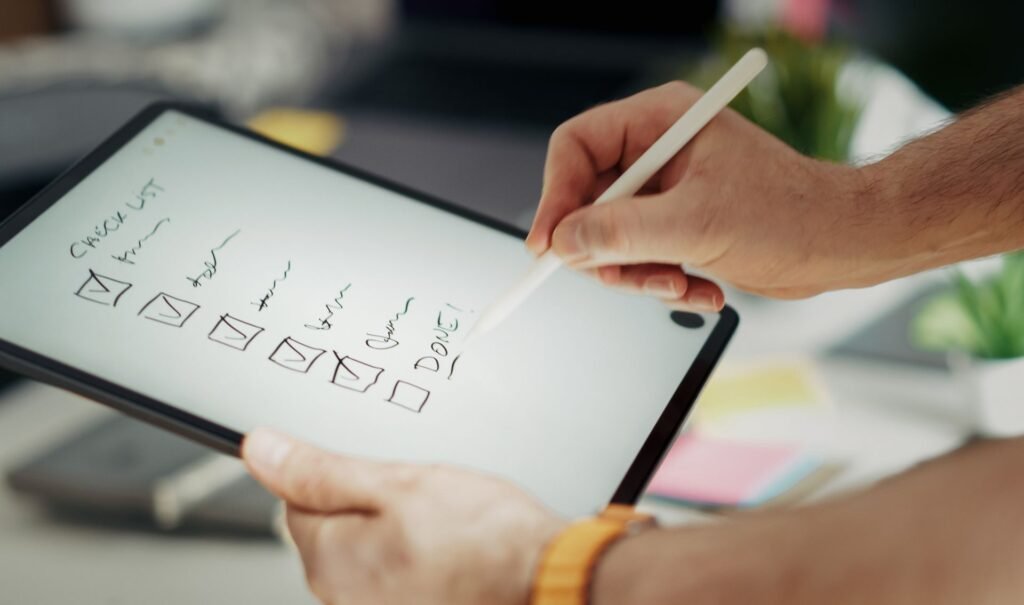
    Hand writing handwritten notes on a tablet screen with a stylus pen
    Photo: Pexels
    Share
    Facebook Twitter LinkedIn Pinterest Email Copy Link

    For three years, the main reason to buy a Kindle Scribe instead of a regular Kindle was simple: you could write on your books. Scribble in the margins, circle a quote, drop a handwritten sticky note on a chapter you want to come back to. No other Kindle could do that, and neither could the Kindle app on your phone.

    That changed quietly last week. Amazon pushed an update to the Kindle app for Android that adds handwriting and stylus support, and it borrows almost the entire Scribe annotation toolkit. Amazon did not announce it with a blog post. Readers found it on their own, posted screenshots on Reddit, and the reaction was about as warm as anything Amazon has shipped this year: “nice surprise”, “such a game changer”.

    There is one big condition, though. You need a device with real, native stylus support. Here is what the update does, which hardware gets it, and whether it changes the math on buying a Scribe.

    Quick answerThe Kindle app for Android now lets you write directly on book pages with a stylus, add handwritten sticky notes, use Active Canvas (text reflows around your notes, like on the Kindle Scribe) and write margin side panel notes. You can pick pen styles, colors and sizes, and circle, underline or highlight by hand. It only works on devices with native stylus support, such as Samsung Galaxy Tab tablets and Galaxy S Ultra phones with an S Pen. Finger input does not count. The feature is not on iPhone or iPad yet. It is free with the app update from Google Play.

    What you can do with a stylus now

    According to Amazon’s support documentation, the stylus-enabled version of the Android app supports four kinds of handwritten annotation. If you have used a Kindle Scribe, all of them will feel familiar.

    ToolWhat it doesBest for
    Write on the pageDraw, circle, underline and highlight directly over the text with a choice of pen styles, colors and sizesMarking up textbooks and nonfiction
    Handwritten sticky notesA note attached to a passage that opens when you tap it, so the page stays cleanLonger thoughts and questions
    Active CanvasOpens space inside the page and reflows the book text around your handwritingNotes that should sit right next to a paragraph
    Margin side panelA collapsible panel beside the text for running commentaryTablets and study sessions

    The same update also beefs up the regular, typed annotation tools. The Android app now supports text notes, highlights, underlines and outlines, and some of those are new to the app too. That matters even if you never pick up a stylus, because it means the Android app is now closer to feature parity with Amazon’s own hardware than it has ever been.

    Active Canvas is the standout. On a Scribe, it is the feature that makes handwritten notes feel like part of the book rather than a layer of ink sitting on top. Writing a note pushes the surrounding text out of the way, and the note stays anchored to that spot when you change font size. Getting that behavior on a phone or tablet app is a bigger engineering lift than simple ink on a page, and it is the clearest sign Amazon is deliberately porting the Scribe experience rather than bolting on a drawing layer.

    Which devices actually get it

    Recommended for you:

    A 2007 Nokia Can Now Talk to ChatGPT and Claude. First It Has to Trust a Stranger’s Certificate.
    Mobile·Oct 29, 2026

    A 2007 Nokia Can Now Talk to ChatGPT and Claude. First It Has to Trust a Stranger’s Certificate.

    This is where the fine print kicks in. The handwriting tools appear only on Android devices with native stylus support. Tapping with your finger does not unlock them, and a cheap capacitive stylus with a rubber tip behaves like a finger as far as Android is concerned.

    Who gets handwriting in the Kindle app right now Status grid. Android tablets with a native stylus such as Galaxy Tab: yes. Android phones with a built-in stylus such as Galaxy S Ultra: yes, reported by users. Amazon Alexa Tablet 12 Pro with Pro Pen: yes, reported. Android e-readers such as Onyx Boox: mixed reports. Android phones without a stylus: typed notes and highlights only. iPhone and iPad: not yet. Kindle Scribe: yes, native. Who can write in Kindle books today Handwriting status by device type, late October 2026 Android tablets with a native stylus (Samsung Galaxy Tab with S Pen) Yes Android phones with a built-in stylus (Galaxy S Ultra models) Yes, per users Amazon Alexa Tablet 12 Pro with the Pro Pen Yes Android e-readers (Onyx Boox and similar) Mixed reports Android phones without a stylus Typed notes only iPhone and iPad (including iPhone Duo with Apple Pencil) Not yet Sources: Amazon support pages, user reports on Reddit, Good e-Reader, The eBook Reader
    If your device has an active pen that Android recognizes as a stylus, you are probably covered.

    Samsung owners are the big winners. Galaxy Tab tablets that ship with an S Pen are the most obvious fit, and Reddit users report that phones like the Galaxy S24 Ultra picked up the feature too. Samsung’s Ultra phones are the only mainstream flagships that still carry a built-in stylus, which is one of the quieter reasons to pick the Ultra over the smaller models, as our Galaxy S26 vs S26 Plus vs S26 Ultra comparison lays out.

    Amazon’s own new tablets are a clue to the timing. Amazon launched its Android-based Alexa Tablet lineup in mid-October, and the top model, the Alexa Tablet 12 Pro, works with an optional Pro Pen that supports writing on Kindle books. Bringing the same tools to the regular Android app a week or so later looks less like a coincidence and more like Amazon finishing the job across its whole Android codebase.

    E-reader owners should temper expectations. Some users say the handwriting tools show up on certain Onyx Boox models, which run Android and have pens. Others suspect the app will not recognize those pens without workarounds, especially on devices that lack official Google Play certification. If you own a Boox, update the app and check, but do not buy one for this.

    Still waiting: iPhone and iPad

    Apple users are left out for now. Amazon’s support page does mention Active Canvas on supported iOS devices, which suggests the work is in progress, but no iPhone or iPad user has reported the handwriting tools in the iOS app yet. That is a little ironic: Apple just added Apple Pencil support for the iPhone Duo in iOS 27.2, and an unfolded foldable is a near-perfect shape for reading and annotating books. iPad owners with an Apple Pencil are the most obvious next audience.

    Before you rely on itAmazon has not published release notes for this update, so a few details are still unconfirmed. We have not seen official word on whether handwritten notes sync to a Kindle Scribe or other devices, and Amazon’s documentation keeps a separate list of personal document file types that accept notes, so sideloaded files may behave differently from Kindle store books. If you are planning to annotate an entire semester of reading, test it on one book first.

    How to start writing in a Kindle book on Android

    The rollout appears to be server-side as well as tied to the app version, so if you do not see the tools straight away, give it a day. Here is the basic routine.

    1. Update the Kindle app from the Google Play Store.
    2. Open any Kindle book on a device with a native stylus.
    3. Touch the page with the stylus or open the reading toolbar and look for the new pen tools.
    4. Pick a pen style, color and size, then write, circle or underline directly on the text.
    5. Switch to Active Canvas or a sticky note when you want the note anchored to a passage instead of drawn over it.

    If the pen tools never appear, the app most likely does not see your pen as a stylus. That is the case for passive rubber-tip styluses and for some third-party pens on devices that were not designed around one.

    Does this kill the Kindle Scribe?

    TechRadar framed the update as “one less reason to buy a Kindle Scribe”, and on paper the numbers back that up. If you already own a stylus-equipped Samsung, you just got most of the Scribe’s annotation features for nothing.

    What it costs to handwrite notes in Kindle books, by device Horizontal bar chart of US launch prices. Stylus phone or tablet you already own: $0. Kindle Scribe without front light: $429.99. Kindle Scribe: $499.99. Alexa Tablet 12 Pro plus Pro Pen: about $590. Kindle Scribe Colorsoft: $629.99. The cheapest Scribe is now the one you already own US launch prices for hardware that can handwrite in Kindle books Stylus device you own $0 with the free app update Scribe, no front light $429.99 Kindle Scribe $499.99 Alexa Tablet 12 Pro + Pen ~$590 Scribe Colorsoft $629.99 Amazon list prices at launch; the Pro Pen is sold separately for about $90. Sale prices vary.
    A stylus phone or tablet now does most of what a $500 Scribe does for annotation. It does not do E Ink.

    In practice, it is not that simple. The Scribe’s real advantage was never just the pen. It is the E Ink screen: no glare in sunlight, no blue light at night, weeks of battery life, and a paper-like texture that makes long reading and writing sessions comfortable. A Galaxy phone or tablet does none of that. Writing on glass with an S Pen for ten minutes is fine. Annotating a 400-page book on an LCD or OLED panel is a different experience, and it is the one Scribe owners chose to avoid.

    Recommended for you:

    Apple Will Swap a Cracked iPhone Duo for Free. In a Year, the Same Crack Costs $999.
    Mobile·Oct 28, 2026

    Apple Will Swap a Cracked iPhone Duo for Free. In a Year, the Same Crack Costs $999.

    The Scribe also does more than annotate books. It is a full digital notebook with its own notebooks, templates and AI summarizing tools. If you are weighing Amazon’s two writing e-readers, our Kindle Scribe vs Scribe Colorsoft breakdown covers who should pay extra for color.

    Kindle app on a stylus Android deviceKindle Scribe
    Handwriting on book pagesYesYes
    Active CanvasYesYes
    ScreenLCD or OLED, glossy, backlitE Ink, paper-like, front lit
    Battery for readingHoursWeeks
    DistractionsEvery notification you ownClose to none
    Extra cost$0 if you already own the deviceFrom $429.99

    Who this update is really for

    The biggest beneficiaries are students and anyone who reads nonfiction for work. A Galaxy Tab with an S Pen is already a common study device, and being able to mark up the course reading in the same app you bought it in removes a whole workaround involving PDFs and separate note apps. It is also a nice upgrade for people who read comics and manga on Android tablets and like to sketch along.

    For committed e-reader fans, the Scribe still wins on comfort. But Amazon has made a telling choice here. It used to treat handwriting as a hardware perk that sold $400 to $600 devices. Now it treats handwriting as a Kindle feature that should follow your books everywhere. If you are curious about other ways to write digitally, dedicated E Ink notebooks and smart pens are worth a look too.

    Bottom lineIf you own a Galaxy Tab or an S Pen phone, update the Kindle app today. You just got Scribe-style annotation for free. If you were about to buy a Scribe mainly to write in books and you already have a stylus device, try the app first. If you want E Ink, long battery life and a distraction-free reader, the Scribe is still the better tool, and iPhone and iPad owners will have to wait.

    About this article: GeekBlog covers U.S. technology news, AI, phones, smartwatches and gaming. Every story is written and checked under our Editorial Policy. Spotted a mistake or have a story tip? Contact our editors.

    Share. Facebook Twitter Pinterest LinkedIn Tumblr Telegram Email Copy Link
    Previous ArticleA 2007 Nokia Can Now Talk to ChatGPT and Claude. First It Has to Trust a Stranger’s Certificate.
    Olivia Hartman

      Olivia Hartman is GeekBlog's general technology reporter, covering the wider world of tech beyond smartphones: AI and software, laptops and PCs, gaming, streaming, space, science, consumer gadgets, deals and the policy stories shaping the industry. A versatile journalist with a nose for what actually matters, Olivia turns breaking news and product launches into accessible, no-hype reporting for everyday readers.

      Related Posts

      14 Mins Read

      A 2007 Nokia Can Now Talk to ChatGPT and Claude. First It Has to Trust a Stranger’s Certificate.

      11 Mins Read

      iOS 27.2 Fixes 163 Security Flaws. Four in Five iPhones Are Still on iOS 26.

      13 Mins Read

      Apple Will Swap a Cracked iPhone Duo for Free. In a Year, the Same Crack Costs $999.

      15 Mins Read

      iFixit Gave the iPhone Duo a Record Foldable Score. Its Inner Screen Still Costs $999 to Replace.

      12 Mins Read

      Samsung Is Building a Phone OLED Without a Metal Mask. The First Sample Is Due by New Year.

      9 Mins Read

      Apple Warned iPhone Duo Walk-Ins to Stay Home. Its Marketing Chief Says Stores Kept Some.

      Top Posts

      Every iPhone Camera Ranked in 2026 (Best to Worst)

      July 6, 2026316 Views

      MapQuest Now Shows the Plate Readers on Your Route. It Won’t Say Where the Map Comes From.

      October 19, 2026169 Views

      iPhone Battery Replacement Cost: Every Model, Apple vs Repair Shop

      October 6, 2026148 Views
      Stay In Touch
      • Facebook

      Subscribe to Updates

      Get the latest tech news from FooBar about tech, design and biz.

      Most Popular

      MapQuest Now Shows the Plate Readers on Your Route. It Won’t Say Where the Map Comes From.

      October 19, 2026547 Views

      iPhone Battery Replacement Cost: Every Model, Apple vs Repair Shop

      October 6, 2026396 Views

      Apple Told Its Stores Not to Expect iPhone Duo Walk-Ins. Carriers Can Beat January by Weeks.

      October 20, 2026254 Views
      Our Picks

      Kindle for Android Now Takes Handwritten Notes. Your Phone Needs a Real Stylus to Use It.

      October 29, 2026

      A 2007 Nokia Can Now Talk to ChatGPT and Claude. First It Has to Trust a Stranger’s Certificate.

      October 29, 2026

      How to Fix Switch 2 Joy Con Drift: Calibrate, Update or Repair

      October 29, 2026

      Subscribe to Updates

      Get the latest creative news from FooBar about art, design and business.

      HEICJPG.online - Convert HEIC to JPG online
      Facebook
      • About Us
      • Contact us
      • Privacy Policy
      • Disclaimer
      • Terms and Conditions
      • Editorial Policy
      • Cookie Policy
      • Your Privacy Choices
      © 2026 GeekBlog

      Type above and press Enter to search. Press Esc to cancel.