

Follow ZDNET: Add us as a preferred source on Google.
ZDNET’s key takeaways
- You can turn any TV into a Frame TV-like experience for free.
- With Roku Backdrops, your TV can show art or photos when idle.
- Settings tweaks can also make your TV look more like framed art.
If you’ve ever wanted a Samsung Frame TV because you love how it seems to disappear into a room by displaying art instead of a dull, blank black screen, I totally get it. I’ve been eyeing one for years, but ultimately, I like my TVs big.
I already have an 85-inch Samsung TV, and switching to a Frame TV in the same size would cost me well over $3,000. Yeah, no.
Also: Own a Samsung TV? I changed these 6 settings to speed up the whole system
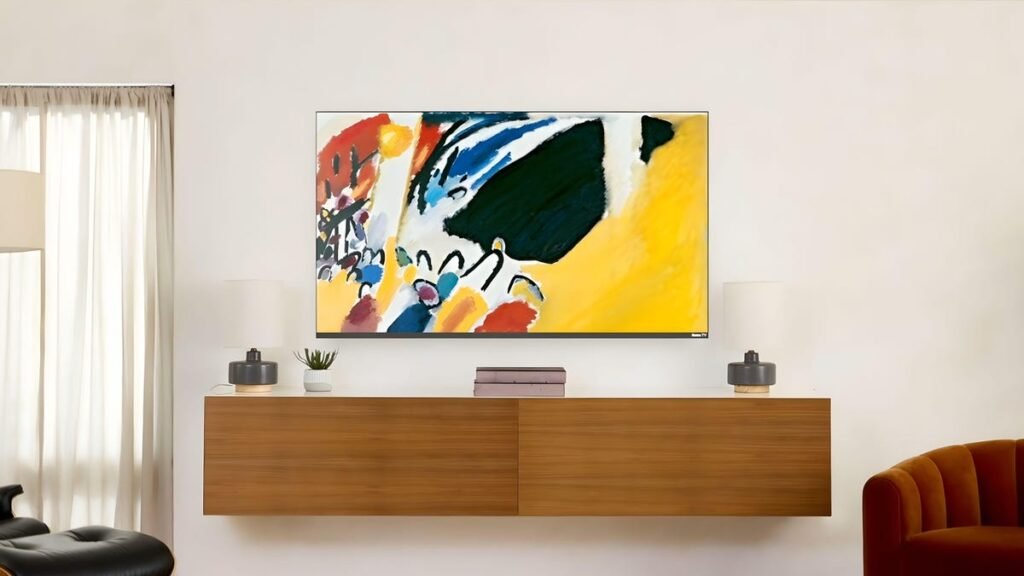
Frame TVs look great, but there has to be a more affordable way to achieve that art-on-the-wall effect. The good news is that there is, and it doesn’t cost a thing. About a year ago, Roku introduced its Backdrops feature, which transforms any TV into a rotating art display or a single static image when no other content is playing. So, instead of a dark rectangle on my wall, my TV can become part of my decor.
How to turn any TV into a Frame TV with Roku
What you’ll need: You don’t have to buy a new TV to pull this off, but you do need a Roku streaming device connected to your existing TV or a standalone Roku TV, both of which I already own in my home.
Roku Backdrops, which launched in late 2024, turns your TV into an art display when you’re not watching anything. It works by showing curated artwork, photography, or your own photos as either a rotating gallery or a single static image. Backdrops is available in newer versions of Roku OS, so make sure your device is up to date.
How to get Roku Backdrops:
- From the Roku Home screen, go to Settings > System > System update.
- Select Check now and install any available updates.
- Once updated, look for Backdrops on your Home screen.
- Don’t see it? Open Streaming Channels, search Backdrops, and add it.
Also: Your Roku has secret menus and screens – here’s how to unlock them
On some Roku TVs, Backdrops also appears under Settings > Backdrops.
One of the best parts of Backdrops is that it includes thousands of free images, ranging from classic paintings to modern photography, so you don’t have to curate your own art to display.
How to browse Roku’s art collections:
- Launch the Backdrops app and select the Browse button.
- Browse the curated collections. You’ll see classic artwork by famous artists, landscapes, abstract images, fine photography, and more.
- Select any collection to preview the images within it.
- You can also open individual images to preview them and see details like the artist name or artwork title.
Also: I changed 6 settings on my Roku TV to instantly improve its performance
Backdrops will let you display an entire rotating collection or a single image, which brings me to the next step.
Once you’ve found something you like, you’ll need to tell Roku how to display it. If you want to mimic a traditional framed print, I recommend choosing a single image to display.
How to set artwork or a slideshow on Roku:
- To display one image, open an image to preview and select Start Backdrops.
- You can also press the * button on your Roku remote to preview it, set it, or add it to favorites.
- To set a slideshow, open a collection and select Set as Backdrop.
Also: How to clear your Roku TV cache (and say goodbye to slow performance)
You may also want to adjust your TV’s settings so the image looks natural in your room. Try lowering the brightness and contrast, turning off motion smoothing, and switching to a mode such as Picture or Movie. The exact steps vary by TV, so check your model’s manual or settings menu.
It costs nothing, takes only a few minutes to do, and instantly makes your TV feel more like framed art.
If you have your own art you want to display, you’re not limited to Roku’s collections. Backdrops lets you upload personal photos or link a Google Photos album.
How to display your own art on Roku:
- In the Backdrops app, select Upload photos toward the bottom.
- You may be asked scan a QR code with your phone.
- Next, upload images from your phone or computer through Roku’s site.
- Organize photos into albums if you want multiple collections.
- Alternatively, select Connect Google Photos and choose an album.
Also: I replaced my bedroom TV with this $180 Roku projector and can’t go back
Once uploaded, your personal albums will appear in Backdrops below Roku’s collections. For the best display quality, Roku suggests using high-resolution photos in JPG or PNG format. The resolution should match or exceed your TV’s resolution to avoid any pixelation.
Backdrops will automatically activate when your Roku device is idle. This is the part that makes the whole setup feel like magic. You can adjust your Backdrops settings under Backdrops app > Settings > Backdrop preferences. From there, enable Backdrops, set your image duration, and choose start and stop times.
Also: Is your Roku or Fire TV streaming device tracking you? It’s possible – how I put an end to it
If you want to manually force your TV into art mode, you can do that, too.
How to manually enter art mode on Roku:
- If you have a Roku voice remote, say “Launch Backdrops” to begin displaying your artwork.
- Once your backdrop is displayed, press * on your remote to customize the image duration, auto-start time, daily stop time, and browse backdrops.
Is Roku Backdrops free to use?
Yes. The Backdrops feature and its built-in art collections are free to use. There is no subscription required, and uploading your own photos does not cost anything, either.
Also: Own a Roku TV? My 20+ best shortcuts to get the most out of the system
Does Backdrops work on all Roku devices?
It works on most Roku TVs and newer Roku streaming players. If your device supports recent Roku OS updates, it has Backdrops.
Can I make my TV look even more like a Frame TV?
Yes. Some people hang their TV and add physical frames. You can either make one yourself or buy a custom frame on Etsy or another third-party seller. You can also hide cables with wall channels. I bought this one on Amazon a couple years ago and have had no issues with it.
Source: www.zdnet.com
About this article: GeekBlog covers U.S. technology news, AI, phones, smartwatches and gaming. Every story is written and checked under our Editorial Policy. Spotted a mistake or have a story tip? Contact our editors.
