Close Menu
GeekBlog

    Subscribe to Updates

    Get the latest creative news from FooBar about art, design and business.

    What's Hot

    OpenAI allegedly sent police to an AI regulation advocate’s door

    October 11, 2025

    Samsung Galaxy XR leak shows dual 4K micro‑OLED displays

    October 11, 2025

    The Vampire Lestat New Teaser

    October 11, 2025
    Facebook X (Twitter) Instagram Threads
    GeekBlog
    • Home
    • Mobile
    • Tech News
    • Blog
    • How-To Guides
    • AI & Software
    Facebook
    GeekBlog
    Home»Tech News»HyperSpace Trackpad Pro Hands-On: A Windows Answer to Apple’s Magic Trackpad
    Tech News

    HyperSpace Trackpad Pro Hands-On: A Windows Answer to Apple’s Magic Trackpad

    Michael ComaousBy Michael ComaousOctober 7, 20253 Mins Read
    Share Facebook Twitter Pinterest LinkedIn Tumblr Email Copy Link
    HyperSpace Trackpad Pro Hands-On: A Windows Answer to Apple’s Magic Trackpad
    Share
    Facebook Twitter LinkedIn Pinterest Email Copy Link

    Apple was the first to truly popularize the touchpad (or trackpad, as Apple calls it), and most importantly, make it good. Over the years, the company enhanced the experience with a handful of features, such as multi-finger gestures or haptic feedback. Windows alternatives have struggled to keep up.

    While touchpads in laptops have improved in Windows laptops, there are few external options to compete with the supremacy of the Apple Magic Trackpad 2, a definitive Mac accessory, until now. I got some early hands-on time with Hyper’s HyperSpace Trackpad Pro, a Windows-based touchpad that—surprisingly—surpasses Apple’s hardware.

    Meet Your Match

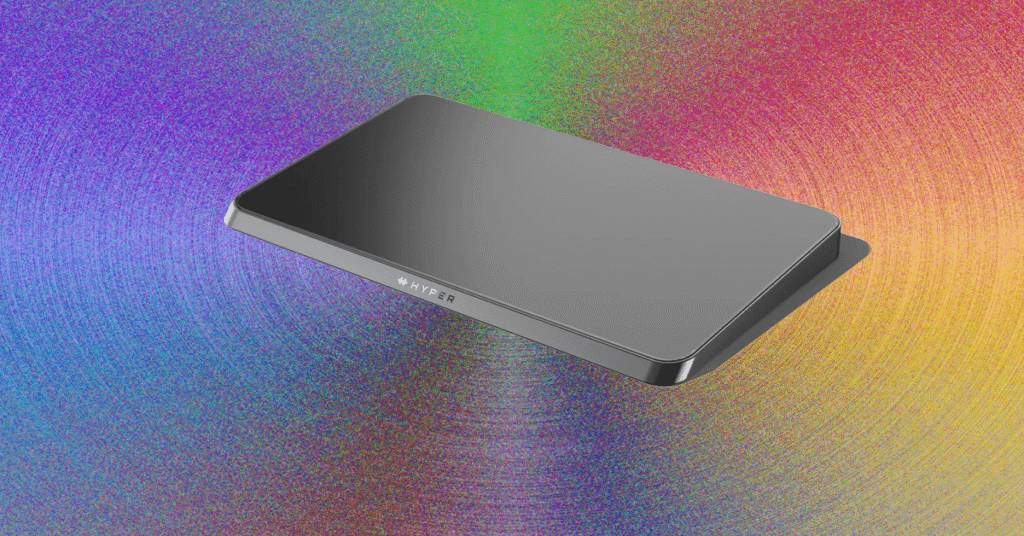
    The HyperSpace Trackpad Pro’s main goal is to provide a high-quality Windows alternative to the Magic Trackpad. That’s easy to check off. It has a pretty design, housed in a CNC metal chassis that feels superb. It resembles the Space Gray Magic Trackpad, featuring dark silver sides and a black trackpad glass surface. It charges via USB-C next to the manual power button on the back and can connect via cable or Bluetooth. It’s more or less the same size as the Magic Trackpad.

    • Photograph: Luke Larsen

    • Photograph: Luke Larsen

    • Photograph: Luke Larsen

    • Photograph: Luke Larsen

    Hyper

    HyperSpace Trackpad Pro

    It’s performance that really matters. It has a 240-Hz report rate (otherwise known as polling rate), which is what gives you that smooth cursor movement, matching the rate of the Magic Trackpad. That might not sound impressive compared to the high-end 1,000-Hz gaming mice, but for a touchpad, it feels super smooth. I’m happy to report that when it comes to the basics of swiping, clicking, and navigating, the HyperSpace Trackpad Pro feels every bit as precise and smooth as Apple’s hardware. It works right out of the box and really elevates what you can do on Windows.

    Like the Magic Trackpad, the HyperSpace is entirely haptic-based, meaning that when you click down, there’s no physical button being depressed. Instead, you get the reverberation of the haptics, which accurately simulates the feeling of clicking. One of the benefits of this is that every part of the surface is clickable, unlike mechanical dome switch touchpads. You also get the ability to customize every aspect of the surface and the click itself, which is where Hyper ambitiously attempts to take the Trackpad Pro beyond the competition with its Hydra Connect software.

    Steep Learning Curve

    HyperSpace Trackpad Pro HandsOn A Windows Answer to Apples Magic Trackpad

    Photograph: Luke Larsen

    My first impression of the HyperSpace wasn’t good. To say there is a steep learning curve, which the folks at Hyper warned me about, is an understatement. After plugging it in and attempting to click on an icon on my desktop, I assumed I had a defective unit. Trying to click kept pulling up the right-click menu, and the click itself felt inconsistent.

    answer Apples HandsOn HyperSpace Magic Pro Trackpad Windows
    Share. Facebook Twitter Pinterest LinkedIn Tumblr Telegram Email Copy Link
    Previous ArticleUpdate: Senate blocks funding as Trump conditions health talks
    Next Article FBI reviewed Republican senators' records in January 6 probe
    Michael Comaous
    • Website

    Michael Comaous is a dedicated professional with a passion for technology, innovation, and creative problem-solving. Over the years, he has built experience across multiple industries, combining strategic thinking with hands-on expertise to deliver meaningful results. Michael is known for his curiosity, attention to detail, and ability to explain complex topics in a clear and approachable way. Whether he’s working on new projects, writing, or collaborating with others, he brings energy and a forward-thinking mindset to everything he does.

    Related Posts

    2 Mins Read

    OpenAI allegedly sent police to an AI regulation advocate’s door

    3 Mins Read

    Samsung Galaxy XR leak shows dual 4K micro‑OLED displays

    2 Mins Read

    The Vampire Lestat New Teaser

    3 Mins Read

    Yes, your iPhone can track every place you visit – here’s how to turn it off

    2 Mins Read

    These SteelSeries Earbuds Are Great for Gaming and Are 35% Off Right Now

    2 Mins Read

    Trump admin fires more health employees amid government shutdown

    Top Posts

    The Mesh Router Placement Strategy That Finally Gave Me Full Home Coverage

    August 4, 2025166 Views

    Past Wordle answers – all solutions so far, alphabetical and by date

    August 1, 202581 Views

    How to Turn Off Voicemail on Android Quickly and Easily

    August 2, 202567 Views
    Stay In Touch
    • Facebook

    Subscribe to Updates

    Get the latest tech news from FooBar about tech, design and biz.

    Most Popular

    The Mesh Router Placement Strategy That Finally Gave Me Full Home Coverage

    August 4, 2025166 Views

    Past Wordle answers – all solutions so far, alphabetical and by date

    August 1, 202581 Views

    How to Turn Off Voicemail on Android Quickly and Easily

    August 2, 202567 Views
    Our Picks

    OpenAI allegedly sent police to an AI regulation advocate’s door

    October 11, 2025

    Samsung Galaxy XR leak shows dual 4K micro‑OLED displays

    October 11, 2025

    The Vampire Lestat New Teaser

    October 11, 2025

    Subscribe to Updates

    Get the latest creative news from FooBar about art, design and business.

    Facebook
    • About Us
    • Contact us
    • Privacy Policy
    • Disclaimer
    • Terms and Conditions
    © 2025 geekblog. Designed by Pro.

    Type above and press Enter to search. Press Esc to cancel.