

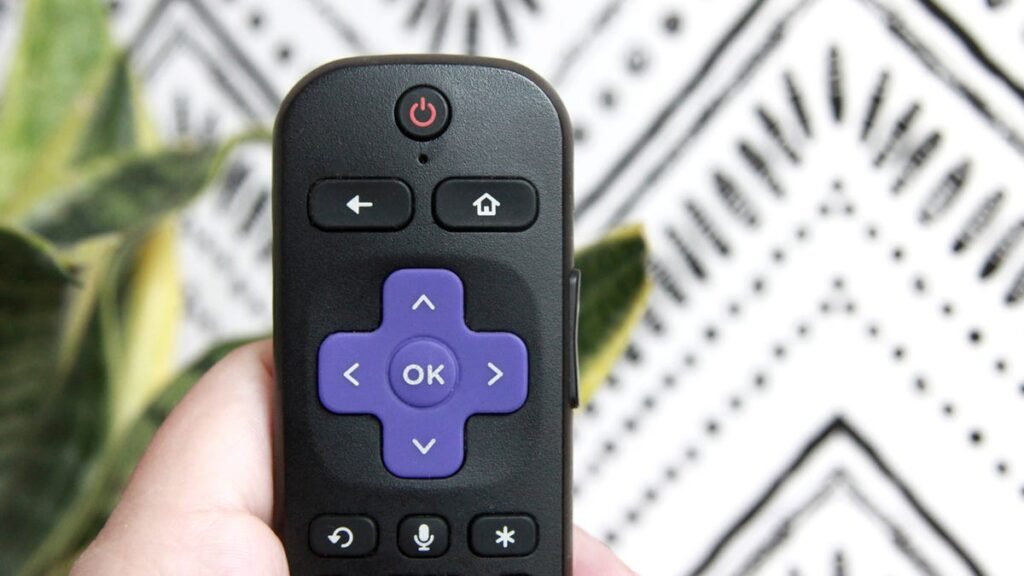
Did you know Roku has several secret menus you can access with just a few clicks of the remote? They’re like easter eggs — hidden screens that can reveal diagnostic information, advanced toggles, and developer tools you never knew you wanted (or needed).
You can do a “soft” reset with these menus, see a log of every remote button press since your last power cycle, find out the exact build of Netflix, Disney+, or Peacock you’re running, check out your CPU temperature, or run a TV input test or AP speed test.
Also: This 30-second fix made my Roku TV run like new again (and why it works)
Sure, most of you may be perfectly happy never using these options on your Roku streaming device, but if you consider yourself a bit of a techie, or maybe you just like pressing buttons to see what happens, these secret menus are downright fun to try.
How to find Roku’s secret menus
What you’ll need: A Roku device and a Roku remote. If you don’t have the physical remote on hand, use the one in the Roku app.
The Developer settings menu is where developers can test their apps on a Roku device before launching them.
So, if you’re a developer, think of this as your personal dev playground. Here, you can enable the Development Application Installer, sideload one test channel, and even manage your rokudev account. To access it, hit Home three times on your remote, press the Up button twice, and then tap Right, Left, Right, Left, Right.
The Network menu isn’t exactly secret, but Roku still gives you a slick remote shortcut to access it.
Also: I changed 6 settings on my Roku TV to give it an instant performance boost
Need your IP and MAC addresses or want to check your internet connection? That’s what this screen is for on your Roku. Just tap Home five times on your remote and then Right, Left, Right, Left, Right to get to it instantly. From this screen you can also view or join networks and even toggle a bandwidth-saver mode.
Here’s where things truly start to get “secret” — heck, it’s even in the name.
The Wireless secret screen on your Roku shows information like signal-strength bars, antenna info, glitch rates, and on-device logs. You can run an AP speed test or purge your Wi-Fi settings, too. If your stream keeps stuttering, this should be your first stop. Just press Home five times and then tap Up, Down, Up, Down, Up.
You can do a factory reset the normal way under Settings. Or you could use a secret menu.
Also: The best Roku TVs: Expert tested and recommended
On your remote, press Home five times, Fast Forward three times, and then Rewind two times. This will get you to the Reset and update menu (also called “Secret Screen”) that has options for a factory reset and refresh — including a soft reset. You can also search for firmware and software updates, run USB port tests, and more.
Handy if your Roku is acting up — and you’re too impatient to use the regular Settings menu.
Once upon a time, this menu let you disable screensaver ads entirely. Nowadays, it’s more about giving you control over scrollable ads and screenshot output formats.
Officially called the “Secret screen 2” menu, it has options like cycle image service, cycle screenshot output format, cycle home screen ad banner server, cycle ad channel, etc. To access this screen, tap the Home button on your remote five times, followed Up, Right, Down, Left, Up.
Want to know which resolutions, refresh rates, and HDR features your Roku device actually supports?
Also: Is your Roku TV spying on you? Probably, but here’s how to put an end to it
This is the place to go if you want to access all your HDMI settings. In the HDMI menu, you’ll also find options to switch inputs or run a TV input test. To access it, press the Home button on your remote, followed by Down, Left, Up, Up, Up.
Your Roku displays granular performance data like CPU temperature and voltage, memory usage, connected remotes and battery levels, and your SSID in the Platform menu.
Even better, this screen is a hub for additional submenus: RF remote diagnostics, IPv6 settings, and a log of every remote button press since your last power cycle. Intense, right? To get to it, tap the Home button on your remote five times, then Fast Forward, Play/Pause, Rewind, Play/Pause, Fast Forward.
Ever wondered which exact build of Netflix, Disney+, or Peacock you’re running?
Also: Roku vs Fire Stick: Which one is best for your streaming needs?
This menu lists every installed channel with version and build-number details. Highlight one and you can uninstall on the spot — perfect for troubleshooting or when you want to boot a misbehaving app.
Want to do a quick restart? Press the Home button five times, then Up, Rewind twice, and Fast Forward two times. No menus, no waiting. Your remote will lock up for a moment, but then your Roku will reboot.
How fast do I need to enter these button sequences?
Pretty fast. If you take a moment too long between button presses, your Roku won’t bring up the secret menu you’re trying to access. If it doesn’t work on the first try, just take a second to breathe and try again.
Also: How to reset your Roku: 4 easy ways
Can I find these Roku menus without pressing button sequences?
Some menus are available in Roku’s settings — like the Network menu. But most of them are buried and only accessible by hitting the right button combo, as far as I can tell. Hence why some of the screens even have “secret” in their name.
I lost my Roku remote. What can I do?
Samesies. Luckily, though, Roku has a software remote available in its mobile app. Download and use that instead.
Source: www.zdnet.com
About this article: GeekBlog covers U.S. technology news, AI, phones, smartwatches and gaming. Every story is written and checked under our Editorial Policy. Spotted a mistake or have a story tip? Contact our editors.
