

Like Power Rangers, smart devices work even better together than they do apart. A smartwatch that pairs with a phone can send you notifications, call alerts, and even act as a remote shutter for your camera. These ecosystems of products complement each other, allowing you to handle your workflow in your way and work seamlessly between devices.
Apple’s ecosystem extends way beyond its iPhone and Watch offerings, and extends to the iPad, Apple TV and, of course, the Mac. Apple’s original proposition has evolved over the years, and its operating system looks and feels very similar to that of the iPad and even the iPhone – the same icons and ways to adjust settings. That makes using a Mac an easy transition for a user of either product.
With Windows 10 support ending on 14th October 2025, many users are now considering an upgrade. If you are already using an iPhone or an iPad, there are several reasons why you might want to choose a Mac as your new machine.
Setting up from an iPhone
When you first get a Mac, there’s an option to transfer your settings and content over from an older machine. Initially, this was just for Macs (and Time Machine backups) but more recently, you could do this from a PC as well, by installing the Windows Migration Assistant on your old machine. Now, though, you can set up your new Mac using an iPhone. When you select the option, you simply scan the code on the screen with your phone and it will bring all of your settings across.
(Image credit: Future)
From iPhone to Mac and back again
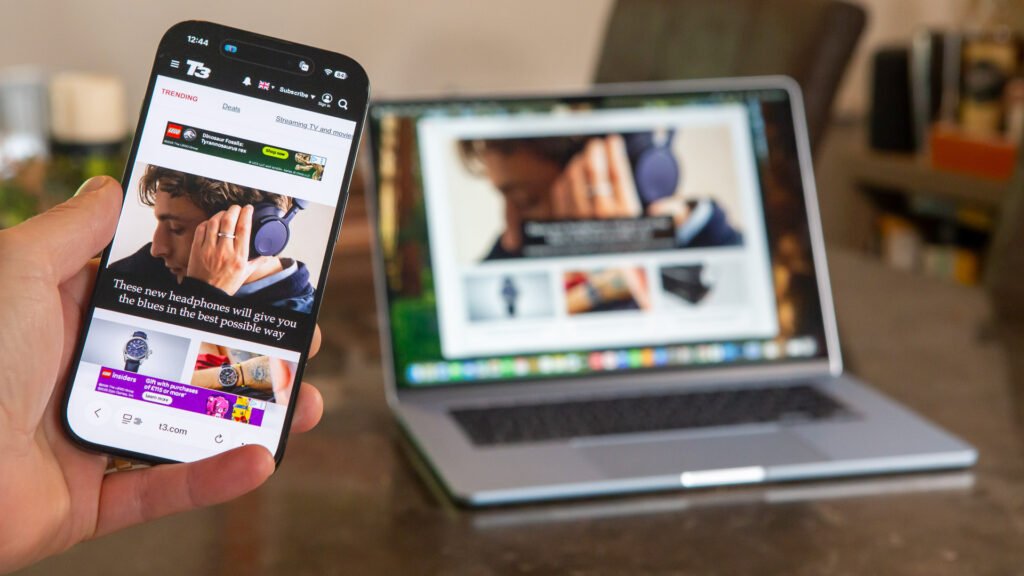
Provided all of your Apple devices are signed in with the same Apple ID, it’s easy to switch devices mid-task. The Handoff feature allows you to take the app you’ve been using on your iPhone and open it on your Mac (or vice versa) and pick up where you left off. This works for all Apple apps as well as many third-party applications, including Chrome.
One of my favourite uses is when I find a website I like on my phone and want to look at it in more detail. With the app open on your phone, a handoff icon will appear on your Mac that, when clicked, will open the same page as on your phone. You can also do it the other way around by swiping up on your phone to enter the app switcher, and choosing the handoff option from there.

(Image credit: Future)
iPhone Mirroring on Mac
While this functionality is also available on Windows PCs for Android phones, the Mac makes it easy to mirror your iPhone display on your desktop and get your phone notifications on screen too. This can be handy if you’re working on the move, as you can keep your phone in your pocket and still access its features from your laptop.

(Image credit: Future)
All devices as one
This is perhaps one of the most underrated features on the Mac. Universal Control allows you to use multiple Apple devices as if they were one. If you have an iPad sat next to your Mac, you can use it as a second display and even drag files from one screen to another. It also means that you can use the same keyboard and mouse across multiple devices, whether that’s an iMac, MacBook or iPad.
I really like this feature as a way to use a Mac mini as my home machine and a MacBook Pro when I’m on the move. With both open on my desk, I can quickly drag files between them or just simply search through my laptop using my mouse without having to pair it to the device.

(Image credit: Future)
Continuity camera
In a similar vein to Universal Control, the Continuity Camera feature allows the main camera on your iPhone to work as if it’s attached to your Mac or Apple TV. This allows the iPhone to function as an extremely high-quality webcam, with adapters available to attach it to your monitor, laptop screen or TV.
This function also allows you to use the iPhone as a one-click scanner. Simply right click on the desktop of your Mac or in one of the Apple apps such as Notes or Pages and you can choose to access your iPhone’s camera to either take a picture or scan a document. In scanner mode, the camera will adjust the angle to keep the page square, automatically take the picture and save the file as a PDF.

(Image credit: Apple)
MacOS Tahoe
Apple’s latest operating system, MacOS Tahoe, doesn’t officially launch until September but you can already use it on current Mac models through the public beta. This upgrade brings a new Liquid Glass design to MacOS, as well as a number of extra features.
Live activities from your iPhone will also mirror to your Mac, for things like food deliveries, taxis or sports scores. The new phone app allows you to make and receive calls in the same way as you would on your iPhone, and even use the new call screening feature to avoid spam or robocalls.
Apple Intelligence is even more integrated too, offering live translation in messages or FaceTime calls. Plus, there’s a new ChatGPT option in the Image Playground to create images from existing photos or text prompts.

MacBook Air M4 in Sky Blue
(Image credit: Future)
More affordable than you think
Mac laptops and desktop computers are often perceived as the more expensive option. While it’s true you can pick up a Windows laptop or Chromebook for significantly less, the difference isn’t as much as you might think, especially when you look for comparative specs.
While the MacBook Pro is higher priced, it’s a professional laptop that is designed for ultimate performance. This is similar to a high-end gaming laptop, in that you really do get what you pay for. The MacBook Air, however, starts from just £999/$999 and still provides blistering performance, way beyond what most users require.
A desktop solution can often be more cost-effective and just as convenient if you only ever work at home. The iMac is a stylish all-in-one machine that starts from £1299/$1299 and gives you a 24-inch 4.5k display as well as M4 chip performance. Meanwhile, the Mac mini starts from just £599/$599, and you can plug in any monitor and keyboard you already own to complete your setup.
