Close Menu
GeekBlog

    Subscribe to Updates

    Get the latest creative news from FooBar about art, design and business.

    What's Hot

    FCC chair calls Paramount/WBD merger “a lot cleaner” than defunct Netflix deal

    March 4, 2026

    Who needs data centers in space when they can float offshore?

    March 4, 2026

    I’m not ashamed to admit the Kobo Remote is the best gadget I’ve bought this year

    March 4, 2026
    Facebook X (Twitter) Instagram Threads
    GeekBlog
    • Home
    • Mobile
    • Tech News
    • Blog
    • How-To Guides
    • AI & Software
    Facebook
    GeekBlog
    Home»How-To Guides»This Chromebook Gets The Basics Right, And It’s $130 Today
    How-To Guides

    This Chromebook Gets The Basics Right, And It’s $130 Today

    Michael ComaousBy Michael ComaousAugust 8, 20252 Mins Read
    Share Facebook Twitter Pinterest LinkedIn Tumblr Email Copy Link
    This Chromebook Gets The Basics Right, And It's $130 Today
    Share
    Facebook Twitter LinkedIn Pinterest Email Copy Link

    I tend to be very against these “basic” computers and Chromebooks that come with entry-level processors, because for over $300 (which is what they usually cost), they’re a scam. If they were always this price, though, it would be a different story completely.

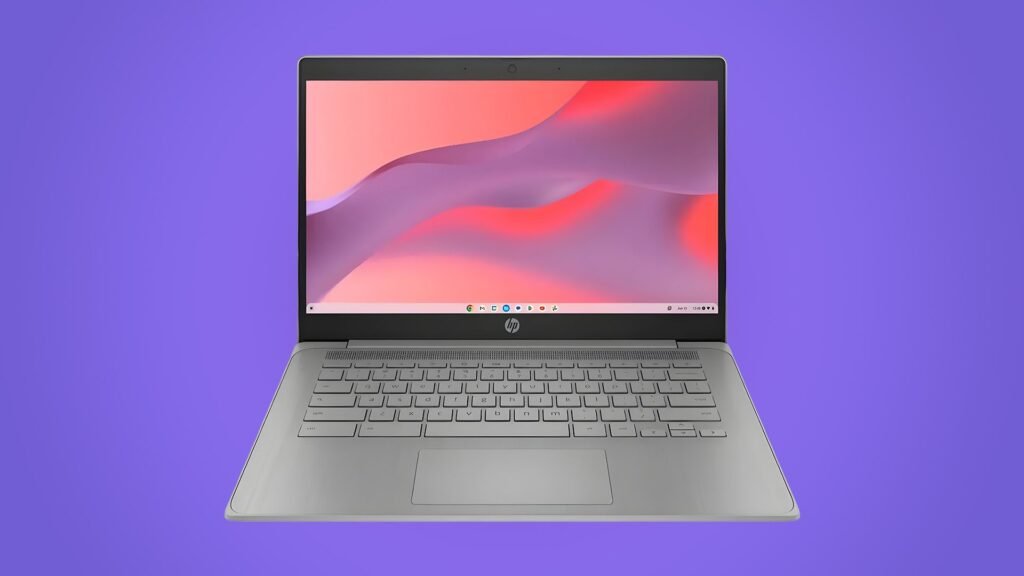
    This HP 14″ Chromebook is as basic as a computer in this day and age can get, but it has a $330 MSRP, which is horrible. Right now, though, you can get it for more than half off, at just $130. It’s a really good back-to-school deal if all you wish is a laptop that gets the basics right and works well for web apps.

    Let me be extremely clear here—this laptop has decidedly entry-level specifications. It has an Intel Celeron N4500 processor, 64GB of eMMC storage, and 4GB of RAM, making it pretty bad at everything that’s not web browsing, answering emails, or using web apps such as Google Docs. It’s as basic as a laptop can get these days. But if your workflow is mostly done online and you don’t need to install any Android/Linux apps except for the most basic ones, you can probably squeeze a lot of juice out of this one. It’s great if you work online and you don’t need absolutely everything else, and it’s great to give a kid their first laptop.

    At $130, we’re basically in “pocket change I can use to grab a used laptop off eBay” territory. And you might be able to grab a 13-year-old MacBook or an unsupported Windows 10 computer that you won’t be able to update to Windows 11, but you’ll be lucky to get anything better than that for this little. And it will also probably have similar specs to this—maybe more storage if you get something with a spinning hard drive. This is not the best computer, but it’s a brand-new computer in its box, it’s still getting updates (including security updates), and it can get some work done. I would much rather buy something like this if I were looking for something in this budget.

    This deal might not last forever, though, so check it out while it’s still live.

    Basics Chromebook Today
    Share. Facebook Twitter Pinterest LinkedIn Tumblr Telegram Email Copy Link
    Previous ArticleNetflix’s most popular show ever has been watched for 1.7 billion hours
    Next Article OpenAI closes gap to artificial general intelligence with GPT-5
    Michael Comaous
    • Website

    Michael Comaous is a dedicated professional with a passion for technology, innovation, and creative problem-solving. Over the years, he has built experience across multiple industries, combining strategic thinking with hands-on expertise to deliver meaningful results. Michael is known for his curiosity, attention to detail, and ability to explain complex topics in a clear and approachable way. Whether he’s working on new projects, writing, or collaborating with others, he brings energy and a forward-thinking mindset to everything he does.

    Related Posts

    2 Mins Read

    Smart home PSA: Apple’s “new architecture” for Home app becomes mandatory today

    3 Mins Read

    Want Alexa+ today? Everyone in the US can finally try it now – here’s how

    4 Mins Read

    I watched the Challenger shuttle disaster from inside Mission Control – 40 years ago today

    6 Mins Read

    How to turn your Roku TV into a Frame-like TV today – for free

    1 Min Read

    You can still save up to 70 percent on headphones from Bose and Sony today

    3 Mins Read

    My Most Trusted Jumpstarter Is Nearly Half Off Today

    Top Posts

    Discord will require a face scan or ID for full access next month

    February 9, 2026761 Views

    The Mesh Router Placement Strategy That Finally Gave Me Full Home Coverage

    August 4, 2025559 Views

    Past Wordle answers – all solutions so far, alphabetical and by date

    August 1, 2025230 Views
    Stay In Touch
    • Facebook

    Subscribe to Updates

    Get the latest tech news from FooBar about tech, design and biz.

    Most Popular

    Discord will require a face scan or ID for full access next month

    February 9, 2026761 Views

    The Mesh Router Placement Strategy That Finally Gave Me Full Home Coverage

    August 4, 2025559 Views

    Past Wordle answers – all solutions so far, alphabetical and by date

    August 1, 2025230 Views
    Our Picks

    FCC chair calls Paramount/WBD merger “a lot cleaner” than defunct Netflix deal

    March 4, 2026

    Who needs data centers in space when they can float offshore?

    March 4, 2026

    I’m not ashamed to admit the Kobo Remote is the best gadget I’ve bought this year

    March 4, 2026

    Subscribe to Updates

    Get the latest creative news from FooBar about art, design and business.

    Facebook
    • About Us
    • Contact us
    • Privacy Policy
    • Disclaimer
    • Terms and Conditions
    © 2026 GeekBlog

    Type above and press Enter to search. Press Esc to cancel.

    Ad Blocker Enabled!
    Ad Blocker Enabled!
    Our website is made possible by displaying online advertisements to our visitors. Please support us by disabling your Ad Blocker.