Close Menu
GeekBlog

    Subscribe to Updates

    Get the latest creative news from FooBar about art, design and business.

    What's Hot

    A Toddler Needed a $20,000 Wheelchair. A High School Robotics Team Built Him One Instead.

    August 5, 2026

    AI’s Memory Boom Is Quietly Crushing the Budget Smartphone

    August 5, 2026

    Scientists Didn’t Say Earth Is Becoming Uninhabitable. Here’s What the “Hothouse Earth” Study Actually Says

    August 5, 2026
    Facebook X (Twitter) Instagram Threads
    GeekBlog
    • Home
    • Mobile
    • Tech News
    • Blog
    • How-To Guides
    • AI & Software
    Facebook
    GeekBlog
    Home»How-To Guides»OnePlus 13 gets its own version of Google’s Best Take
    How-To Guides

    OnePlus 13 gets its own version of Google’s Best Take

    Michael ComaousBy Michael ComaousAugust 9, 20252 Mins Read
    Share Facebook Twitter Pinterest LinkedIn Tumblr Email Copy Link
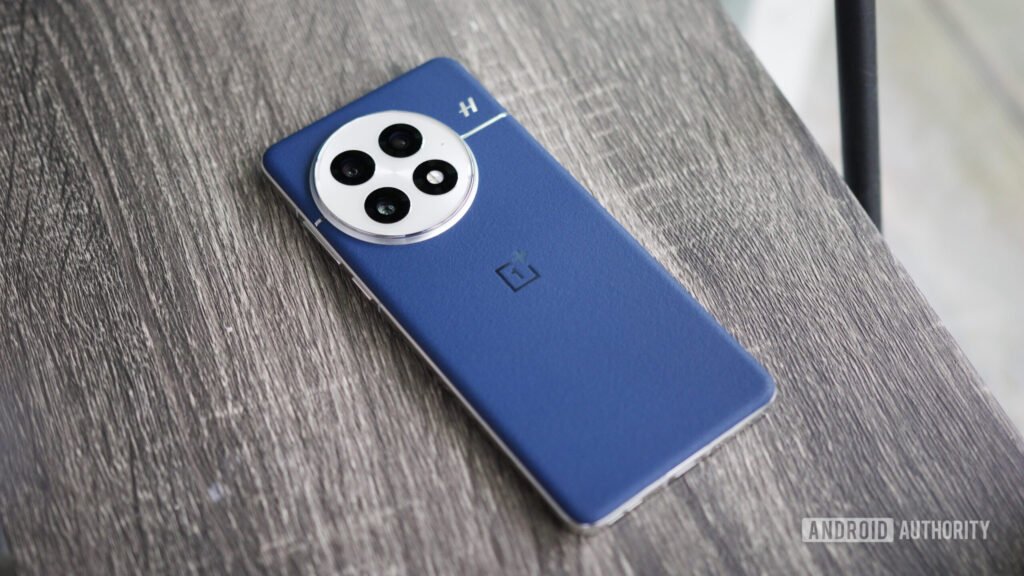
    The blue leather OnePlus 13 lying on a shelf.
    Share
    Facebook Twitter LinkedIn Pinterest Email Copy Link

    Recommended for you:

    I Made the Switch to Linux—These Surprises Caught Me Off Guard
    How-To Guides·Aug 9, 2025

    I Made the Switch to Linux—These Surprises Caught Me Off Guard

    Joe Maring / Android Authority

    TL;DR

    • An update has rolled out for the OnePlus 13.
    • The update introduces the new AI Perfect Shot feature.
    • AI Perfect Shot can recognize a person and replace facial expressions to provide the best shot.

    Earlier this year, OnePlus announced that a bevy of new AI tools would soon be available on its phones. This included two photo-centric features: AI Reframe and AI Perfect Shot. It looks like the latter is now starting to roll out to the OnePlus 13.

    A new software update has arrived for OnePlus 13 owners. The changelog for the update mentions various add-ons and improvements, including the rollout of AI Perfect Shot. Similar to Google’s Best Take tool, AI Perfect Shot can recognize faces in a photo and replace unwanted facial expressions with more desirable expressions. This way you can always get the best photo. For example, if you blink as the picture is taken, you can use this feature to make it look like you were looking at the camera the entire time.

    OnePlus new AI camera features

    Robert Triggs / Android Authority

    In addition to AI Perfect Shot, this update introduces a soft light filter to the Portrait and Photo modes. Users can now export videos as live photos, or export videos and live photos in high resolution. The changelog also mentions that 120FPS video will stay 120FPS even after being edited. And you can now hide content of specific albums from your photo list.

    Seeing as OnePlus said AI Perfect Shot was scheduled to roll out later this summer, it looks like the feature has arrived right on time. Have you received the update on your OnePlus 13 yet? Let us know in the comments section below.

    Thank you for being part of our community. Read our Comment Policy before posting.

    Share. Facebook Twitter Pinterest LinkedIn Tumblr Telegram Email Copy Link
    Previous ArticleGaming on a Chromebook is about to get a lot more difficult
    Next Article Microsoft’s Clippy Crocs Might Be the World’s Weirdest Pair of Shoes
    Michael Comaous
    • Website

    Michael Comaous is a dedicated professional with a passion for technology, innovation, and creative problem-solving. Over the years, he has built experience across multiple industries, combining strategic thinking with hands-on expertise to deliver meaningful results. Michael is known for his curiosity, attention to detail, and ability to explain complex topics in a clear and approachable way. Whether he’s working on new projects, writing, or collaborating with others, he brings energy and a forward-thinking mindset to everything he does.

    Related Posts

    8 Mins Read

    Why Is My Phone Lagging All of a Sudden? (Fixes)

    7 Mins Read

    How to Block Twitch Ads With uBlock Origin (2026)

    8 Mins Read

    How to Clear Cache on Android (Any Phone)

    8 Mins Read

    How to Reset AirPods: Every Model, Step by Step

    8 Mins Read

    How to Transfer Data to a New iPhone: Full Guide

    8 Mins Read

    How to Check Battery Health on Android (No Root)

    Top Posts

    Best Stores for Buying MP3 and Digital Music You Can Keep Forever (2026)

    August 2, 202530 Views

    Every iPhone Camera Ranked in 2026 (Best to Worst)

    July 6, 202613 Views

    How to Fix PS5 Controller Stick Drift (2026): 7 Working Methods

    July 10, 20268 Views
    Stay In Touch
    • Facebook

    Subscribe to Updates

    Get the latest tech news from FooBar about tech, design and biz.

    Most Popular

    Best Stores for Buying MP3 and Digital Music You Can Keep Forever (2026)

    August 2, 2025930 Views

    Discord will require a face scan or ID for full access next month

    February 9, 2026770 Views

    Trade in your old phone and get up to $1,100 off a new iPhone 17 at AT&T – here’s how

    September 10, 2025383 Views
    Our Picks

    A Toddler Needed a $20,000 Wheelchair. A High School Robotics Team Built Him One Instead.

    August 5, 2026

    AI’s Memory Boom Is Quietly Crushing the Budget Smartphone

    August 5, 2026

    Scientists Didn’t Say Earth Is Becoming Uninhabitable. Here’s What the “Hothouse Earth” Study Actually Says

    August 5, 2026

    Subscribe to Updates

    Get the latest creative news from FooBar about art, design and business.

    Facebook
    • About Us
    • Contact us
    • Privacy Policy
    • Disclaimer
    • Terms and Conditions
    © 2026 GeekBlog

    Type above and press Enter to search. Press Esc to cancel.