Close Menu
GeekBlog

    Subscribe to Updates

    Get the latest creative news from FooBar about art, design and business.

    What's Hot

    Trump Renamed AI “Super Intelligence.” The Word Already Meant Something Else.

    October 1, 2026

    Pixel Watch 2 Support Ends Today: What You Lose and What to Do Next

    October 1, 2026

    Singapore Built a Dating App That Pays for Your First Date. There Is a Catch About Who Can Use It.

    October 1, 2026
    Facebook
    GeekBlog
    • Home
    • Mobile
    • Tech News
    • Blog
    • Gaming
    • Smartwatch
    • How-To Guides
    • AI & Software
    Facebook
    GeekBlog
    Home»How-To Guides»Now That Phones Are Thin, Bring Back the Physical Keyboard
    How-To Guides

    Now That Phones Are Thin, Bring Back the Physical Keyboard

    Michael ComaousBy Michael ComaousAugust 2, 2025Updated:September 4, 20264 Mins Read
    Share Facebook Twitter Pinterest LinkedIn Tumblr Email Copy Link
    Now That Phones Are Thin, Bring Back the Physical Keyboard
    Share
    Facebook Twitter LinkedIn Pinterest Email Copy Link

    This year has seen two major developments in smartphone hardware. The emergence of ultra-slim devices and highly polished foldables has finally solved two of the problems that killed off one of my favorite ever types of gadgets: the smartphone with a physical QWERTY keyboard. So, isn’t it time for a comeback?

    Phones With Keyboards Were Amazing

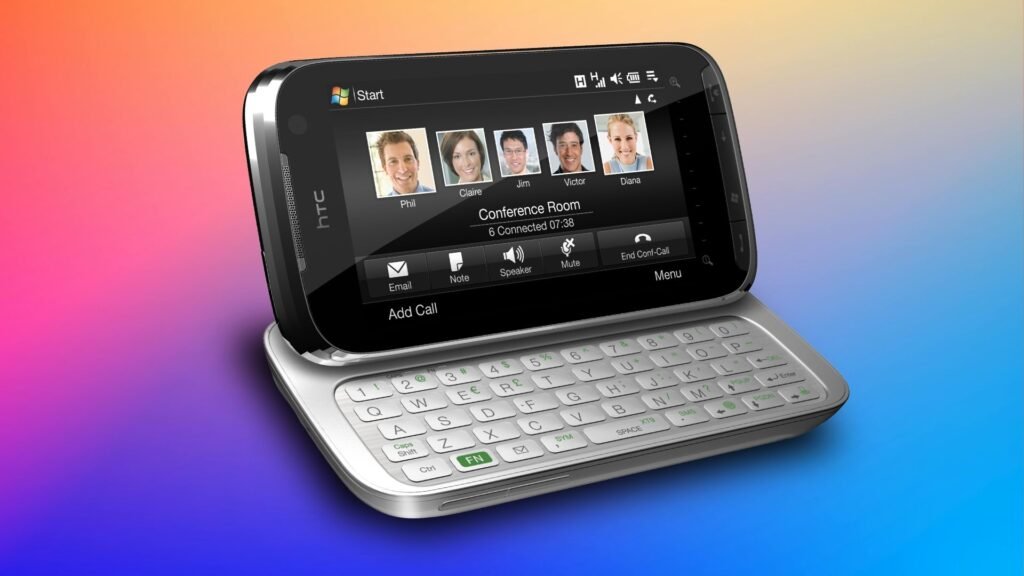
    I used to love phones with physical keyboards, and I’m not just talking about the BlackBerry, although I owned one of those too. I mean devices like the first Android phone, the T-Mobile G1, with its slide-out QWERTY keyboard, or even older handsets like the Windows Mobile-powered HTC TyTN II from 2007 that featured a hinge that propped up the screen like a tiny laptop.

    HTC

    There were loads of devices like it, from Samsung, Motorola, LG, Sony, and more. And they were awesome.

    Looking back, though, it’s not exactly hard to see why they died out. They were thick and clunky devices. The G1 was 0.67 inches thick and had a tiny 3.2-inch display; the TyTN II was three-quarters of an inch thick, and you needed a stylus to use the software keyboard.

    When the iPhone took off with its sleek design, minimal moving parts, and easy-to-use touchscreen typing, the physical keyboard immediately looked dated. But when these phones disappeared, they took a lot of practical usability with them.

    Recommended for you:

    A truck carrying thousands of Galaxy Z Fold 7, Flip 7 units just got stolen
    How-To Guides·Aug 4, 2025

    A truck carrying thousands of Galaxy Z Fold 7, Flip 7 units just got stolen

    In some ways, they were ahead of their time, but the tech is now ready for their comeback. A phone with a physical keyboard could now be as thin as the Galaxy Z Fold 7, which is to say about half the size of the G1. Yet it would have a much bigger screen and a lot more power to take full advantage of its potential.

    Physical QWERTY Keyboards Bring Huge Benefits

    The biggest benefit to a new smartphone with a slide or fold-out keyboard would be to your typing speed. Software keyboards on modern phones are great in portrait mode, albeit they’re still very heavily reliant on autocorrect. But a quality, well-designed physical keyboard will always be better than a software one, especially if you need to do a lot of typing.

    You could have the best of both worlds: touchscreen typing for notes and messaging, and switch to the physical keyboard for anything more.

    Typing in landscape mode on Android.

    It would also vastly aid usability and multitasking. I said that software keyboards are good in portrait mode, but they’re still absolutely terrible in landscape mode, where you can barely fit more than a couple of lines of text onscreen at any time. Switching into horizontal mode is ideal when working on larger documents, but when more than half the screen is taken up by the keyboard, it rather ruins the effect.

    The same goes for multitasking, which becomes a real chore in either orientation when you’ve got the keyboard open. Having a physical keyboard frees up the whole display area for two apps in split-screen mode, and makes it easier to swipe between open apps as well.

    T-Mobile G1 the first Android phone.

    HTC

    This would also bring benefits for the new desktop mode in Android 16. It could help turn your smartphone into a genuine mini-laptop. With a physical keyboard and the screen as a trackpad, you’d be able to make full use of the power of your phone wherever you’ve got access to a desktop monitor.

    And as someone who enjoys retro gaming using emulators for consoles that had physical buttons, it’s easy to imagine how gaming could be helped that as well. The keyboard might even double as an integrated controller, something which no other phone can do, and fix one of the problems with Android gaming.

    Recommended for you:

    Why This Built-In Windows Feature Isn’t a Replacement for Your Password Manager
    How-To Guides·Aug 4, 2025

    Why This Built-In Windows Feature Isn’t a Replacement for Your Password Manager

    The Time Is Right for the Return of the Keyboard

    I refuse to believe that there isn’t at least a small but enthusiastic market for a device with a physical keyboard. But I’m not holding my breath waiting for it to happen. Phones are boring these days, and the adventurous spirit of early Android manufacturers like HTC and LG is long gone. We no longer get experimental or outright wacky Android phones; they all conform to the same look and feel as each other.

    Yet the time is right for their return. The technology exists to take the phones of 15 or 20 years ago and finally fulfill their promise. They could be thinner and lighter, and bigger and more powerful than ever, and could unleash a whole new era of smartphone creativity and productivity. Until then, we’re stuck with writing on glass.

    Share. Facebook Twitter Pinterest LinkedIn Tumblr Telegram Email Copy Link
    Previous ArticleAmazfit Bip 6 review: Surprisingly premium for the price
    Next Article 5 privacy browsers I recommend if you’re tired of ads and tracking
    Michael Comaous

      Michael Comaous is a dedicated professional with a passion for technology, innovation, and creative problem-solving. Over the years, he has built experience across multiple industries, combining strategic thinking with hands-on expertise to deliver meaningful results. Michael is known for his curiosity, attention to detail, and ability to explain complex topics in a clear and approachable way. Whether he’s working on new projects, writing, or collaborating with others, he brings energy and a forward-thinking mindset to everything he does.

      Related Posts

      9 Mins Read

      Is ChatGPT Confidential? What OpenAI Keeps and Who Can Read It

      11 Mins Read

      Passkeys vs Passwords: What Actually Happens When You Lose the Phone

      10 Mins Read

      7 Ways to Get the Most Out of Your Galaxy Z Fold 7

      10 Mins Read

      Is Google Killing Off the Android TV Discover Tab? What Replaced It and What to Do

      8 Mins Read

      Own a Samsung Phone? 10 Settings I Always Change First for the Best User Experience

      16 Mins Read

      Mesh Wi-Fi Placement: How Far Apart to Put Nodes and Where

      Top Posts

      Best Free Online Music Apps in 2026

      July 7, 20263 Views

      Chromebook vs PC: Which One Should You Actually Buy?

      July 7, 20262 Views

      The Light Flip Wants to Sell You a Phone That Does Less

      July 28, 20261 Views
      Stay In Touch
      • Facebook

      Subscribe to Updates

      Get the latest tech news from FooBar about tech, design and biz.

      Most Popular

      How to Convert HEIC to JPG on iPhone, Mac, Android and Windows

      September 3, 20266 Views

      Gal Gadot’s Lawyers Spent Six Months on One AI Clause. Then SAG Called Them for Pointers.

      September 2, 20265 Views

      The Mesh Router Placement Strategy That Finally Gave Me Full Home Coverage

      September 9, 20263 Views
      Our Picks

      Trump Renamed AI “Super Intelligence.” The Word Already Meant Something Else.

      October 1, 2026

      Pixel Watch 2 Support Ends Today: What You Lose and What to Do Next

      October 1, 2026

      Singapore Built a Dating App That Pays for Your First Date. There Is a Catch About Who Can Use It.

      October 1, 2026

      Subscribe to Updates

      Get the latest creative news from FooBar about art, design and business.

      HEICJPG.online - Convert HEIC to JPG online
      Facebook
      • About Us
      • Contact us
      • Privacy Policy
      • Disclaimer
      • Terms and Conditions
      • Editorial Policy
      • Cookie Policy
      • Your Privacy Choices
      © 2026 GeekBlog

      Type above and press Enter to search. Press Esc to cancel.