Close Menu
GeekBlog

    Subscribe to Updates

    Get the latest creative news from FooBar about art, design and business.

    What's Hot

    Crashing the Boys’ Club: Why Cybersecurity Is Finally Opening Its Doors to Career Changers

    July 22, 2026

    Fairphone’s CEO Just Teased Two New Products, and the Timing Could Not Be Better

    July 22, 2026

    Telecom Giants Form C2 ISAC to Fight the Next Salt Typhoon

    July 21, 2026
    Facebook X (Twitter) Instagram Threads
    GeekBlog
    • Home
    • Mobile
    • Tech News
    • Blog
    • How-To Guides
    • AI & Software
    Facebook
    GeekBlog
    Home»How-To Guides»Roku’s new $3 ad-free streaming undercuts Netflix—with a catch
    How-To Guides

    Roku’s new $3 ad-free streaming undercuts Netflix—with a catch

    Michael ComaousBy Michael ComaousAugust 6, 20253 Mins Read
    Share Facebook Twitter Pinterest LinkedIn Tumblr Email Copy Link
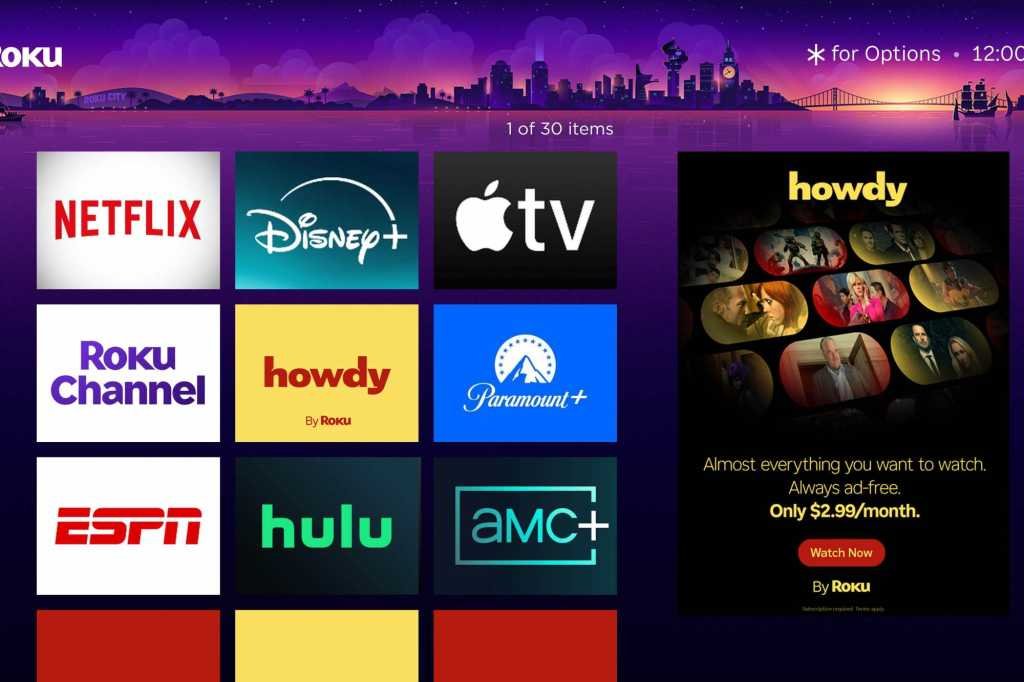
    Roku Howdy service
    Share
    Facebook Twitter LinkedIn Pinterest Email Copy Link

    Want ad-free streaming without paying through the nose for Netflix or HBO Max? Roku’s new budget streamer serves up a tempting selection of movies and TV shows for a lot less, provided you can deal with some caveats. 

    Slated to launch today, Howdy costs just $3 a month for unlimited ad-free streaming, a price that undercuts Netflix’s cheapest—and ad-supported—plan by $5 a month. 

    That low cost of admission gets you roughly 10,000 hours of streaming content, according to Roku, including such highlights as Max Max: Fury Road, Elvis, The Blind Side, Reservoir Dogs, Weeds, Southland, and Kids in the Hall. So far, Howdy’s content partners include Lionsgate, Warner Bros. Discovery, and FilmRise, with “select” Roku Original titles also in the mix. 

    Roku is promising a “high-quality, ad-free experience” from Howdy, including up to 1080p video resolution and Dolby Digital 5.1 sound “where available,” according to a Roku spokesperson.

    So, not too bad for $3 a month, but there is a catch: Aside from watching on a web browser, Howdy content must be streamed either on a Roku device (including a Roku streaming stick or a Roku TV) or the Roku mobile app for iOS or Android. That means if you’re hoping to binge-watch Howdy videos on an Apple TV, a Google TV streaming device, a Fire TV stick, or another non-Roku streaming player, you’re out of luck. 

    The good news is that Roku streaming players are way cheap. For example, you can snag Roku’s latest HD streaming player (which we just reviewed) for just $19 on Amazon, while the 4K-capable Roku Streaming Stick Plus is going for just $30. 

    While you can also stream Howdy content on the Roku app for iOS and Android, you can’t download videos for offline viewing–or at least, not yet, as the feature “may be [available] in the future,” Roku says.

    Howdy may be an ad-free streaming service, but if you watch it on a Roku TV or streaming player, you’ll have to contend with a user interface that is riddled with ads. (Amazon and Google streaming players have ad-stuffed interfaces, too.)

    Earlier this year, Roku got dinged for experimenting with an auto-playing ad that appeared when users first turned on their Roku TVs or streaming devices. The ads had “Close” buttons that allowed you to skip to the home screen, but that didn’t stop Roku users from howling with indignation.  

    Roku said the startup ad was just a “test,” and the intrusive ad placement soon disappeared. 

    Updated shortly after publication with additional details from Roku.

    Streaming
    Share. Facebook Twitter Pinterest LinkedIn Tumblr Telegram Email Copy Link
    Previous ArticleI can’t believe Microsoft beat Apple to selling a 5G laptop
    Next Article Samsung Acknowledges Its ‘Upcoming’ Tri-Fold Phone on Earnings Call
    Michael Comaous
    • Website

    Michael Comaous is a dedicated professional with a passion for technology, innovation, and creative problem-solving. Over the years, he has built experience across multiple industries, combining strategic thinking with hands-on expertise to deliver meaningful results. Michael is known for his curiosity, attention to detail, and ability to explain complex topics in a clear and approachable way. Whether he’s working on new projects, writing, or collaborating with others, he brings energy and a forward-thinking mindset to everything he does.

    Related Posts

    8 Mins Read

    Windows 11 vs Windows 10: Should You Upgrade?

    8 Mins Read

    Why Is My Phone Lagging All of a Sudden? (Fixes)

    7 Mins Read

    How to Block Twitch Ads With uBlock Origin (2026)

    8 Mins Read

    How to Clear Cache on Android (Any Phone)

    8 Mins Read

    How to Use Zoom: Complete Beginner’s Guide

    8 Mins Read

    How to Reset AirPods: Every Model, Step by Step

    Top Posts

    Best Stores for Buying MP3 and Digital Music You Can Keep Forever

    August 2, 202551 Views

    Best Free Online Music Apps in 2026

    July 7, 202649 Views

    Every iPhone Camera Ranked in 2026 (Best to Worst)

    July 6, 202635 Views
    Stay In Touch
    • Facebook

    Subscribe to Updates

    Get the latest tech news from FooBar about tech, design and biz.

    Most Popular

    Best Stores for Buying MP3 and Digital Music You Can Keep Forever

    August 2, 2025896 Views

    Discord will require a face scan or ID for full access next month

    February 9, 2026770 Views

    Trade in your old phone and get up to $1,100 off a new iPhone 17 at AT&T – here’s how

    September 10, 2025381 Views
    Our Picks

    Crashing the Boys’ Club: Why Cybersecurity Is Finally Opening Its Doors to Career Changers

    July 22, 2026

    Fairphone’s CEO Just Teased Two New Products, and the Timing Could Not Be Better

    July 22, 2026

    Telecom Giants Form C2 ISAC to Fight the Next Salt Typhoon

    July 21, 2026

    Subscribe to Updates

    Get the latest creative news from FooBar about art, design and business.

    Facebook
    • About Us
    • Contact us
    • Privacy Policy
    • Disclaimer
    • Terms and Conditions
    © 2026 GeekBlog

    Type above and press Enter to search. Press Esc to cancel.