

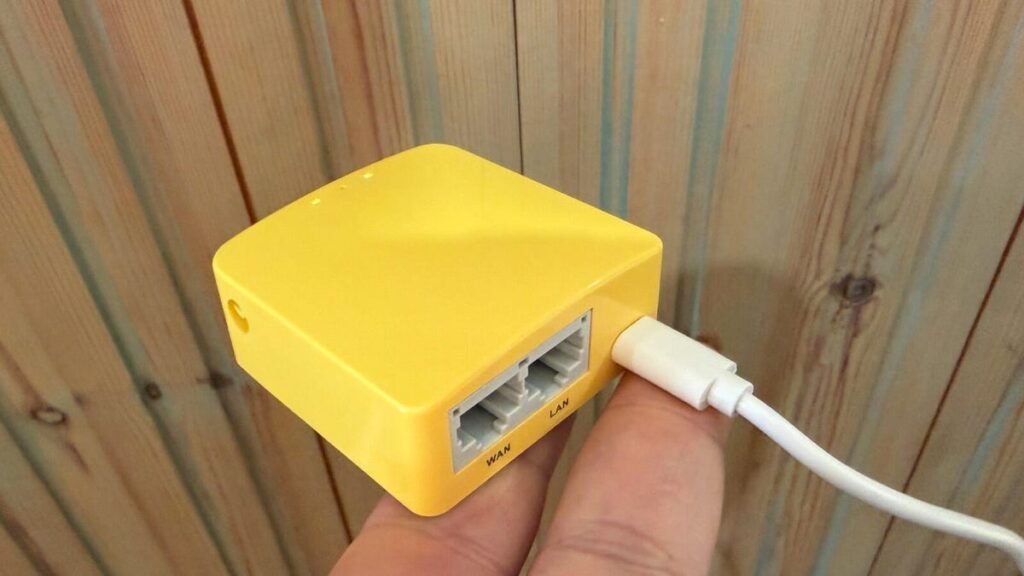
GL.iNet Mango GL-MT300N-V2
pros and cons
- Compact and can be powered with USB
- Offers several ways to get an internet connection when traveling
- Built-in VPN support is a great way to create a secure network when out and about.
- Uses microUSB for power rather than USB-C
- The “getting started” guide only skims the surface of what this device can do
- User interface can be a bit slow at times.
Follow ZDNET: Add us as a preferred source on Google.
I thought that having a mobile hotspot built into my smartphone would put an end to needing a travel router. After all, it works great when I’m in the UK. I get fast internet speeds, and it’s a super reliable way to connect my devices when I’m away from home or the office.
But that’s not the case everywhere. Here in the UK, the rules for telecommunications providers are set by Ofcom (the Office of Communications), and they’re pretty simple — your hotspot should work like your phone. No limitations, no nonsense. But when I’m not in the UK, things get… more complicated. Even in Europe, which has “Roam Like at Home” rules, there are usually hurdles such as speed caps and “fair use policies” to contend with.
And it only gets worse outside of the EU.
Also: This portable SSD with NFC unlock is the most intuitive iPhone accessory I’ve tested
So, mobile hotspots didn’t become the amazing solution they could have been — and not because of the technology, but because of artificial limitations imposed by carriers. If the carriers can make an extra buck from you or put a hurdle in the way of using what you’ve paid for, you can be sure that, in the absence of legislation, you will face obstacles.
This issue means hotspots are only part of the solution, partly because of carrier nonsense and partly because Wi-Fi coverage is getting better. However, public Wi-Fi is fraught with its own complications, restrictions, FUPs (Fair Use Policies), and more.
Also: How to enter Safe Mode on your Android phone – and when’s the right time to do it
What I needed was a tool that let me rise above all this nonsense and create secure, private, and portable Wi-Fi networks while traveling, whether I’m connected to Wi-Fi at a hotel, airport, café, or Airbnb, or I have to connect to a local cellular provider.
And a big part of that approach is the GL.iNet Mango (GL-MT300N-V2) mini smart router.
Networking smarts in a small box
The Mango is a tiny box that packs a lot of networking smarts and lets you access the internet in several ways. Have free Wi-Fi? Use the device as a repeater. Come across a free WAN port? No problem (as long as you have a cable). Want to tether to your smartphone? Mango lets you do that.
And if all else fails, you can plug a 4G modem dongle into the USB port and use the device to connect to a local cellular provider (hold this thought, because I’ll tell you how to do this without messing with local SIM cards and such).
Also: I set up a Firawalla Orange router at home, and it’s a bigger security upgrade than expected
The Mango is powered via USB, and this is one of those situations where you’ll need a microUSB cable (will they ever die?) and a USB port with power. Power banks will work as long as they don’t mind the low current draw, but if you’re using a modem dongle, you’ll need an outlet that delivers at least 5V/2A (which really isn’t much by today’s standards).
How to get started with the Mango
How easy you find the Mango to use depends on your experience with networking and networking devices. The Get Started guide is, as the name suggests, all you need to get going.
But if you want to set up things like VPNs and similar, you’ll either already know what you’re doing to some degree, or you’ll use GL.iNet’s extensive support documents and active community forum. The former will tell you how to do things, and the latter comes in handy when things aren’t behaving as they should.
My advice to first-time Mango users is to fire it up, follow the instructions to connect the device, perform basic tasks like updating the firmware, and then connect it to your home network so you can get used to using it.
There’s a lot to the Mango’s user interface.
Adrian Kingsley-Hughes/ZDNET
Unless you know your LANs from your WANs, this device isn’t something you want to take out of the box when you’re in a foreign country and try to find an internet connection that won’t steal your identity or fill your devices with malware.
I also suggest changing the default Wi-Fi password, as Mango is one of those devices that doesn’t use a unique password.
The device comes apart easily, and there’s scope for tweaks.
Adrian Kingsley-Hughes/ZDNET
After that, well, the internet’s your oyster for the taking. I’d suggest setting up a VPN, as it’s the best way to secure your portable network.
The tinkerer in me can’t leave things alone, and I’m already thinking about adding external antennas to my Mango. The process seems a bit involved, but it might be a task to pass an evening.
My foreign travel tip
If you’d rather connect to a local cellular provider than rely on free Wi-Fi, I’ve got a trick I’ve used for the past year or so that works great. I got myself a USB dongle modem and a SIM card that allows me to load eSIMs onto it. I then buy an eSIM online.
Also: Also: I tested a solid-state portable battery for a week – now lithium-ion feels outdated
I’ve been using Maya Mobile and Saily (which come with apps for Android and iOS, but there are loads of other providers out there), load the virtual SIM onto the physical SIM card, and I’m good to go.
This way, I’m getting great deals on data abroad (far better than my domestic carrier offers), and I’m in control.
ZDNET’s buying advice
For $30, the GL.iNet Mango (GL-MT300N-V2) mini smart router is a lot of networking and security built into a small box. And it’s not only made my travel safer, but it’s also made getting a good connection that I can share across different devices much easier. It’s one of those devices that just works, so I can overlook that it requires a microUSB for power and that the user interface can feel a bit slow at times.
Add a USB modem dongle and an eSIM-compatible SIM, and I’m a happy traveler.
Source: www.zdnet.com
