

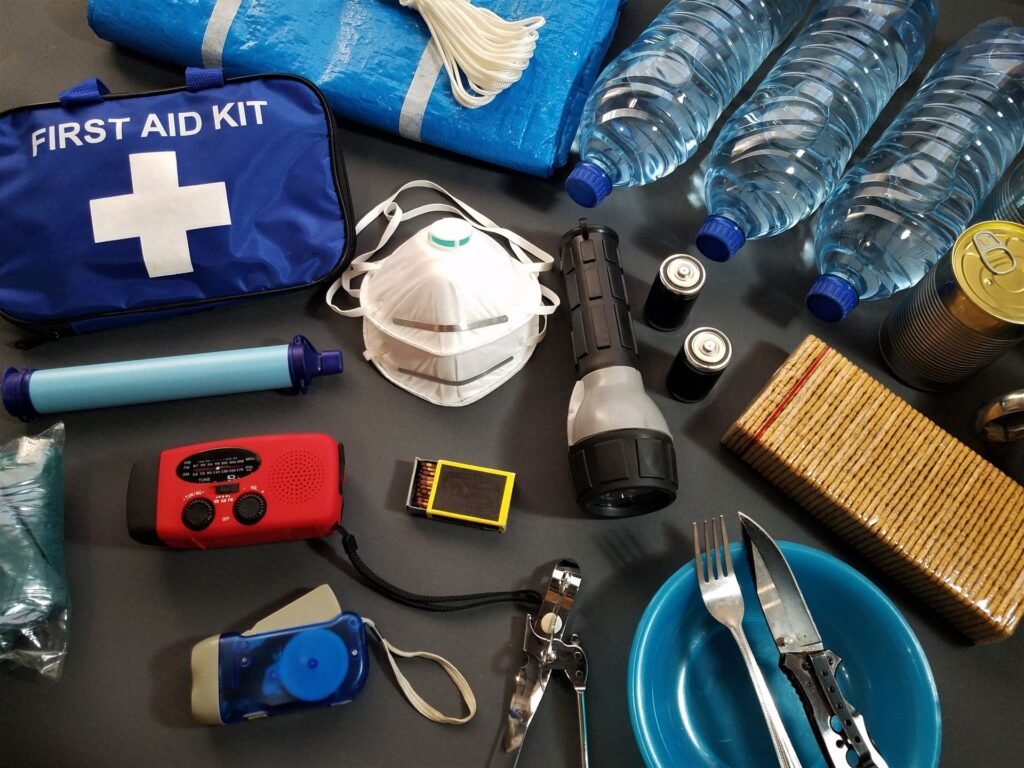
Dan Bongino has a shopping list for you, and most of it runs on batteries. On a recent episode of The Dan Bongino Show, the former FBI deputy director told listeners to build a basic emergency stockpile: “Have yourself an emergency radio, have yourself some batteries, get yourself some emergency food, get yourself a rain collection and water filtration, some filtration tablets.”
He framed it as cheap insurance. “The best day of your life, you don’t need them. And in 10 years, you’re like, ‘Ah, I wasted $1,000 or whatever’,” he said. “The worst day in your life is your kids looking you in the face like, ‘Hey Dad, Mom, where’s the water?'” UNILAD Tech picked up the comments and used them as a nudge to check one piece of gear almost everyone already owns: the phone in your pocket, and whether it will actually buzz when officials send an emergency alert.
Plenty of people switched off the loud alerts after one too many 2 a.m. AMBER notifications and never switched them back on. Here is how to check, on iPhone and Android, and what else belongs in a kit if you take Bongino’s advice.
The short version
- iPhone: Settings > Notifications, scroll to the very bottom, and check the Government Alerts toggles.
- Android: look for Wireless emergency alerts under Settings > Safety and emergency (Samsung and many others) or Settings > Notifications (recent Pixel builds).
- National Alerts can’t be turned off. AMBER, Public Safety and most threat alerts can, so make sure they’re on.
- Alerts need a WEA-capable phone that is powered on, out of airplane mode and on a participating carrier.
- FEMA’s Ready.gov baseline: one gallon of water per person per day for at least three days. That is 12 gallons for a family of four.
Who Bongino is, and why “former”
Bongino, a former Secret Service agent turned conservative podcaster, became FBI deputy director in March 2025. He announced in December 2025 that he would leave in January, and his last day at the bureau was January 3, 2026, according to reporting from The Blaze and others. CNN reported the exit followed friction with the Justice Department and strain on his personal life. His podcast returned on February 2, 2026, per Axios.
So the stockpile advice comes from a podcast host with a law enforcement résumé, not from a current FBI official, and it isn’t an official FBI warning. The advice itself, though, lines up closely with what FEMA has told households for years.
How to check emergency alerts on iPhone
Apple tucks these settings at the bottom of a long menu, which is why people forget they exist.
Toggles (US carriers): AMBER Alerts, Emergency Alerts (+ Always Deliver), Public Safety Alerts, Test Alerts
iOS 26.2 and later: Settings > Notifications > Enhanced Alerts > Earthquake Alerts, Imminent Threat Alerts
- Open Settings and tap Notifications.
- Scroll all the way down to Government Alerts.
- Turn on AMBER Alerts, Emergency Alerts and Public Safety Alerts.
- Tap Emergency Alerts and enable Always Deliver if you see it. With it off, emergency alerts won’t make a sound while the phone is in Silent mode.
- Test Alerts are off by default and only appear on US carriers. Leave them off unless you want the state and local test pings.
Two newer details are worth knowing. Since iOS 26.2, US iPhones also get Enhanced Safety Alerts, a separate Apple-delivered layer with toggles for Earthquake Alerts and Imminent Threat Alerts (both on by default) plus an optional “Improve Alert Delivery” setting that shares your approximate location with Apple. Apple says these may arrive faster than the carrier-delivered government version, and you can get both for the same event. Second, whatever you set on the iPhone carries over to a paired Apple Watch, and a cellular watch can receive alerts on its own. If someone in your house relies on wrist vibrations, our guide to smartwatches for deaf and hard of hearing users covers which models handle alerts best.
Apple’s own notes also apply here: some alerts can’t be turned off, and AMBER and Public Safety Alerts aren’t available in every country. Running an older build? Our iOS 27.2 update guide explains what the latest release fixes and whether to install it now.
How to check emergency alerts on Android
Android is messier because every manufacturer moves the menu. The fastest route on any phone is to open Settings and search for “emergency alerts.”
Older Samsung builds: Settings > Notifications > Advanced settings > Wireless emergency alerts
Google Pixel: Settings > Safety & emergency > Wireless emergency alerts
Newer Pixel builds (per Google): Settings > Notifications > Wireless emergency alerts
Once you’re in, make sure Allow alerts is on, then check the individual switches: Extreme threats, Severe threats, AMBER alerts and Public safety messages. State and local tests are optional. Samsung’s support page lists the same core categories.
Which alerts you can switch off
Wireless Emergency Alerts (WEA) run through FEMA’s Integrated Public Alert and Warning System (IPAWS). Authorized agencies send a message to FEMA, FEMA passes it to participating carriers, and carriers broadcast it from cell towers covering the affected area. It is free and needs no app or sign-up.
| Alert type | What it covers | Can you disable it? |
|---|---|---|
| National Alert (formerly Presidential) | Nationwide emergencies issued by the President or the FEMA Administrator | No |
| Imminent threat (Extreme / Severe) | Tornadoes, flash floods, hurricanes, wildfires, evacuation orders, shelter-in-place | Yes (iPhone: “Emergency Alerts”; Android: Extreme and Severe threats) |
| AMBER Alert | Child abductions meeting law enforcement criteria | Yes |
| Public Safety | Less severe but important info, such as boil-water notices or road closures | Yes |
| State and local tests | Test messages from local alerting authorities | Opt-in, off by default |
| Enhanced Safety Alerts (iPhone) | Apple-delivered earthquake and imminent threat alerts, iOS 26.2 and later, US and Taiwan | Yes |
A few useful WEA facts. On 4G LTE and newer networks, alerts can run up to 360 characters, up from the original 90, and agencies are told to also send a 90-character version for phones on older networks. Carriers must deliver Spanish-language alerts. The “Presidential Alert” label was renamed “National Alert” under a 2021 FCC order, with carriers required to switch the wording by July 31, 2022. The system has been used heavily: FEMA said it had sent more than 70,000 alerts by mid-2022, and reports around the October 2023 national test put the count above 80,000.
Why an alert might not reach you
The FCC lists the basics plainly: to receive a WEA message, your handset must be WEA-capable, switched on and not in airplane mode. Beyond that, the usual culprits are:
- Airplane mode or Wi-Fi only. WEA rides the cellular network, so a phone that is only on Wi-Fi won’t get it.
- Phone off or out of signal. No tower, no broadcast. In a widespread outage, this is exactly where a radio earns its spot in the kit.
- Older or imported phones. Most recent handsets support WEA, but some older devices don’t.
- Carrier participation. The FCC says alerts reach WEA-capable phones if the carrier takes part, and suggests checking with smaller carriers directly.
- Muted alerts. If you’ve silenced vibration or sound for alerts, you may not notice one arrive. That is what Always Deliver on iPhone fixes.
No signal at all? iPhone 14 and later models include Emergency SOS via satellite. In September 2026 Apple extended free satellite access by another year for eligible iPhone 14, 15 and 16 owners. Android owners and iPhone users can also tap carrier satellite texting services, which we break down in our guide to Starlink satellite texting on Verizon, AT&T and T-Mobile.
The kit: what Ready.gov actually recommends
Bongino’s list maps neatly onto FEMA’s. Ready.gov recommends one gallon of water per person per day, for drinking and sanitation, for at least three days. FEMA’s “Are You Ready?” guide notes that, depending on where you live, you may want 3, 7 or even 14 days of water on hand. For a family of four, that is the difference between 12 gallons and 56.
The tech side of the list deserves a little thought:
- A NOAA Weather Radio. NOAA Weather Radio All Hazards broadcasts on seven VHF frequencies between 162.400 and 162.550 MHz, which a normal AM/FM set can’t receive. The National Weather Service says the network has more than 1,000 transmitters covering an estimated 97% of the US population. Look for a model with SAME (Specific Area Message Encoding) so it only sounds for your county, and with hand-crank or solar charging so it keeps working when the batteries run out.
- A power bank, charged. Ready.gov’s list includes a phone with chargers and a backup battery. A bank you forgot to charge is just a brick, so put a reminder on your calendar.
- A solar panel or crank charger helps in longer outages, though small folding panels charge slowly. Treat them as a backup to a full power bank, not a replacement.
Bongino’s $1,000 estimate, in context
You don’t need to spend $1,000 to meet FEMA’s baseline. Twelve gallons of water, a few days of canned food, a weather radio, a flashlight and a decent power bank cover the three-day minimum for a family of four, and many households already own half of it.
Sources and further reading
- UNILAD Tech: How to check your iPhone receives emergency alerts after FBI warning
- UNILAD Tech: Former FBI boss urges Americans to build an emergency stockpile
- Apple Support: Government, Emergency and Enhanced Safety Alerts on iPhone
- Apple Support: Government, Emergency and Enhanced Safety Alerts on Apple Watch
- Google Pixel Help: Wireless emergency alerts
- Samsung: Use your Galaxy phone or tablet in emergency situations
- FCC: Wireless Emergency Alerts (WEA)
- FEMA: Wireless Emergency Alerts
- Ready.gov: Build a Kit
- National Weather Service: NOAA Weather Radio FAQ
- MacRumors: Apple extends free satellite access for iPhone 14, 15 and 16 users
- Axios: Bongino to resume podcast on Feb. 2
- The Blaze: Dan Bongino officially leaves the FBI
About this article: GeekBlog covers U.S. technology news, AI, phones, smartwatches and gaming. Every story is written and checked under our Editorial Policy. Spotted a mistake or have a story tip? Contact our editors.
