

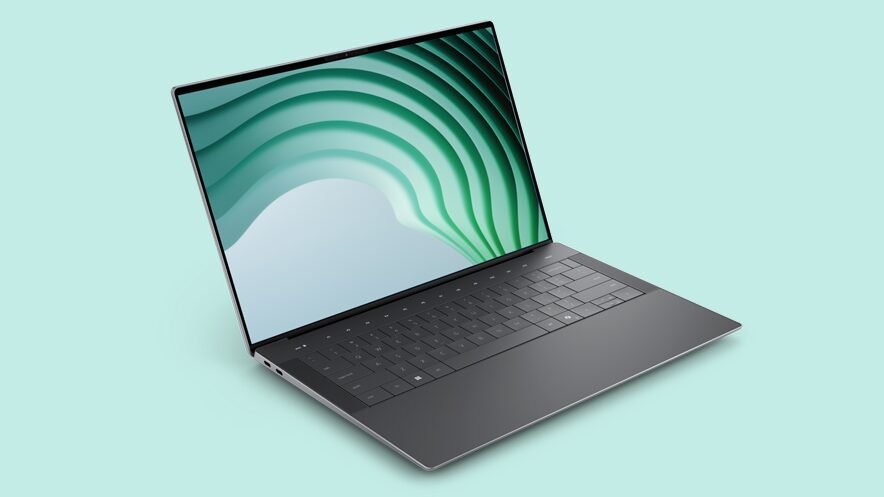
Dell revamped its entire lineup last year, dropping the revered XPS name for the apparently simpler Pro, Pro Max and Premium labels. As Roger Daltrey once yodelled: “Meet the new boss, same as the old boss”.
The Dell 14 Premium, on review here, effectively replaces the (previously) most popular model, the XPS 14. Although the branding is entirely new, the laptop itself is pretty much the same, with only minor upgrades.
That’s fine, though, as the 14 Premium retains all the things we loved about the XPS: fast processors combined with lots of memory and storage, all wrapped into a svelte, highly portable package that hits the sweet spot of price, performance and portability.
Price & Availability
The Dell 14 Premium is available now in fetching Platinum or Graphite finishes. I tested the highest-end version, which features an Intel Core Ultra 7 255H processor, 32GB of RAM, a 1TB SSD, and the NVIDIA RTX 4050 graphics chip, as well as a 3.2K OLED display. That makes it the most expensive version, of course.
Trimming a few options yields the cheapest version at £1499 / $1,699 / AU$2799, which features 16GB of RAM, a 512GB SSD, no dedicated graphics, and a 2K LED display. There are some sales on, too, so you might find these available for even less.
Editor’s note: Richard’s test version had the 265H variant of Intel’s processor, so off-the-shelf results will differ slightly compared to the review unit provided by Dell.
Design
You’d be forgiven for looking at the Dell XPS 14 and the 14 Premium and thinking that they are the same laptop: both share the same minimalist and sleek design, with a machined aluminium case and invisible Gorilla Glass touchpad, with a low-profile keyboard and touch-screen function keys.
Those with eagle eyes might notice that the Dell logo on the back of the lid has changed with the rebranding, but it’s otherwise identical.
There are some changes inside the case, featuring a new and quieter cooling system, that moves the heat produced by the 16-core Intel Core Ultra 7 processor (which tops out at a speedy 5.1GHz).
This supports LDDPR5x memory, too, which can transfer data slightly quicker than last year’s XPS models. That’s combined with an Nvidia RTX 4050 graphics processor with 6GB of dedicated video memory.
Features & Specification
Image 1 of 6


The Dell 14 Premium features an impressive array of capabilities beyond the processor and GPU, including three Thunderbolt 4 ports (two located on the left side), Wi-Fi 7 connectivity, and Bluetooth 5.4 wireless networking. Any of the Thunderbolt 4 ports can be used to charge the laptop with the included 60 Watt USB power supply.
The display on my review unit was the OLED option, a gorgeous 3.2K resolution that offers excellent colour, dynamic range and overall clarity. It has a 120Hz refresh rate, and is twinned with an excellent set of speakers on either side of the keyboard.
Although those speakers are on the small side, they produce very clean, clear sound, albeit without much bass punch. They are great for gaming, though, as they create an effective 3D sound feel that helps you sense when something hideous is sneaking up beside you.
The keyboard here is acceptable: the keys are well-sized and have sufficient separation for touch-typing, but lack travel and have a very squishy, almost ‘wet cardboard’ feel.
The invisible touchpad feels a little odd, but I got used to it fairly quickly, and the fake haptic feedback (it feels like a clicky switch, but it’s actually created by a small motor) helps you know when you’ve pressed hard enough.
One area that has had some improvement is the touch function keys. These, located right above the keyboard, replace physical function keys with touch-sensitive spots on the glass cover. They switch between media keys and function keys with a press of the Fn key on the main keyboard. I still found it hard to find the keys by touch, which is annoying for games and other apps that use function keys a lot.
Performance

(Image credit: Future)
Are there any significant performance improvements for the 14 Premium? Ehh, no, but it’s still a speedy laptop for the size. The newer processor and slightly faster memory provide a slight speed boost over the XPS 14, but nothing revolutionary. It’s a little nippier in apps like Photoshop, and 3D games run a little bit faster, but only by a few percentage points.
The Dell 14 Premium achieved a very decent score of 6752 in the PC Mark 10 office benchmark, and a highly credible score of 1205 and 12fps in the 3DMark Steel Nomad test. Both of those are just a little higher than last year’s XPS 14, and are among the high ranks for laptops of this class.
There was no shortage of performance for power-hungry apps during my testing: I found the notorious memory and processor hogs Photoshop and Premiere to be quick and responsive, and a little faster than the XPS 14.
The laptop had no problem converting a 4K video file, but editing at higher resolutions was a little beyond its reach: when I tried applying complex filters to 6K and 8K video files, it slowed to a crawl. That’s not a surprise, though: these filters really require a faster processor and a top-end GPU to render real-time results.

(Image credit: Bethesda Softworks)
The RTX 4050 GPU proved capable of handling 3D gaming at medium resolutions: in the racing game F1 22, in High graphics quality at Full HD resolution, it ran at approximately 82fps, which looked great on the 120Hz refresh rate OLED screen. It can’t handle the maximum resolution of the screen, though, managing a rather jerky 12fps at the native 3200 x 3000 pixels in the Ultra graphics preset.
The 3D hack-and-slash game Doom: The Dark Ages exhibited a similar pattern: it was unplayably slow at the full 3.2K resolution of the display in Ultra Nightmare mode, but once I lowered the resolution to 1680 x 1050 at the High graphics preset, it became just about playable at around 30fps.
The bottom line here? The Dell 14 Premium offers sufficient performance for most daily tasks and general video/photo editing tasks. But it baulks at more intense tasks like 6/8K video editing.
Gaming requires some compromises: the Nvidia RTX 4050 GPU can crank out a lot of frames, but only at quality settings and resolutions a step or two below the maximums that dedicated gaming laptops typically use, and can’t take full advantage of the 3.2K resolution of the OLED screen. To be fair, though, this isn’t a gaming laptop.
Battery Life
The Dell 14 Premium features a 6.9Wh battery integrated into its sleek case, which can power the system for an impressively long time.
In the PC Mark 10 battery test, which simulates office work, it lasted 7 hours and 30 minutes – enough for a full day of work away from a power source.
That depends on what you are doing, of course. When I fired up a game, however, the battery life dropped into minutes rather than hours, such is the way with these things.
Verdict

(Image credit: Dell)
The transition from the XPS 14 to the Dell 14 Premium is largely about branding: there are very few changes from the older model, so the XPS 14 might be a better choice if you can find a refurbished model on sale.
However, the Dell 14 Premium is a worthy successor to the XPS, retaining all the things we loved about it. It strikes an excellent balance of power, portability, and general computing perfection.
Also consider
As I mentioned above, the previous model, the XPS 14, is very similar, so you could save a lot of money by just getting a refurbished XPS 14 from the Dell Outlet. If you want something new, the Apple MacBook Air (2025) has similar processing power and simple styling, but is a little cheaper.
