


The best offline music app depends on what you already pay for and which phone you use. For iPhone owners it is Apple Music, which downloads lossless audio and has no ads. For everyone else it is Spotify Premium, which allows 10,000 downloaded songs on each of up to five devices. If you want offline music for free, Audiomack lets you download songs without paying, with ads, and your library card unlocks hoopla and Freegal, which let you download music with no ads at all.
Quick answer
Best overall: Spotify Premium ($12.99 a month), the most flexible downloads across phones, computers and watches. Best for iPhone: Apple Music ($11.99), downloads up to hi res lossless. Best for YouTube users: YouTube Music Premium ($11.99), with Smart downloads that refill your offline library automatically. Best free: Audiomack, the only major streaming app with free offline downloads. Best free with no ads: hoopla and Freegal with a library card. For music you own: VLC or Musicolet.
Offline listening is what makes a music app usable on flights, subways, road trips through dead zones and anywhere you want to save mobile data. We compared download limits, audio quality, the hidden rules (most apps need you to reconnect every 30 days) and current US prices for every major option as of October 2026.
Offline music at a glance
Prices are US monthly individual plans, October 2026. Storage figures are approximate.
The best offline music apps compared
| App | Price per month | Free offline? | Download limits | Best offline quality | Best for |
|---|---|---|---|---|---|
| Spotify Premium | $12.99 | No (podcasts only) | 10,000 songs per device, 5 devices | Lossless | Most people, any platform |
| Apple Music | $11.99 | No free tier | Limited by storage | Hi res lossless (ALAC) | iPhone and Mac users |
| YouTube Music Premium | $11.99 | No | Limited by storage | 256 kbps AAC | Heavy YouTube users |
| Amazon Music Unlimited | $12.99 ($11.99 with Prime) | No | Limited by storage | HD and Ultra HD lossless | Prime and Alexa households |
| Audiomack | Free | Yes, with ads | Limited by storage | Up to 320 kbps with Premium | Free offline listening |
| hoopla | Free with library card | Yes, no ads | Monthly borrow limit set by library | Varies | Free and ad free borrowing |
| Freegal Music | Free with library card | Yes, MP3s you keep | Weekly download limit set by library | MP3 | Building a free permanent library |
| VLC or Musicolet | Free | Yes, your own files | None | Whatever your files are | Music you already own |
1. Spotify Premium: best overall
Spotify is the most flexible offline app. Toggle Download on any playlist, album or podcast and it saves to your device; you can keep up to 10,000 songs on each of up to five devices, including phones, tablets, computers and supported smartwatches. On Android you can also store downloads on a microSD card from the storage settings. Downloads stay playable as long as you go online at least once every 30 days. Premium costs $12.99 a month in the US since early 2026, and supports lossless quality. Spotify Free can download podcasts but not music. New to it? Our guide to using Spotify covers the basics.
2. Apple Music: best for iPhone
On an iPhone, Apple Music is the most seamless choice. Tap the download arrow on any song, album or playlist, or turn on Automatic Downloads so everything you add to your library is saved for offline play. In Settings, then Music, you can choose the download quality, all the way up to hi res lossless, and turn on Optimize Storage so old downloads are removed when space runs low. Apple Music costs $11.99 a month since July 2026, with no free tier and no ads. See our Apple Music guide for setup.
3. YouTube Music Premium: best for YouTube users
YouTube Music Premium’s standout offline feature is Smart downloads, which automatically fills your phone with a rotating mix of music you are likely to want, refreshed when you connect to WiFi. You can also download specific songs, albums and playlists. Offline files need a connection at least every 30 days. It costs $11.99 a month, or get it bundled in YouTube Premium at $15.99, which also removes ads across YouTube.
4. Amazon Music Unlimited: best for Prime households
Amazon Music Unlimited downloads in HD and Ultra HD lossless quality and works well with Echo speakers. It costs $12.99 a month, or $11.99 if you have Prime. Prime on its own includes ad free listening mostly in shuffle mode, which is fine at home but limited for planning offline listening.
5. Audiomack: best free offline music app
Audiomack is the rare streaming app that lets free users download songs for offline listening, with no paywall on offline playback. The trade off is ads, and the catalog leans toward hip hop, Afrobeats, R&B and independent artists rather than every major label release. Audiomack Premium removes ads and raises the audio quality.
6. hoopla and Freegal: free and ad free with a library card
If you have a US public library card, check whether your library offers hoopla, Freegal or both. hoopla lets you borrow albums and download them in its app for offline listening, with no ads; your library sets a monthly borrow limit. Freegal lets you download a set number of songs each week as MP3 files that you keep permanently. Both are free and completely legal.
7. VLC and Musicolet: for music you own
Music you own is offline by definition. VLC (iPhone, iPad and Android) plays nearly any audio format, including FLAC, with no ads, and Musicolet on Android is a fast, ad free player that works entirely offline. On iPhone, the built in Apple Music app also plays music synced from a computer without a subscription. If you want to buy music to keep, our guide to the best stores for buying MP3 and digital music compares the options.
How much storage offline music uses
Before you download a whole library, check the quality setting. Higher quality sounds better on good headphones, but it fills a phone quickly.
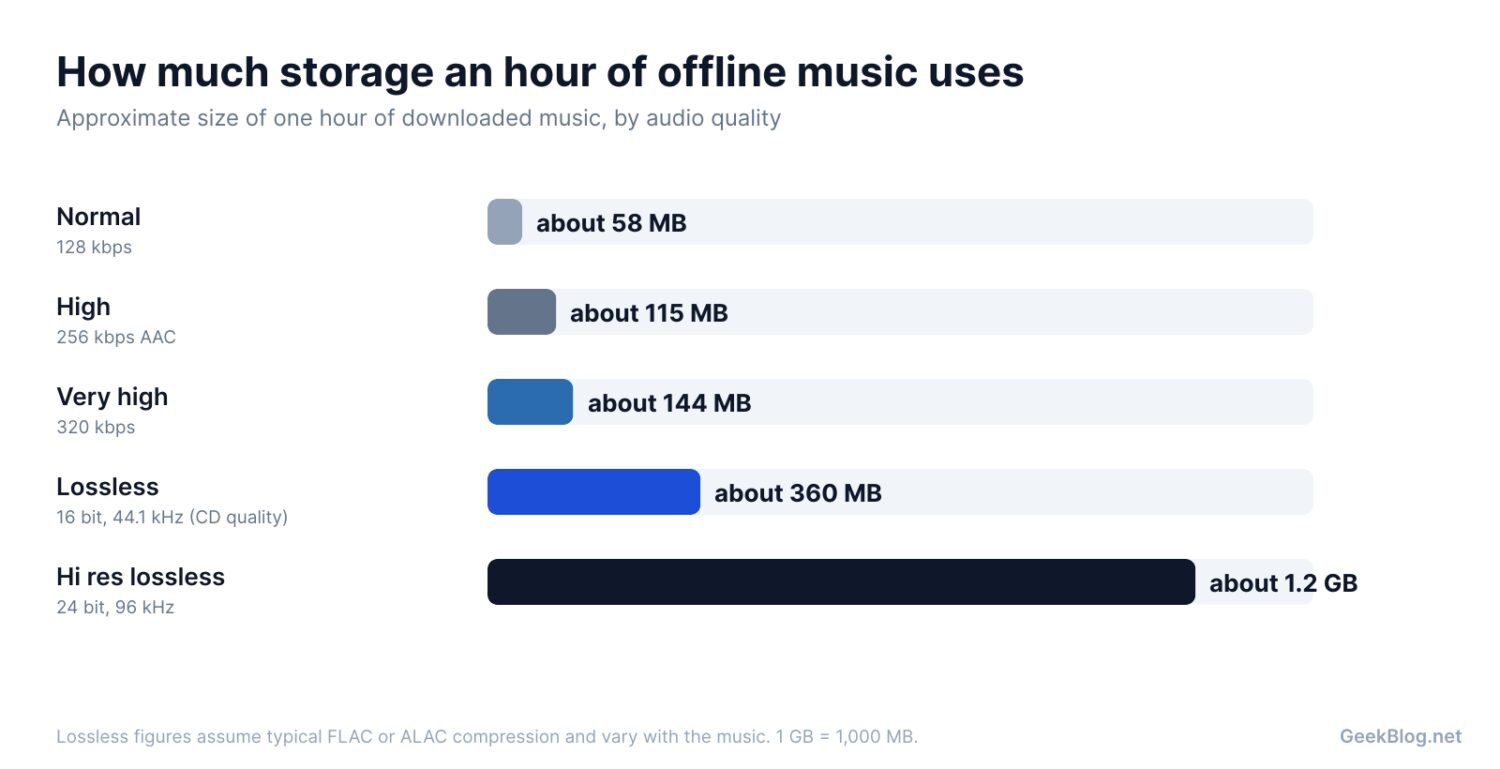
As a rule of thumb, 1,000 songs of average length at 256 kbps take around 7 GB, while the same 1,000 songs in CD quality lossless take roughly 20 to 25 GB. On a 128GB phone, high quality compressed audio is the sensible default for most of your library, with lossless saved for favorite albums. If you listen on AirPods or other Bluetooth earbuds, lossless is mostly wasted, since Bluetooth compresses the audio again. Our pick of the best AirPods explains which models support which codecs.
How to download music for offline listening
- Spotify: open a playlist, album or podcast and tap the Download toggle or arrow. To force offline playback, turn on Offline mode in Settings.
- Apple Music: tap the plus to add a song or album to your library, then tap the download arrow. To download everything automatically, go to Settings, then Music, and turn on Automatic Downloads.
- YouTube Music: tap the download icon on a song, album or playlist, or open Library, then Downloads, and turn on Smart downloads.
- Audiomack: tap the download icon on any song or album; downloads appear under My Library.
Tip
Download over WiFi the night before a trip, then switch your phone to airplane mode and play a few songs to confirm they work without a connection. Also open the app online at least once a month, or most services will lock your downloads until you reconnect.
Which offline music app should you use?
Best overall
Spotify Premium: 10,000 songs per device on five devices, works on every platform, great playlists.
Best on iPhone
Apple Music: hi res lossless downloads, Automatic Downloads and no ads, for $11.99.
Best free
Audiomack for free downloads with ads, or hoopla and Freegal with a library card for no ads at all.
Our take
If you pay for a streaming service already, it almost certainly does offline well, so learn its download settings before switching. If you do not want to pay, start with your library card: hoopla and Freegal are the best kept secret in free, ad free, offline music.
Prefer streaming without interruptions? See our guide to music apps without ads, or our list of the best free online music apps.
Frequently asked questions
What is the best free offline music app?
Audiomack is the best free offline music app from a major streaming service, because it lets free users download songs, with ads. For no ads at all, hoopla and Freegal are free with a US library card and allow offline listening.
Can you download music on Spotify for free?
No. Downloading music on Spotify requires Premium, which costs $12.99 a month in the US. Free users can download podcasts but not songs or albums.
How many songs can you download on Spotify?
Spotify Premium allows up to 10,000 downloaded songs on each device, on up to five devices. You need to go online at least once every 30 days to keep downloads playable.
Does Apple Music work offline?
Yes. Apple Music subscribers can download any song, album or playlist and play it without a connection, in quality up to hi res lossless. You can turn on Automatic Downloads to save everything you add to your library.
Do downloaded songs expire?
On subscription services, downloads stay playable only while your subscription is active, and most apps require you to connect at least every 30 days. MP3s you buy, or download from Freegal, are yours to keep.
How much storage does offline music use?
Roughly 58 MB per hour at 128 kbps, 115 MB at 256 kbps, 144 MB at 320 kbps, and around 360 MB for CD quality lossless. Hi res lossless can use well over 1 GB per hour.
Sources and further reading
- Trusted Reviews: Spotify lifts offline download limit to 10,000 songs on five devices
- FreeYourMusic: which streaming platforms let you download music offline
- Audiomack (Wikipedia): free offline playback and Premium tiers
- Kansas City Public Library: hoopla and Freegal free music services
About this article: GeekBlog covers U.S. technology news, AI, phones, smartwatches and gaming. Every story is written and checked under our Editorial Policy. Spotted a mistake or have a story tip? Contact our editors.
