

Summary
- Motorola’s Razr Ultra (2025) is well-built and versatile. It also works as a fun and helpful desktop clock/notification hub.
- The phone’s cover screen offers convenient access to notifications and apps like Google Calendar.
- Despite some drawbacks like finicky facial recognition and cramped apps, the cover screen adds unique convenience to the foldable phone.
I’ve always thought clamshell foldable smartphones are cool (there’s just something satisfying about snapping them shut), but it’s never felt like their design has a truly useful purpose. Sure, it’s great that they fold up and become smaller, making them easier to slide into a pocket compared to a standard smartphone. I’ve also enjoyed leaving Motorola’s Razr Ultra (2025) open to watch YouTube videos while doing the dishes, and though I’m not a selfie person, the front-facing camera is capable of snapping some truly cool, very convenient photos of myself.
In nearly every way, Motorola’s latest flagship clamshell is an absolute unit across the board, but my favorite feature has actually surprised me.
Beyond that, the Razr Ultra (2025) features solid build-quality, an excellent array of top-tier cameras, a foldable display crease I can barely see and feel, and a durable titanium hinge, making it an undeniable blast to snap the phone shut. This year, Motorola’s flagship also comes equipped with Qualcomm’s powerful Snapdragon 8 Elite chip, giving it plenty of power. I’ve even found its outer display to be useful for quickly checking notifications (more on this later) and playing one particular pre-installed game (Marble Mayhem is fantastic and feels like it was designed for the Razr).
I’m a huge fan of the throwback woodgrain Moto Razr Ultra (2025) color.
Still, unlike book-style foldables like the Galaxy Z Fold 7, clamshell foldables don’t offer a bigger, tablet-like screen when they’re open. In fact, they can often feel downright awkward when unfolded, given their tall size and weighty upper half. With this in mind, over the past few weeks I’ve spent with the Razr Ultra (2025), I’ve tried to find a way to fit the foldable’s unique design into my life.
In nearly every way, Motorola’s latest flagship clamshell is an absolute unit across the board, but my favorite feature has actually surprised me.

- Brand
-
Motorola
- SoC
-
Snapdragon 8 Elite
- Display
-
7-inch foldable OLED (165Hz, 2992 x 1224 pixel resolution), 4-inch external (165Hz, 1272 x 1080 pixel resolution)
- RAM
-
16GB
The Motorola Razr Ultra (2025) is a solid all-around clamshell foldable thanks to its durable design, Snapdragon 8 Elite chip, and expansive cover display.

See our process
How we test and review products at Pocket-lint
We don’t do arm-chair research. We buy and test our own products, and we only publish buyer’s guides with products we’ve actually reviewed.
It’s doubles as a versatile, very expensive desktop clock
This keeps me plugged into notifications, without diving too deeply into the phone

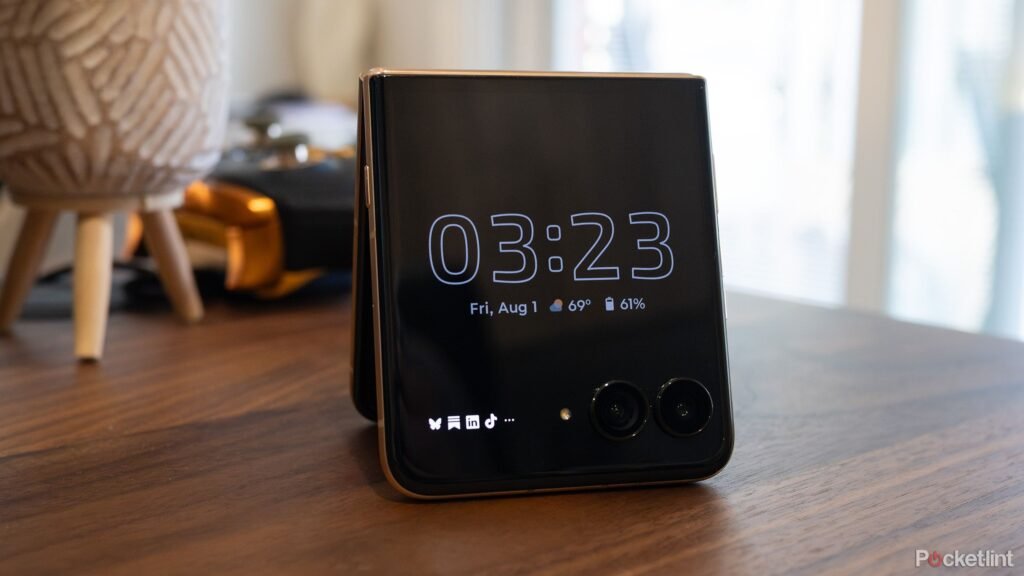
Along with being my primary phone, I’ve been using the Razr Ultra (2025) as a desk-side clock and notification machine. You can do this by opening the Razr Ultra (2025) and placing it in a triangle position or by opening it and pointing its interior screen towards you (I prefer the tent angle). The setting to turn this feature on is under Settings > External Display and either Sleep Display or Desk Display. It may sound a bit silly, but I’ve grown to really appreciate this feature over the past few weeks.
When I’m at my desk, the surprisingly expansive 3.6-inch 90Hz screen is in its blacked-out, always-on mode where it displays the current time and an array of notification symbols across the bottom (how the time appears can be customized in fun ways, too). When I want to use the cover screen to check a notification, I just tap the display to light it up with the bright green background I set, and I’m automatically logged in thanks to the magic facial recognition.

At one point, I thought maybe the cover screen would be good for checking out the weather, but as far as I can tell, I can’t get it to change to Celsius from Fahrenheit.
I can then tap on notifications and quickly scroll through them. If I see one that I need to respond to, I press on it and open the phone. This allows me to easily keep tabs on my growing mountain of notifications without getting distracted by the siren call of scrolling Instagram or TikTok because I’m not actually opening the Razr Ultra (2025) and using its internal screen.
I’ve also started checking my daily schedule with the surprisingly useful Google Calendar Panel that’s accessible by swiping right after unlocking the phone. This has given me a focused way to keep tabs on what meetings I have coming up throughout the day.

Related
The Galaxy Z Fold 7 brings foldables to the brink of greatness
The Galaxy Z Fold 7 is a significant upgrade from the Fold 6, featuring a sleeker design while still delivering impressive performance.
I’m looking forward to figuring out if other cover screen Panels and apps work for me
I haven’t found any more yet, though

Quickly glancing at the Razr Ultra (2025)’s display has become my go-to way to stay on top of notifications.
The experience isn’t perfect, though. Sometimes facial recognition doesn’t work, and I’m forced to put in my PIN, which can get frustrating, especially if you’re trying just quickly to check a notification. I’ve also found that opening apps on the cover screen that aren’t official panels can be a cumbersome, frustrating process that doesn’t feel worth it.
For example, Gmail and Google Maps feel cramped, and I quickly found myself opening the Razr Ultra (2025) to use the apps on the interior display.

It’s like a very expensive sandwich.
Still, it’s been fun to play around with the foldable smartphone’s cover screen, and I’m looking forward to uncovering more ways to make it work for me.
While I haven’t tried it yet, you can also put Samsung’s Galaxy Z Flip 7 in a very similar always-on display mode (Samsung finally expanded the Z Fold 7’s cover display to an edge-to-edge 6.5-inches).
This device was provided to Pocket-lint by Motorola.

Related
5 overlooked iOS 26 settings I can’t wait to have on my iPhone
Apple’s iOS 26 software update is set to arrive on the iPhone this fall. Beyond new liquid glass visuals, I’m excited for these smaller additions.
